Vight documents every call and ticket in your PSA

It also answers your phones, triages new tickets, and finds answers in your client docs. Built for MSPs.
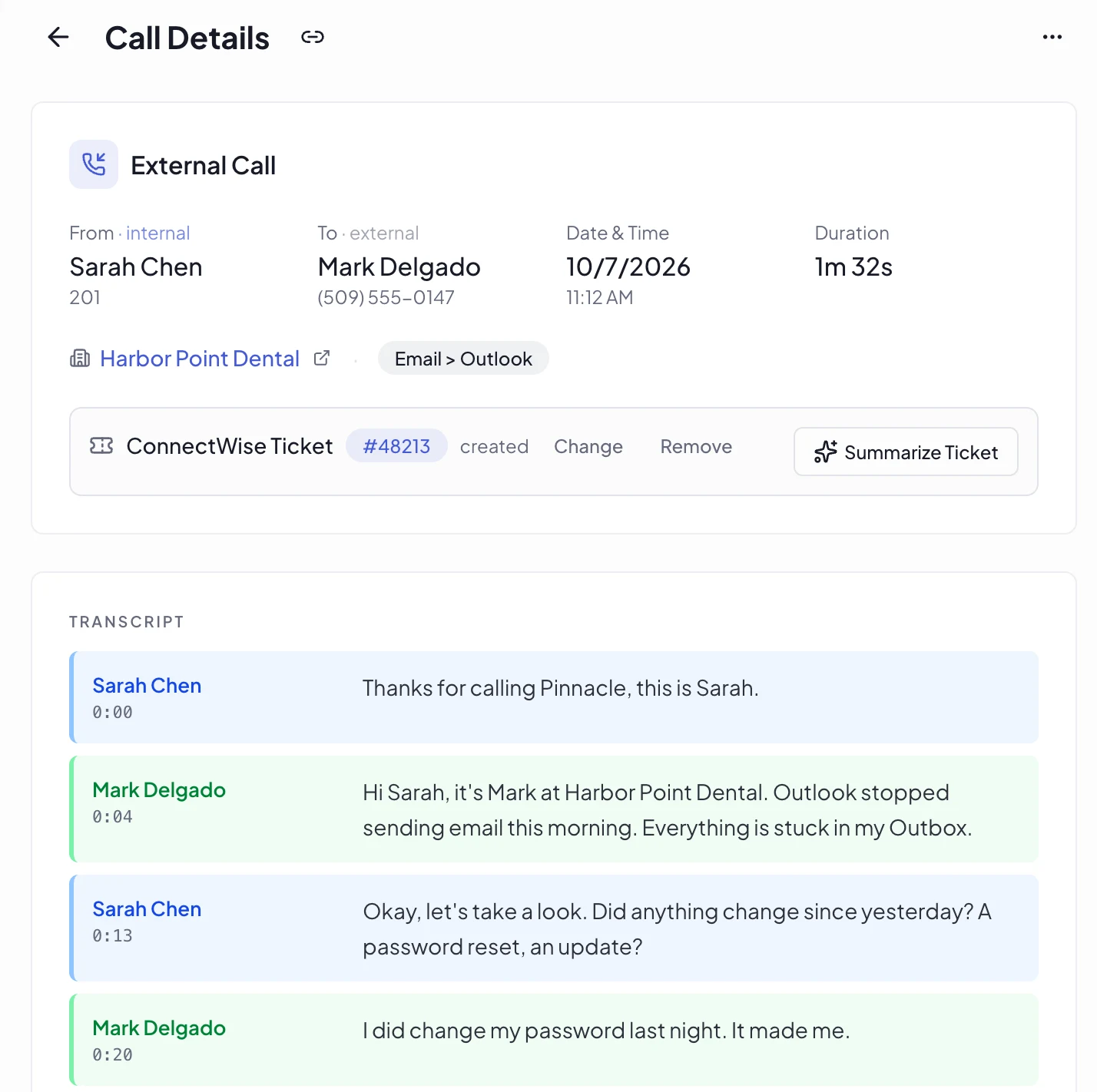

A call in Vight with its transcript, the client, and the ConnectWise ticket it created
~35%
Average productivity boost
1M+
Time entries automated
< 1 day
To get up and running
Works with your stack
ConnectWise
Autotask
HaloPSA
Syncro
3CX
Microsoft Teams
RingCentral
Zoom Phone
See all integrations

Every fix makes the next ticket faster

Calls and work sessions land on the ticket. From there Vight builds your team's memory, briefs the next tech before they start, and lets agents take the repeat work.

The work
Call4:12

Sarah Chen with Mark at Harbor Point Dental

ScreenBeta

Sarah's work session on #48213

On the ticket
ConnectWise #48213 · Harbor Point Dental
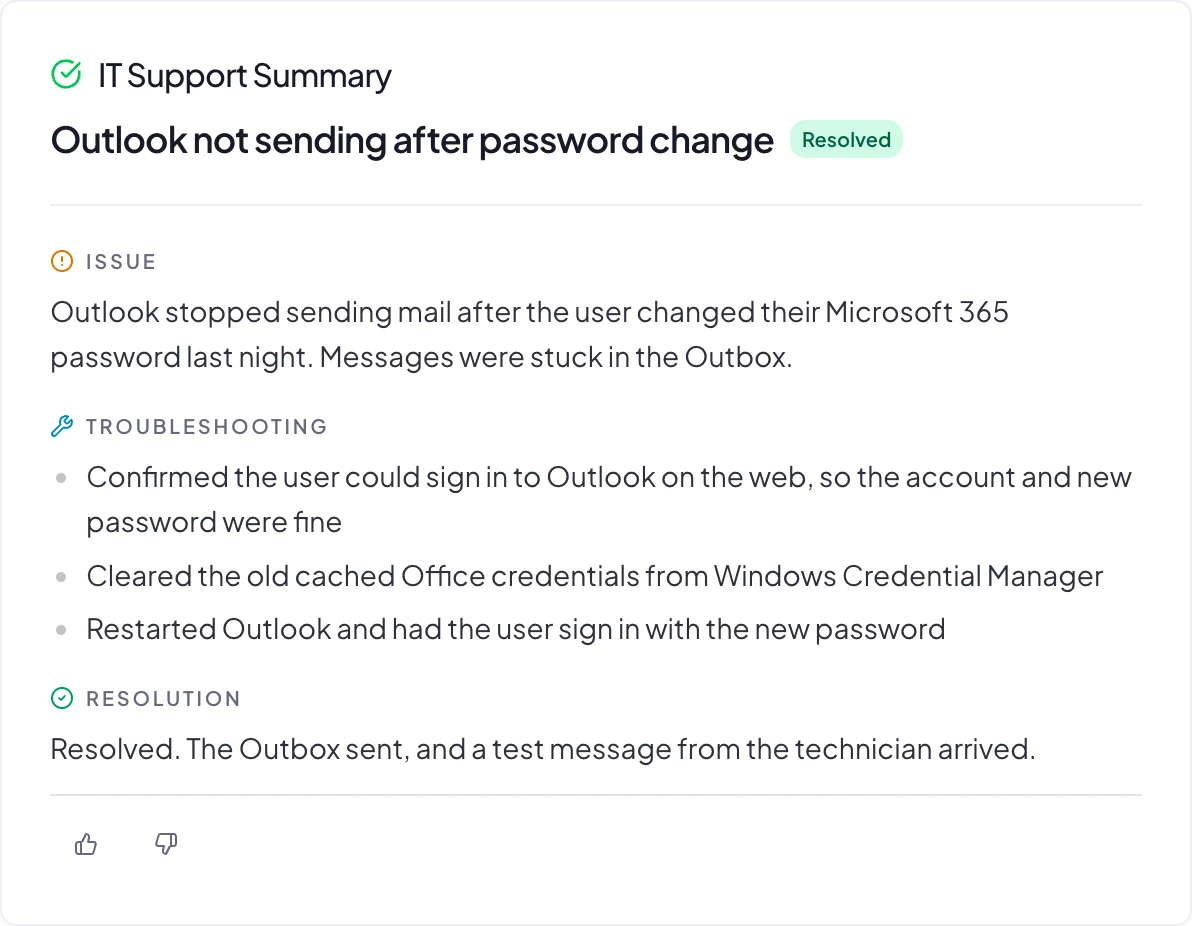
Outlook not sending after password change
Time entry · 0.1hCall
Call with Mark: cleared the cached Office credentials
Time entry · 0.6hScreen
Work session: reset the Outlook profile and tested sending
Becomes knowledge
Team memory
RunbookOutlook stops sending after a password change
ClientHarbor Point: Office keeps old credentials after a reset
Brief on the next ticket
#48290 Outlook asks for password again
Fixed before: #48213
First check: clear cached credentials
Continue in chat
Your AI toolsMCP
"What did we do for Harbor Point this week?"Claude or ChatGPT answers from your Vight calls and tickets. Read only, with your permissions.
Agent resolutionBeta
#48302 Password reset for Jen
Agent plans itTech approvesDone in Entra
The IT Support Summary Vight wrote for the call: issue, troubleshooting steps, and resolution

Every call becomes a time entry in your PSA

Vight transcribes and summarizes each call, then posts it as a structured time entry. Technicians finish the call and move to the next task.

Techs take calls as usual, with nothing new to click
Transcribed with speaker identification, then written up as issue, steps taken, and resolution
Notes and time entries posted to your PSA
Also runs on every call

Sentiment

Scores client sentiment 1 to 5 and alerts on negative calls.

Critical Alert

Sends outages and urgent situations to your escalation channel.

Sales Opportunity

Spots upsell and expansion signals for your account managers.

Call Clarity

Scores call audio and whether the client could follow the tech.

Meeting Notes

Action items, decisions, and next steps from internal calls.

#4187Service Desk · Northfield Supply
today
Maya GrantNorthfield Supply9:02
email not working!! can't send anything this morning. please help
Vightmatched a scenario9:02
Email delivery issueMissing: who is affected, the error, whether webmail works.
Vightemailed Maya9:03
“Is it just you or others too? Any error when you hit send? Does webmail work?”
Maya Grantreplied9:11
“Just me I think. Outlook shows error 0x800CCC0F. Webmail works fine.”
Vightinternal note9:11
Single user, send fails in Outlook with 0x800CCC0F, webmail is fine. Still confirm: any recent password change.Status: Ready to Work
9:02 to 9:11, and no technician touched it.

Triage gets the missing details before a tech picks it up

Vight triages every new ticket. It matches the request, emails the client for the details they left out, and writes up what a tech needs to know.

Emails the client for missing details, automatically
Posts an internal note: what's answered, what to still confirm
Moves the ticket to a ready-to-work status you choose
See how triage works
Also runs on every ticket

Title Rewrite

Rewrites vague titles with the requester's name and urgency.

Categorization

Sets the type, subtype, and item.

Deduplication

Merges duplicate tickets from the same client.

Sentiment

Flags frustration in ticket notes.

P1 Alert

Spots active P1 incidents and alerts your team once.

Work done on screen becomes a note on the ticket

A lightweight agent captures the screen while your techs work tickets. AI turns each session into documentation nobody had to write.

Step 1 · Capture
+38

The work is captured

An agent runs quietly in the background on each tech's machine, recording the session while they work the ticket. Techs never start a timer or paste a screenshot.

Step 2 · AI Work Note
Ticket #104892 · 42 min session

AI writes what happened

A step-by-step work note of what was actually done: the diagnosis, the changes, the resolution.

Step 3 · Documentation
Time entry posted · 0.75h
KB article drafted from the fix

Your PSA and KB stay current

Time entries land on the ticket. Knowledge base articles get drafted from real fixes, ready to review and publish.

An AI agent answers your phones and opens the ticket

It asks the right questions, captures the caller's details, and files the ticket, even at 2am.

Front desk mode: triages inbound calls during business hours
After-hours mode: captures emergencies when no one's available
Creates tickets with caller info, urgency, and full context
Natural conversation with smart follow-up questions
Vight AI Agent
After-hours · Inbound Call
Active
"Hi, thank you for calling Acme IT Solutions. My name is Alex, how can I help you today?"
Caller
"Our whole server just went down and nobody can work. I need someone out here ASAP."
Agent
"I understand this is urgent. Can you tell me which office location this is affecting, and roughly how many people are impacted?"
Ticket #109442 Created
Server Down / Acme Corp · Priority: Emergency · All staff affected
Ask Vight
Live data · All sources
Ready
>
what's acme corp's firewall and vpn setup
⏎
searchingclientsassetsconfigsticket_notes
Acme Corp
· 14 assets
0.18s
FirewallSonicWall TZ470v7.0.1
Public IP203.0.113.42Comcast Biz
VPNWireGuard:51820 · 8 users
Last patchedMay 14, 202621 days ago
Pulled from ticket #104892 and 2 config docs.
Saved Queriesyour team's presets
/network_config
/device_inventory
/backup_status
/patch_compliance

Techs ask Vight and get answers from your tickets and docs

Your technicians ask Vight in plain English and get the answer mid-call. Client configurations, device inventories, patch status, ticket history, all of it, surfaced in seconds.

Pulls configs, devices, and credentials from client docs
Cross-references tickets, calls, assets, and notes
Every answer cites its source ticket or document
Save team-wide slash commands for common lookups
Also in Claude and ChatGPT through the Vight MCP connector

Works with your stack

Connect your phone system, PSA, and messaging platform

Phone Systems

3CX
VitalPBX
RingCentralMicrosoft Teams
Zoom Phone
Dialpad
Intermedia
GoTo
SkySwitch / NetSapiens
Cytracom
8x8

RMM

ConnectWise Automate
ConnectWise RMM

Messaging

Documentation

SharePoint
IT Glue
Hudu

Security built for MSP client data

Your calls and tickets are full of client details. Vight is SOC 2 compliant, encrypts everything it stores, and keeps each MSP's data apart from every other MSP's.

Compliant
AICPASOC 2

SOC 2

Independent attestation of our security controls and data protection practices. Held to the standard security teams expect.

Visit the Trust Center
AES-256 · TLS

Encryption

Everything Vight stores is encrypted at rest and in transit. Your PSA and phone system keys are encrypted a second time before they're saved.

Microsoft · Google

Single sign-on

Sign in with Microsoft or Google Workspace. Vight stores no passwords, so your own MFA and sign-in policies apply.

Frequently asked questions

No. Vight integrates directly with your existing PSA to post call notes and time entries, sync tickets and clients, and run ticket AI apps. It enhances what you already use.
No. It connects to your existing phone system and PSA. Most teams are up and running within a day.
Not at all. They take calls as usual. Vight handles documentation automatically in the background.
Yes. Recordings, transcripts and tickets are encrypted at rest with AES-256 and in transit, people sign in with Microsoft or Google, you can limit access to your office IP addresses, and each MSP's data is kept separate. Our Trust Center at trust.vight.ai has the details.

Book a Demo

See how Vight automates your MSP workflows. Pick a time that works for you.