Most “best AI tools for MSPs” lists measure one thing: how much of the service desk front door an AI can take over. Can it read a new ticket, ask the client a question, reset a password, close the loop. That matters. But it skips the place where most MSPs quietly lose money, which is the work that never gets written down.
A tech takes a ten-minute call on their desk phone, fixes the problem, and moves to the next one. No note, no time entry. A project meeting runs forty minutes and the only record is whatever someone remembered to type afterward. A tech spends an hour in a client’s Entra admin center and logs “worked on user issue, 0.5 hrs.” At the end of the month the owner looks at a flat-fee agreement and has no idea whether that client made money.
We reviewed eight of the most-read AI-for-MSP lists published this year, including Thread’s own. None of them treated call documentation, meeting notes, screen-capture work notes or client profitability as a category. So this list judges AI tools by three questions instead of one:
- The front door: does it triage, gather details, resolve routine tickets, and fix the problem on the user’s PC?
- The record: does the work your team already did end up on the ticket, with accurate time?
- The money: can you see what each client and each tech actually earns you?
Quick picks: the best AI tools for MSPs by use case
- Best overall for documentation and profitability: Vight
- Best AI service desk front door: Thread
- Best Teams-first technician agent with deep integrations: NeoAgent
- Best if you’re all-in on ConnectWise: zofiQ (now owned by ConnectWise)
- Best for broad PSA support plus voice, verification and scheduling: MSP Process
- Best for BI dashboards and agreement reporting: MSPbots
- Best for search across a large data estate: CrushBank
- Best library of prebuilt M365 and AD automations: Pia
The best AI tools for MSPs, compared at a glance
✓ = yes, documented on the vendor’s site. ◐ = partial (see the note in that tool’s section). ✗ = not found on the vendor’s site or docs as of November 4, 2026. In the L2 column, ✓ means the AI works on the end user’s computer itself, the way a tech would; ◐ means it runs scripts on the device through your RMM or its own agent.
| Tool | Calls your techs take | Meeting notes | Screen-work notes | Ticket AI | Asks client for details | L1 resets | L2 fixes on the PC | AI voice agent | Client profit | Time audit | In the PSA ticket |
|---|---|---|---|---|---|---|---|---|---|---|---|
| Vight | ✓ | ✓ | ✓ (beta) | ✓ | ✓ | ✓ | ✓ | ✓ | ✓ | ✓ | ✓ |
| Thread | ◐ | ✗ | ✗ | ✓ | ✓ | ✓ | ◐ | ✓ | ◐ | ◐ | ✓ |
| NeoAgent | ◐ | ✗ | ✗ | ✓ | ✓ | ✓ | ◐ | ✓ | ✗ | ◐ | ✓ |
| zofiQ | ✗ | ✗ | ✗ | ◐ | ✗ | ◐ | ◐ | ✗ | ✗ | ✗ | ✓ |
| MSP Process | ◐ | ✗ | ✗ | ◐ | ✗ | ✓ | ✗ | ✓ | ✗ | ✗ | ✓ |
| MSPbots | ◐ | ✗ | ✗ | ◐ | ✗ | ◐ | ✗ | ◐ | ◐ | ◐ | ◐ |
| CrushBank | ✗ | ✗ | ✗ | ◐ | ✗ | ✗ | ✗ | ✗ | ◐ | ◐ | ✓ |
| Pia | ✗ | ✗ | ✗ | ◐ | ◐ | ✓ | ◐ | ✗ | ✗ | ✗ | ✓ |
“Calls your techs take” is the column people misread, so here is exactly what it means: the tool pulls recordings from the phone system you already run and turns calls your techs take directly into ticket notes and time entries. Several tools document calls their own AI answers, or calls you forward to their number. That’s useful, but it misses the calls a tech dials or answers on their own extension.
1. Vight: best for capturing the work and seeing what it earns
Best for: MSPs on ConnectWise, HaloPSA, Autotask or Syncro who know their techs do more work than their time entries show.
Pricing: $250 to $1,650 a month for a pooled monthly credit allowance ($250, $550, $950 and $1,650 plans), custom above that. No per-seat fees, month-to-month, 30-day trial. A 10-minute call uses about 4 credits and an AI-processed ticket about 1.5. (pricing)
Vight starts from the record, not the front door. It connects to the phone system you already run and pulls every recorded call, so the call a tech takes on their own extension gets transcribed, matched to the right ticket and posted as a note and a time entry without anyone pressing a button. It supports 13 phone systems today: 3CX, Microsoft Teams, RingCentral, Zoom Phone, Dialpad, GoTo Connect, 8×8, Webex Calling, VitalPBX, NetSapiens/SkySwitch, Cytracom, Bicom PBXware and Intermedia Unite. (how it works)
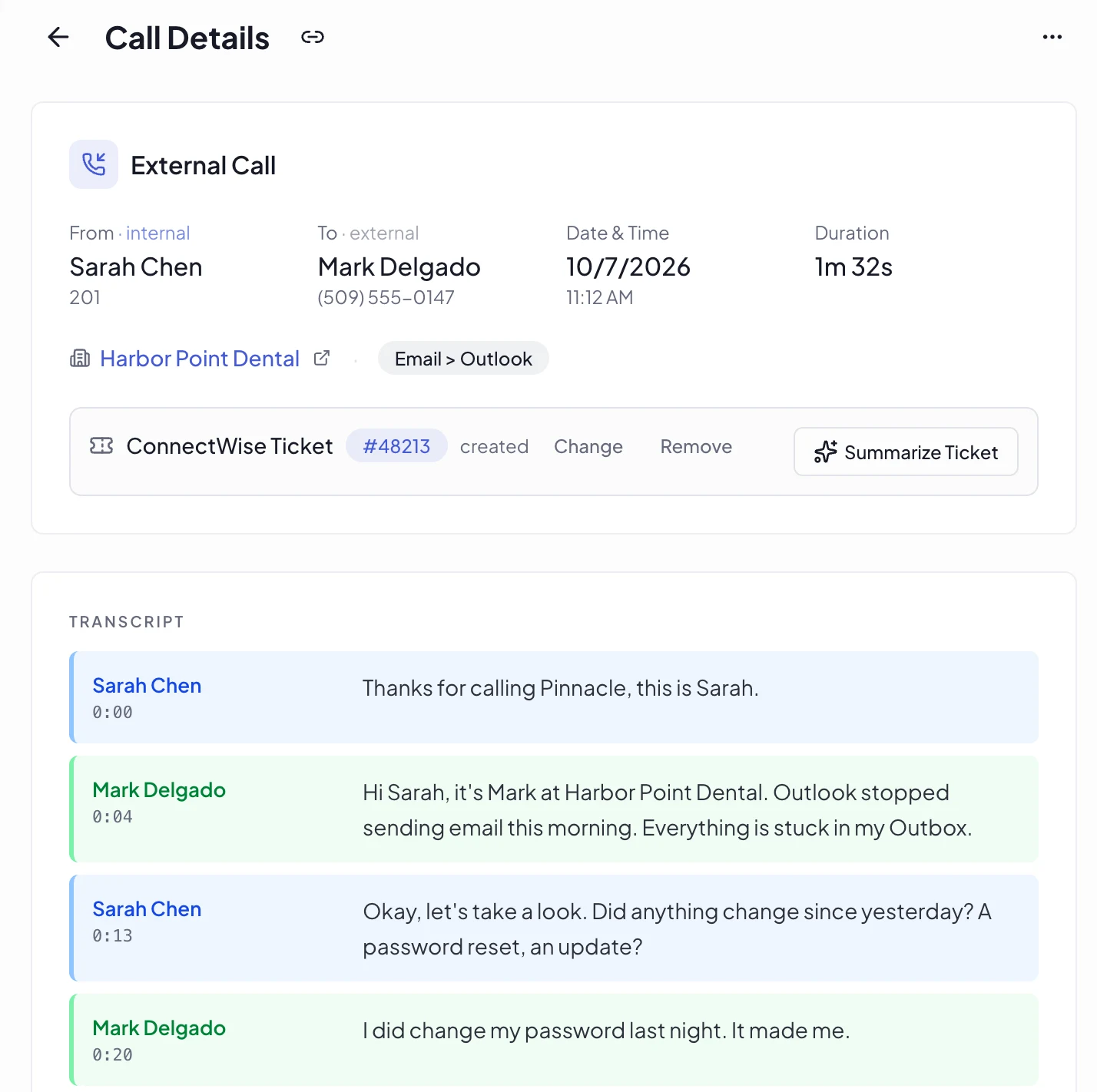
The matching is where most call tools fall down, so it’s worth knowing how Vight does it. It looks for ticket numbers spoken on the call, the caller’s phone number and PSA contact, and the recent tickets of both the caller and the tech, then reads the call against those candidates. If nothing fits, the call stays unlinked instead of landing on the wrong ticket, and a reviewer can pick from the five most likely tickets. Time entries are placed around the tech’s other entries so the same minutes aren’t billed twice.
Where Vight stands apart
- L1 resets from the ticket. When a ticket is a password or MFA reset, your tech resets the account in Microsoft 365 with one click from the ConnectWise, HaloPSA or Autotask ticket, and Vight notes the change on the ticket.
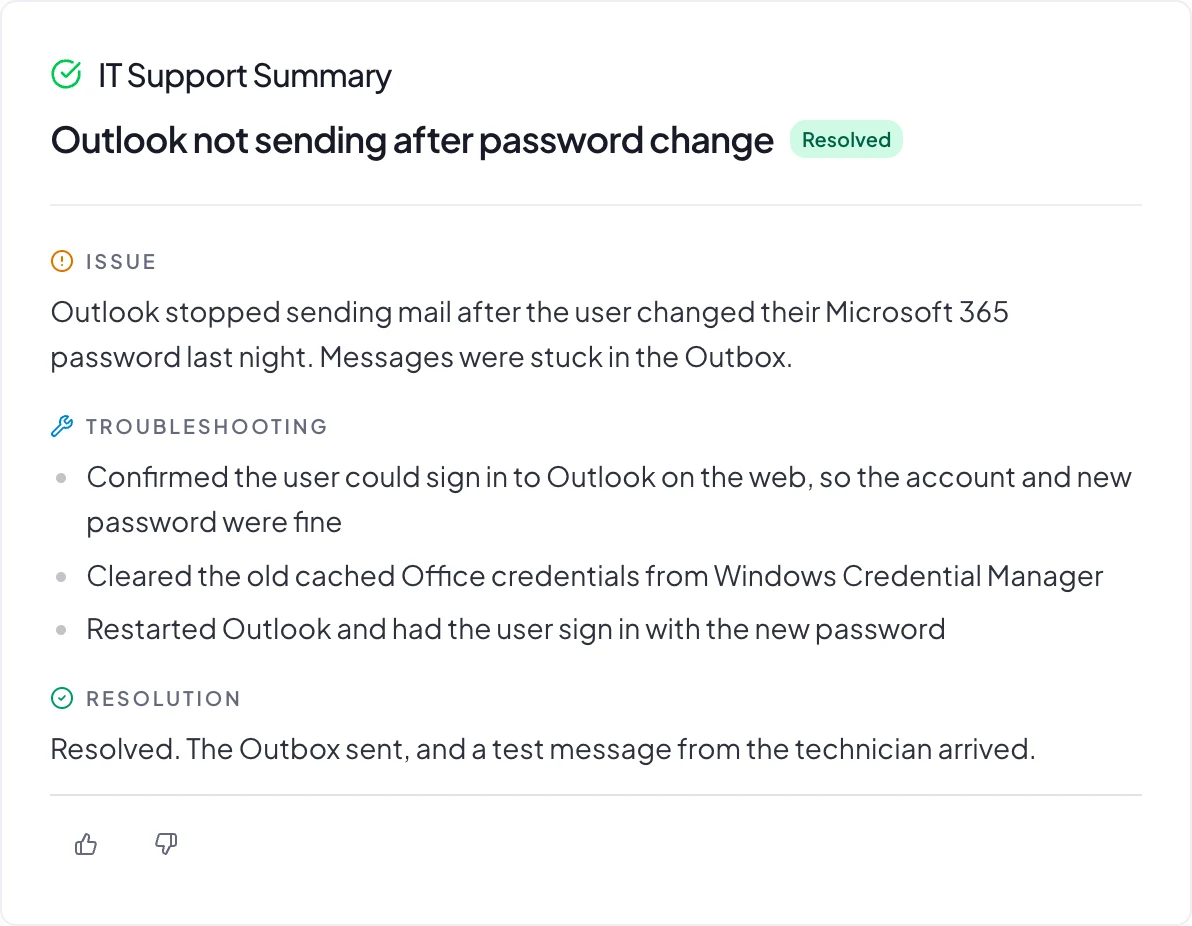
- L2 fixes on the user’s PC. Once your tech approves the plan, Vight works on the end user’s computer to fix the problem the way a tech would. The user sees your MSP’s name, not ours, and Vight notes what it did on the ticket.
- Meeting notes that land in the PSA. A notetaker joins Teams, Zoom, Google Meet and Webex meetings from your calendars, and the notes go where your call notes go.
- Work notes from the screen (beta). A lightweight Windows agent, deployed through your RMM, watches which ticket a tech has open and writes the work note from what they did on screen. Password managers and personal apps can be excluded, screenshots that show a secret are dropped, and screenshots are deleted after 60 days.
- Profitability per client and per tech. On ConnectWise, Vight puts invoices next to logged time and shows revenue, labor cost, margin and profit per hour for each client, with per-member hours and cost. MSPbots also reports agreement profitability; no other tool here ties it to per-tech labor cost.
- Time Review. On ConnectWise, a reviewer sees each tech’s day on one timeline next to their calls and screen work. Vight flags overlapping entries and 15+ minutes of ticket work with no time logged, and fixes save straight back to the PSA.
- Call intelligence. Every call can be scored for customer sentiment, checked for critical situations, scanned for sales signals (vendor switches, expansion, dissatisfaction), and scored for coaching across six dimensions with quotes from the call. (call intelligence)
It also covers the front door: ticket title rewrites, categorization, duplicate merging, triage that emails the requester for missing details (ConnectWise and HaloPSA), an AI voice agent, P1 alerts, an on-call schedule with rotations and covers, and end-user verification by Microsoft Authenticator push. Ask Vight answers questions across your calls, tickets, IT Glue, Hudu and SharePoint, and a read-only connector lets Claude and ChatGPT search your calls and tickets.
Where it’s weaker: Vight doesn’t run a branded end-user chat bot the way Thread or NeoAgent do. Profitability and Time Review are ConnectWise-only today, and triage covers ConnectWise and HaloPSA.
2. Thread: best AI service desk front door
Best for: MSPs that want clients to start in chat, email or a voice agent and have AI handle intake.
Pricing: $19 per managed customer per month (AI Essentials) or $34 (AI Pro); chat add-on $5 per customer; Voice AI $15 per customer on Pro. (pricing)
Thread is the most complete “AI service desk” on this list. Clients reach it through Teams, Slack, a desktop Messenger or phone, and Magic Agents ask clarifying questions, prioritize, categorize and title tickets. Automagically runs PowerShell runbooks for routine fixes like Microsoft 365 password resets. Thread Verify sends an SMS link or Authenticator push before sensitive changes, and Voice On-Call rings the rotation in order.
On calls, Thread captures what goes through Thread: inbound calls forwarded to its number and outbound calls placed from Inbox or the PSA. It lists forwarding steps for about 30 phone systems. A call a tech dials directly from their own phone isn’t captured. Profitability exists as a prompt skill that works out an agreement’s effective hourly rate from revenue you paste in, and a skill finds tickets worked with no time logged.
Pick Vight instead if most of your support happens on calls your techs take directly, or you need per-client margin from real invoices.
3. NeoAgent: best Teams-first technician agent
Best for: MSPs that live in Microsoft Teams and want an agent that can act across many tools.
Pricing: Pilot $500/month (2,500 credits), Starter $1,300, Growth $2,340, custom above; end-user bot $9 to $79 per client; Phone Agent $300/month plus usage. 14-day trial. (pricing)
Neo works from Teams for both techs and clients, connects to more than 200 tools, and runs RMM scripts and ScreenConnect commands with technician approval. It handles triage, merges, password resets and MFA unlocks, and has time entry QA. Its Notetaker mode records inbound calls forwarded through Neo and writes the transcript and summary to the ticket; it doesn’t create time entries from calls. For meetings it reads Fathom and Plaud recordings rather than joining meetings itself. We found no profitability reporting.
Pick Vight instead if you need notes and time from every call and meeting, not only calls routed through an agent.
4. zofiQ (ConnectWise): best for ConnectWise-native agents
Best for: ConnectWise PSA shops that want agents from their PSA vendor.
Pricing: Not published.
ConnectWise acquired zofiQ in January 2026. Its agents categorize tickets by board, type, subtype and item, rewrite summary lines, fill company and contact fields, and resolve some issues through the RMM. A Copilot in the ConnectWise pod searches tickets, IT Glue and Hudu. We found no call documentation, voice agent, client-facing triage or profitability reporting, and its help docs are ConnectWise-only.
Pick Vight instead if you’re on HaloPSA, Autotask or Syncro, or you need calls and meetings documented.
5. MSP Process: best for voice, verification and scheduling across many PSAs
Best for: MSPs on less common PSAs that want an AI voice front desk plus identity verification.
Pricing: Not public; priced by technician and client volume, with add-ons. (plans)
MSP Process supports the widest PSA list of any tool here (ConnectWise, Autotask, HaloPSA, Syncro, Kaseya BMS, SuperOps, ServiceNow and more). Its AI voice agent answers 24/7 and resets passwords in Entra ID and AD, and it offers 12+ end-user verification methods, on-call rotations with paging, and ScheduleAssist bookings that sync to the PSA. The CallScribe add-on documents outbound calls with time entries; it doesn’t name phone systems. No meeting notes, screen capture or profitability found.
Pick Vight instead if you want every inbound and outbound call documented automatically, plus margin reporting.
6. MSPbots: best for BI dashboards
Best for: MSPs that want reporting across 80+ integrations, with automation bots.
Pricing: BI from $89/month, BI Unlimited $699/month, AI credits $399 to $1,799/month. (pricing)
MSPbots is strongest as business intelligence: agreement profitability by client, service and project, utilization per tech, and bots that chase time-entry lag. Its triage dedups and categorizes tickets, and an AI phone agent is in alpha with a small group of design partners. Profitability is by agreement; per tech it shows utilization rather than margin.
Pick Vight instead if you want the time entries fixed at the source, from calls and screen work, so the dashboards are reading accurate data.
7. CrushBank: best for search across a large data estate
Best for: Larger MSPs, especially ones absorbing acquisitions, that need one search over PSA, documentation and SharePoint data.
Pricing: Packages, contact sales. (packages)
CrushBank positions itself as a managed data lakehouse: natural-language search across tickets, agreements and docs, with bring-your-own LLM, plus agents that bundle related tickets and audit agreements for billing leaks. It runs in the ConnectWise pod and inside HaloPSA. No call, meeting or screen documentation, and no voice agent.
Pick Vight instead if the knowledge you’re missing is in calls and screen sessions that never reach the PSA in the first place.
8. Pia: best prebuilt M365 and AD automations
Best for: MSPs that want ready-made onboarding, offboarding and access-request automations.
Pricing: Usage-based or fixed plans quoted at a demo; Pia Chat $10 per client per month. (Pia Chat)
Pia ships more than 100 prebuilt M365 and Active Directory automations, runs zero-touch password resets from SmartForms, classifies and routes tickets, and works from a pod in ConnectWise, HaloPSA and Autotask. No call or meeting documentation, profitability or time review.
Pick Vight instead if your bottleneck is documentation and billing accuracy rather than repetitive provisioning.
How to choose the best AI tools for MSPs
Start with where your money leaks, not with which demo looked smartest.
- If clients can’t reach you fast enough or L1 tickets bury your techs, look at the front-door tools, Thread and NeoAgent, and ask whether a tool can finish the fix on the user’s PC or only run a script.
- If your techs do the work but the ticket doesn’t show it, you need a tool that documents calls, meetings and screen work and writes accurate time. That’s Vight’s category, and it’s the one the other lists leave out.
- If you can’t tell which clients are profitable, check whether the tool computes margin from your real invoices and time, or only shows utilization.
Then ask every vendor the same four questions in the demo:
- Which calls does it capture: every call from my phone system, or only calls routed through you?
- Does it write time entries, and how does it avoid double-billing the same minutes?
- Which of my PSAs does each feature support? Several features on this list are ConnectWise-only.
- What does it cost at my client count and ticket volume, in writing?
If the first answer is “only calls routed through us,” ask what happens to the calls your techs make from their own desk phones. Book a Vight demo and we’ll show you the answer on your own PSA and phone system.
FAQ
What is the best AI tool for MSPs?
It depends on the problem. For documenting calls, meetings and screen work and seeing client profitability, Vight. For an AI front door that handles client chat and intake, Thread. For a Teams-based technician agent with broad integrations, NeoAgent.
Which AI tools document MSP phone calls automatically?
Vight pulls recordings from 13 phone systems and documents calls techs take directly. Thread, NeoAgent, MSP Process and MSPbots document calls in narrower ways, mostly calls their own agent answers or calls forwarded through them.
Can AI write time entries in ConnectWise, Autotask or HaloPSA?
Yes. Vight posts time entries from calls to ConnectWise, HaloPSA, Autotask and Syncro, and from screen work to ConnectWise, HaloPSA and Autotask. Several service-desk tools write time entries for the work their own agent does.
Is there an AI tool that shows client profitability for MSPs?
Vight shows profit and margin per client and per tech on ConnectWise. MSPbots reports agreement profitability by client and utilization per tech. Thread offers a prompt-based agreement profitability check.
Can AI fix problems on an end user’s PC?
Some tools can. Vight works on the user’s computer itself once a technician approves the plan. NeoAgent, Thread, zofiQ and Pia run scripts on the device through your RMM or their own agent.
Do AI service desk tools replace technicians?
Some vendors market their agents as your next service desk hire. In practice, the resolution tools on this list run routine L1 work under approval settings you control, and the documentation tools make the work your techs already do visible and billable.