
It's 7:40 on a Monday, the overnight queue is forty tickets deep, and your dispatcher is re-reading each one to work out which are backup alerts, which are password resets, and which single ticket is the file server nobody can reach. Half of them will move queues again by lunchtime. The sorting, not the fixing, eats the morning.
That sorting is what Autotask AI is built to absorb. A 2025 Global Managed Security Survey found that 92% of MSP respondents said interest in AI had contributed directly to business growth during the preceding year, and 67% said they applied it to customer support (Channel Futures on the Global Managed Security Survey). Adoption is no longer the open question. Accountability is.
What follows is a working guide to what these features do, where a person still signs off, and how to prove the result with records instead of anecdotes.
Table of Contents
- What Autotask AI Automates and Where Staff Still Decide
- How Smart Ticket Triage Routes a Request
- Approval Tiers and Client Data Governance
- Connecting Autotask to Your RMM, Phones and Documentation
- Measuring Whether Autotask AI Improves Ticket Handling
- Choose Where to Start With Autotask AI
What Autotask AI Automates and Where Staff Still Decide
Autotask AI is the collection of AI features inside Autotask PSA that read a ticket's content and context, classify and route it, attach the documentation a technician needs, and create tickets from monitoring events. It removes manual sorting and lookup. It does not decide what the fix is.
| Function | What the AI does | Human decision still needed |
|---|---|---|
| Issue priority | Assesses contextual urgency and business impact | Technician confirms priority changes on critical clients |
| Issue and sub-issue | Identifies the category and sub-issue from ticket content | Review when the request is ambiguous or spans two categories |
| Technician routing | Matches required expertise against workload and availability | Lead reviews assignments for specialist or escalated work |
| Documentation suggestions | Surfaces passwords, checklists and procedures from ticket context | Technician verifies credentials and steps before use |
| RMM-created tickets | Places monitor and agent tickets in designated queues with default fields | Admin sets queues, defaults and device mappings |
The documentation row is the one that changes a technician's day. Autotask runs on an open architecture with APIs and integrations to more than 170 industry tools, including endpoint management, backup and IT documentation systems, and its documentation suggestion surfaces relevant passwords, checklists and procedures based on ticket context, so nobody tabs between repositories mid-call (Datto's Autotask PSA product page). The value isn't the suggestion. It's that the suggestion arrives attached to the ticket where the next person can see what was considered.
Read the third column as the design surface
Two rows change records that other systems trust. Priority starts SLA clocks. The queue feeds reporting, contract rules and billing. A wrong priority on a client's line-of-business app isn't a sorting error, it's a missed response window, and a mis-queued ticket can bill against the wrong agreement.
That's why "AI replaces dispatch" is the wrong frame. These features make incomplete intake visible before dispatch, which is a smaller promise and a more useful one. Routing is a proposal. The decision to accept it stays with a person until you've proven otherwise.
Design rule: if a wrong output could reach a client inbox or land on an invoice, it needs a signature before it ships.
Start where a wrong output stays internal: title cleanup, duplicate flags, category suggestions. Those are cheap to get wrong and quick to correct. Routing and priority are the rows that deserve an approval step from day one, and the work is deciding who signs and what gets recorded when they do.
How Smart Ticket Triage Routes a Request
At 02:14 an email lands in the service desk. The overnight backup job failed on the file server, and the staff who start at six cannot reach the shared folders. It's one ticket, but it carries a symptom, an asset and a business impact, and pulling those apart is the work triage either does well or botches.
Autotask's triage workflow evaluates contextual urgency and business impact to classify priority, identifies the issue and sub-issue, determines the expertise required, and routes the ticket to a technician based on skill match, workload and availability (Datto on Digital Specialists for ticket triage). Here is that same ticket moving through five stages.
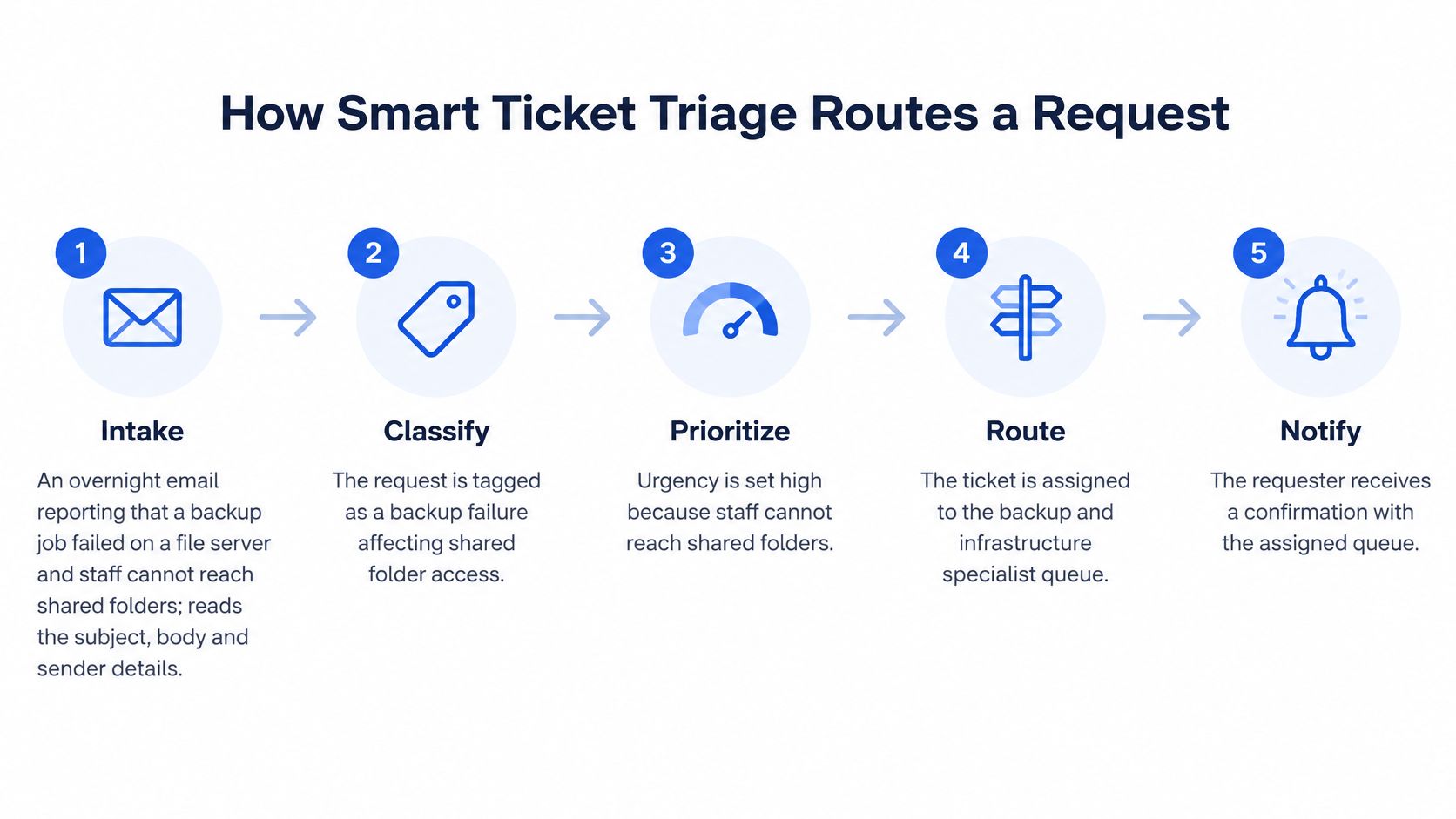
- Intake. The system reads the subject, body and sender details, then pulls the client record and open tickets for the same asset. Missing context here is what makes everything downstream guesswork.
- Classification. The request is tagged as a backup failure with a shared folder access symptom. Two sub-issues, one ticket, which is more accurate than forcing it into a single category.
- Priority. Urgency comes from business impact, not from the word "failed." A whole office locked out of shared folders outranks a single-user password reset sent at the same minute.
- Expertise and routing. The required skill set is server and storage administration, and the ticket goes to whoever has it plus the capacity to take it now, rather than to the next person in a round robin.
- Notification and handoff. The requester gets a confirmation naming the assigned queue, which cuts the "any update?" reply that would otherwise arrive by nine.
None of that is keyword tagging. A word-matching rule fires on every nightly backup warning, including the informational ones that clear themselves before anyone reads them. Contextual triage weighs the failure, the shared folder symptom and the time of day, so the same alert on a test server lands in a low queue and this one doesn't.
What to prepare before routing goes live
Map first, switch on second. Write down your queues and retire the dead ones, since a model trained on your re-route habits will automate the noise along with the signal. Build skill profiles for each technician and keep the availability calendar honest, because routing reads both.
Teams rebuilding categories at the same time usually find it easier to set up an IT ticketing workflow with defined intake fields before an AI layer starts proposing changes to those fields. Intake quality decides how much of this works at all, and our guide to ticket triage goes deeper on the handoff between a request arriving and a technician starting.
The video below walks through the routing concept in vendor terms, which is useful for spotting what the feature promises versus what your board will do on day one.
The final check is dull and essential. Run the example ticket on a test board and see where it lands. If it goes to the wrong queue, the fault is almost always the skill profile or the availability calendar, not the model.
Approval Tiers and Client Data Governance
A technician types a client name into the documentation panel and gets back another client's VPN procedure, complete with a service account name. Nothing crashed. Nothing was obviously breached. It's still the worst outcome of the week, because it means a retrieval layer is reading across a boundary the client believed was solid.
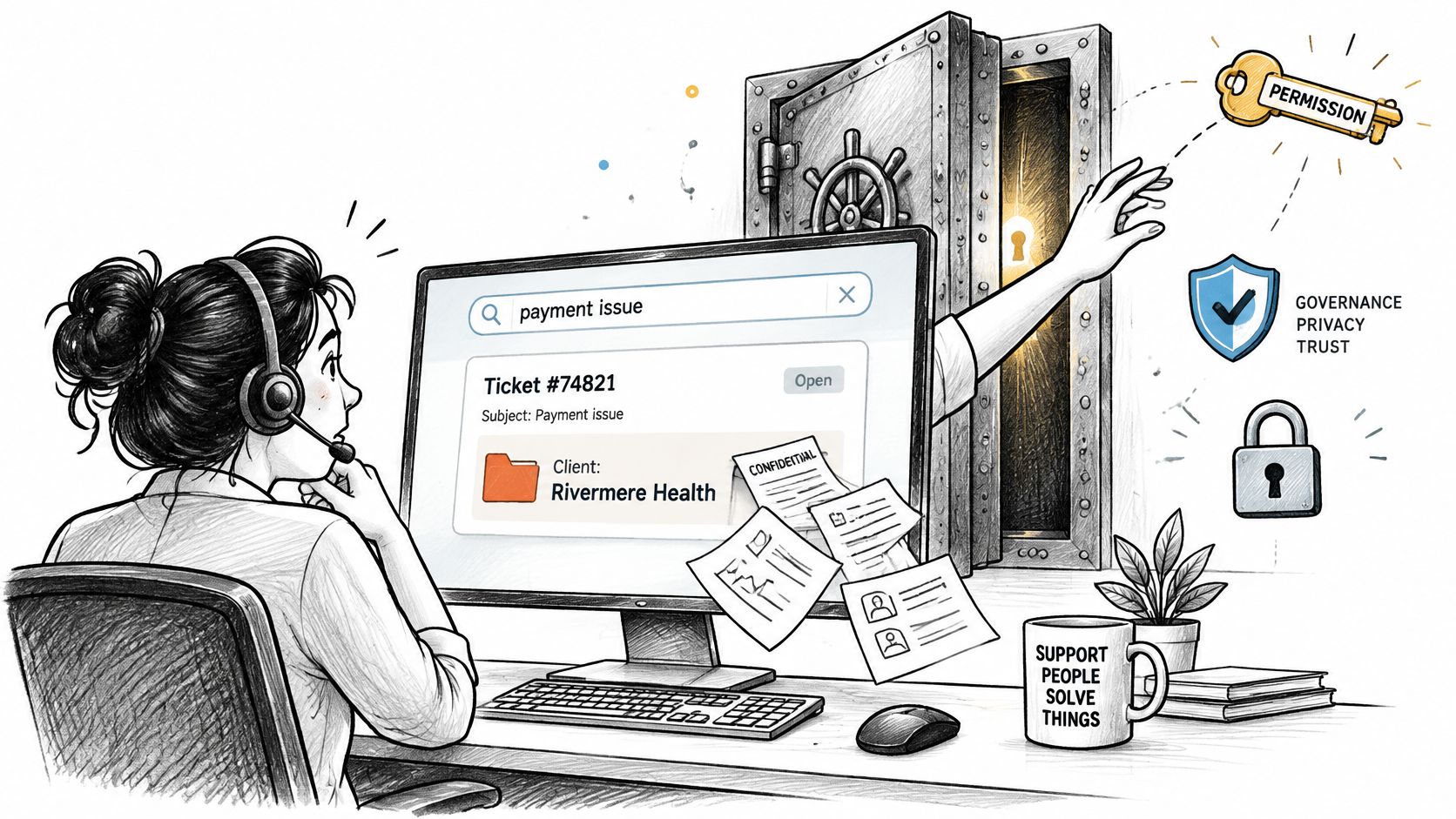
That failure is why governance keeps topping the surveys. An independent industry survey on AI agents in ITSM found governance, data security and privacy were the leading concerns, cited by 45% of respondents, with reliability next at 39% (ManageEngine's AI agents in ITSM survey). Visibility runs close behind as a worry: many MSPs can't say with confidence which AI tools touch their client data or where the outputs end up.
The test to apply to every automation: could a wrong action reach a client, or create a bill? If yes, it needs a signature.
Three tiers, sorted by what a wrong action costs
Tier one, automatic. Low-risk metadata runs unattended: title cleanup, category and sub-issue suggestions, duplicate flags, an internal note that says what the AI thinks it saw. A mistake here costs a technician a moment of correction and nothing else.
Tier two, technician approval. Changing priority and closing a ticket both require a click from the person holding it. This tier catches the two errors that hurt: a summary omitting a troubleshooting step, or a ticket closing while the customer still has the problem.
Tier three, manager approval. Customer-facing commitments, emergency escalation and billing-related time entries go up a level. A callback promised to a client or a block-hour entry against a contract is a commercial act, so it gets commercial oversight.
NIST's AI Risk Management Framework gives you the structure underneath those tiers: define and differentiate human and AI responsibilities, document the oversight process, and evaluate how effective those controls are in proportion to system risk (NIST AI 600-1). Written down, that amounts to a few sentences per tier and a named owner for each one.
What to retain for every automated action
Keep the original transcript or event payload, the model and version metadata, the generated output, the approver's identity, the edit history and the final downstream action. That record set is what lets you roll back when an AI summary drops a step or a ticket lands in the wrong queue, and it's what turns vague unease about the tool into something measurable.
The same framework points toward tracking overrides, reported errors or complaints, response times and adjudication activity. In Autotask terms those become false-triage rate, approval rate, escalation miss rate and median correction time, all of which you can report without buying another tool.
The questions a client auditor will ask
- Least-privilege roles. Which roles can retrieve, and does the dispatcher account need documentation access at all?
- Client-level isolation. Can a search for one client ever return another client's article, credential or ticket?
- Retention terms. How long is a transcript kept, and who deletes it?
- Redaction. Are credentials and personal data stripped before text reaches a model?
- Source-cited output. Can a technician see which ticket or document an answer came from?
- Read-only versus write. Is this an assistant that answers, or an agent that changes tickets and triggers workflows? They need different controls.
- Access reviews. Quarterly, with a named owner and a record that it happened.
Read the terms of whichever AI provider processes your PSA data before you connect it. When Claude, ChatGPT or Microsoft Copilot answers questions from Vight's calls and tickets through our MCP connector, access is read-only under your permissions, and the returned data is processed by the AI provider you select, under that provider's terms. If you're deciding where a governed layer sits in your stack, our overview of AI for MSPs covers the operating model.
The question to answer isn't whether the feature is secure. It's whether you can show a client and an auditor exactly what the AI accessed, inferred, changed and retained. Write the answers on one page, date it, and review it each quarter. That page is your policy.
Connecting Autotask to Your RMM, Phones and Documentation
AI features only see what the integrations hand them. There are four layers in play: the PSA where the ticket lives, the RMM producing alerts, the phone system carrying the conversation, and the documentation platform holding the client's history. Every one of them needs a clean map to the same company and the same asset before any classification is worth reading.
Datto's Autotask integration with Datto RMM lets monitor-generated and end-client-agent tickets land in designated Autotask queues with configurable issue, sub-issue, work-type and ticket-note defaults (Datto RMM's Autotask integration guide). The order you set it up in is what keeps the queue clean.
Six setup steps for the RMM connection
- Create API credentials with only the permissions the integration needs. Reason: a credential that can read contracts and billing is a liability sitting in an integration nobody watches. Usual slip: reusing an admin key because it was already in the password vault.
- Map each RMM company to the matching Autotask company or site. Reason: the company mapping is what attaches a ticket to the right agreement. Usual slip: skipping the site level, which produces tickets that look client-facing but bill against nothing.
- Map devices and configuration items. Reason: an alert should attach to the asset a technician recognizes. Usual slip: unmapped devices creating orphan tickets nobody can action.
- Set the target queue and the defaults for issue, sub-issue, work type and ticket notes. Reason: defaults are the difference between a routable ticket and a paragraph of machine text. Usual slip: one broad default sub-issue across every alert type, which erases the triage signal you just paid for.
- Sync user-defined fields only if something downstream reads them. Reason: UDF sprawl slows every API call and adds nothing to routing. Usual slip: enabling every field because the checkbox exists.
- Test on one audited, already-mapped workstation before wider rollout. Reason: you want to see the ticket, the asset and the queue line up once before you replicate it across a hundred devices.
The mapping mistake to watch: an unmapped device doesn't fail loudly. It produces an alert that lands in a general queue with no asset context, and a technician spends the first ten minutes working out what the ticket is even about.
The same discipline applies above the PSA. Check which documentation and endpoint systems feed suggestions, and whether the phone system passes caller details into the ticket or just a phone number. A PSA-side AI layer supplements the PSA rather than replacing it, and the routing rules, contracts and billing logic stay where they are. Vight works the same way: it integrates with your existing PSA to post call notes and time entries, sync tickets and clients, and run ticket AI apps, with your PSA still the system of record.
Test rule to close on: run the native features and any add-on against the same set of sample tickets, then compare notes. Same input, same board, two sets of output.
Measuring Whether Autotask AI Improves Ticket Handling
Treat accuracy like a set of gates, each with its own lock. Routing, suggested fixes and generated notes fail in different ways, so each needs its own measure and its own threshold. Peer-reviewed ITSM research treats ticket assignment and incident resolution as separate machine-learning tasks with different evidence requirements, which is the right mental model (University of Bath research portal). Routing can work from structured fields and retrieved history. A resolution recommendation needs cited documentation and asset context, beyond ticket text.
| Metric | What it shows | How the pilot target gets set |
|---|---|---|
| Assignment accuracy and macro-F1 | Whether tickets land in the right queue across all queues | Hand-score a sample of last quarter's closed tickets, then set a floor per queue |
| Top-k retrieval accuracy | Whether the right procedure or document appears in suggestions | Replay closed tickets and count how often the correct article ranks in the top results |
| Technician acceptance rate | How often suggested fixes are used as offered | Run several weeks in shadow mode, then set the level below which a category stays in review |
| Omission or hallucination rate | Missing or invented steps in generated work notes | Compare notes line by line with the call record; one invented step fails the sample |
| False-triage rate | Priority or queue changed by a technician after AI triage | Baseline your current re-route rate and require the AI to stay at or below it |
| Approval rate | Share of AI decisions accepted without change | Set after shadow mode; a low rate means the category isn't ready, not that reviewers are slow |
| Escalation miss rate | Urgent tickets not escalated in time | Zero tolerance for the P1 categories you name in advance, reviewed weekly |
| Reassignments and SLA breaches | Rework and missed response windows after routing | Compare with the pre-pilot quarter; a rise cancels the rollout for that queue |
| Duplicate closures | Duplicate tickets closed without checking the original | Sample weekly; a closure that loses information sends the category back to human review |
| Technician overrides | How often staff replace AI output | Track by category and by technician; a rising trend points at prompts or data, not at staff |
| Median correction time | Time taken to fix AI-generated errors | Measure from the override to the corrected record and report it beside the time saved |
Macro-F1 averages performance across queues, so a busy queue cannot hide weak results in a small one. That matters when a routing model looks accurate overall because it handles password resets well and still misfiles network outages.
Shadow mode is how you fill the last column
Run the AI beside your technicians without letting it act. Its recommended queue, priority and summary go to a side channel, and a dispatcher compares that against what they decided. Every disagreement is a data point, and the pattern in those disagreements tells you which category is ready and which needs work.
A disagreement pattern is more useful than a disagreement count. Ten misses on one alert type point to a category fix. Ten misses spread across ten categories point to weak source data or unclear rules.
Then promote only the workflows that clear thresholds you wrote down before the pilot started, before you saw the numbers. A category that clears its floor goes live with approvals attached. One that falls short goes back to shadow mode with a specific fix to make.
Here's the trap. Faster triage that raises reassignments or overrides isn't an improvement, it's the same work moved later in the day. Vendor material leaves the operational questions open, and Datto's own 2025 review describes Smart Ticket Triage in feature terms without independent evidence on accuracy by ticket type, false-priority rates or technician time saved (Datto's Autotask 2025 year in review). That is a reason to measure before you scale.
Rule for promotion: the threshold gets written down before the pilot, and the person who wrote it doesn't get to move it afterwards.
Take a baseline of reassignments, SLA breaches and correction time before anything is switched on. Then set one target per metric and leave the target cell open until the baseline exists. If utilization and first-contact resolution live in a separate dashboard, keep that context beside this baseline with an MSP KPIs reference so ticket metrics do not get read alone.
Choose Where to Start With Autotask AI
One board, one client group, one low-risk function. That is the whole recommendation, and the discipline is in resisting the second board until the first one reports numbers you trust.
- Choose the workflow with the highest repetitive load and the lowest client impact. Category cleanup or a single queue's routing beats a company-wide priority rewrite.
- Write the approval tier and the metrics before anything is switched on. Two sentences per tier, one target per metric.
- Run shadow mode for a fixed period and review disagreements weekly, not daily.
- Promote only what cleared its thresholds, and keep approvals on priority changes and customer commitments permanently.
The available benchmark is a vendor-published one. A Datto-reported BECA case study says Autotask AI tools processed more than 10,000 tickets without major issues, that the weekly review of tickets older than 10 days or carrying more than 10 logged hours fell from over an hour to 30 minutes, and describes the team as 26% faster (Datto on the BECA case study). Use it as a ceiling to test against. It remains a single MSP's account of its own rollout.
If you're budgeting the work, Vight's Starter plan costs $250/month for 2,500 credits, around 1,700 tickets per month, all AI agents, unlimited users, 24/7 in-app support and 100 GB storage.
The first action this week is small. List every step in the workflow you chose and mark each one unattended or signed. Category cleanup and missing-detail follow-ups can run on their own. Priority changes and anything a client will see keep a name attached. If a step has no clear owner when it goes wrong, it stays on the signed list until it does.
Vight works inside the Autotask you already run: calls are transcribed and summarized onto the right ticket, time entries appear without a timer, new tickets get triaged and chased for missing details, and every answer cites the document or ticket behind it. Your PSA stays the system of record. If you'd rather test the gates than read about them, visit Vight and bring your messiest queue.