
A client calls while your technicians are already handling an outage. Someone takes a message, someone else creates a ticket, and the technician who finally opens it finds little more than “file share not working.” Before diagnosis can begin, they have to call the client back and ask what happened.
Conversational ticketing is meant to close that gap. For an MSP, the useful question isn't how naturally an AI can talk. It's whether the next technician receives a complete, correctly routed ticket without inheriting more cleanup work.
Table of Contents
- What Conversational Ticketing Means for MSPs
- How a Call Becomes a Ticket, Step by Step
- Where Conversational Ticketing Pays Off for MSPs
- Keeping Humans in Control of Automated Intake
- Linking Conversations to PSA Tickets and Documentation
- Misconceptions and Limits That Change the Results
- Confirm Your First Conversational Ticketing Workflow
What Conversational Ticketing Means for MSPs
Conversational ticketing turns a natural-language exchange, such as a phone call, chat, email, or technician conversation, into a structured service record in the PSA, including the title, requester, affected asset, urgency, troubleshooting history, and next action.
Think of a skilled receptionist who fills in the job card while the caller is still talking. They identify the customer, clarify the problem, and make sure the right person receives it. They don't leave an untidy message pad for someone to interpret at the end of the shift.
Conversational ticketing grew out of AI-assisted customer support, where language understanding helps capture requests, classify intent, collect missing details, and route work. An industry summary of IBM's 2024 AI adoption findings reported that 35% of organizations were using or considering natural-language-processing solutions in customer care. That's broader than putting a chatbot on a website: language processing can also support the work behind the conversation.
How It Differs From Familiar Intake Tools
A basic chatbot answers predefined questions and may stop once it delivers an answer. Conversational ticketing must leave behind an operational record, even when it can't resolve the request.
Form-based ticketing asks the client to understand your fields and fill them in correctly. A conversational workflow can clarify an answer, such as whether “the server is down” means an unavailable application or a disconnected workstation.
Voicemail-to-ticket transcribes a message after the fact. Without a follow-up mechanism, it can preserve the caller's words while leaving the technician's diagnostic questions unanswered.
The PSA remains the system of record. Conversational ticketing supplements it by improving what enters the queue, not by creating another place where technicians must track work.
Apply this simple product test:
- Ticket creation: Does it create or update an actual PSA ticket?
- Gap detection: Does it ask for missing information rather than merely summarize?
- Accountability: Does a named person remain responsible for the outcome?
A pleasant conversation is useful. A reliable handoff is the operational requirement.
How a Call Becomes a Ticket, Step by Step
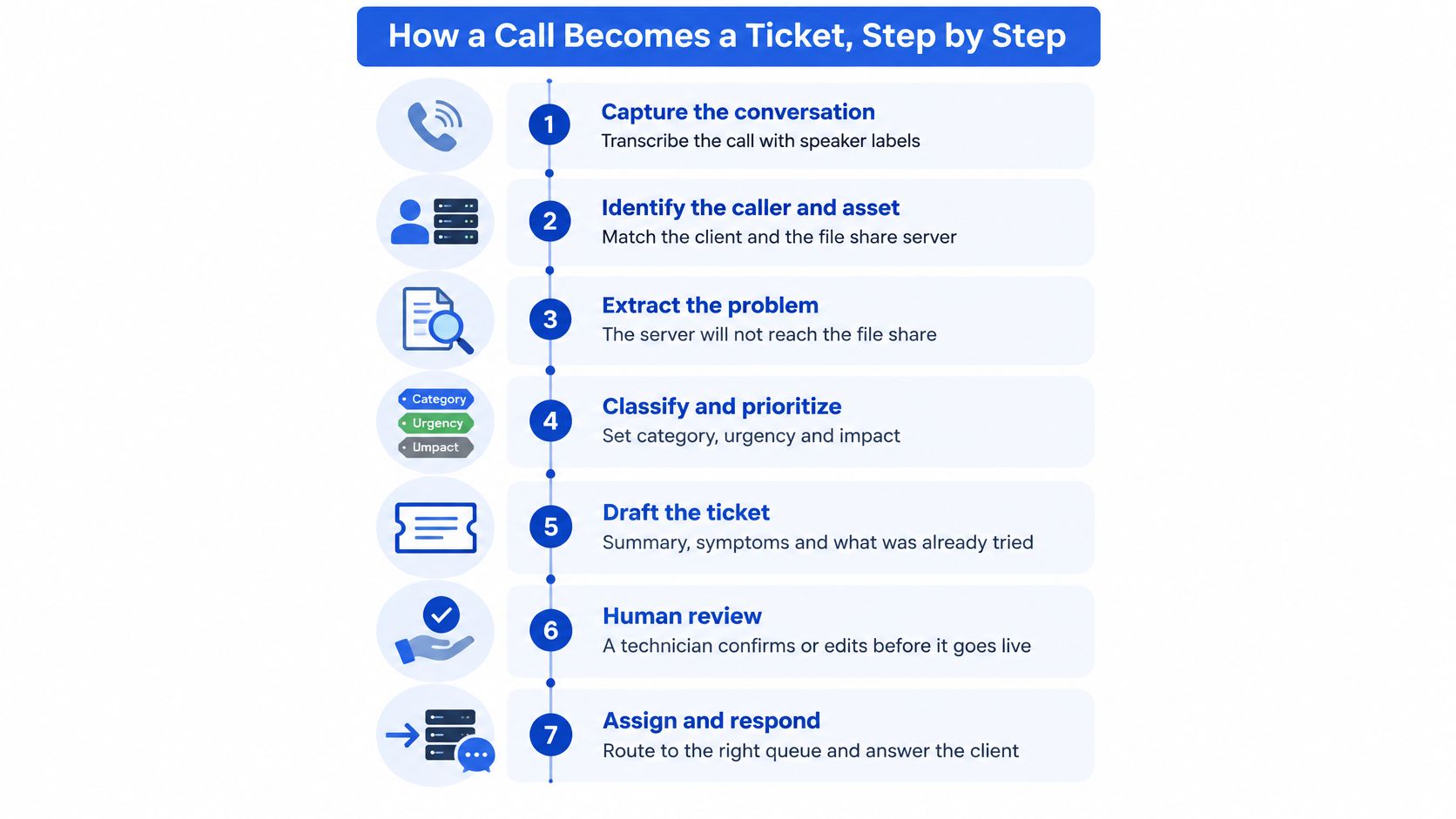
Say a client reports that a server can't reach a file share. Treat that as the caller's description, not a confirmed diagnosis. The workflow should preserve what they said while collecting enough evidence for a technician to investigate.
The flow below illustrates the capture, review, and assignment stages.
The Checkable Outputs
Capture the conversation. Transcribe the call with speaker identification so the caller's statements stay separate from the technician's questions. The checkable output is a speaker-labelled transcript attached or linked to the ticket.
Identify the requester and asset. Match the organization, contact, and reported server against PSA records. If the asset match is uncertain, leave it unconfirmed rather than attaching the request to a plausible but incorrect device.
Classify the issue. Draft a useful title, suggest a category and board, and search for an existing open ticket about the same incident. The dispatcher should see the proposed classification and any duplicate candidate before records are merged.
Detect missing diagnostics. Ask about the affected service, scope, start time, error text, business impact, recent changes, and callback details. The output is a completed diagnostic record, with unanswered questions visibly marked rather than filled by inference.
Write the service record. Add the summary, symptoms, and troubleshooting already attempted, keeping AI-inferred attributes separate from caller statements. Record a resolution only if someone established one; otherwise state that the issue remains unresolved.
Suggest priority and route the work. Propose urgency and impact, flag urgent incidents for human confirmation, and use the MSP's selected ready-to-work status. The technician should receive a ticket in the correct queue with a named next action.
Create the time entry. Use captured call or session duration to draft a labour record against the ticket. Keep observed duration separate from billing treatment, which follows the MSP's service agreement and time-entry rules.
An AI call summary supports this workflow, but a summary alone doesn't prove that identification, gap checking, and routing happened.
Adapting the Workflow to Other Channels
Chat and email skip speech transcription. A portal request arrives partly structured, so the gap check focuses on missing or contradictory fields. A technician's site-visit note can enter at the documentation stage, with the technician identified as its source.
For a non-IT comparison, Mercateer's AI receptionist for plumbing companies provides a useful reference for thinking about receptionist-style intake. An MSP must add technical asset matching, service priorities, and PSA controls.
The order matters. A technician needs more than captured speech: they need verified context, visible uncertainty, and work assigned to the right place.
Where Conversational Ticketing Pays Off for MSPs
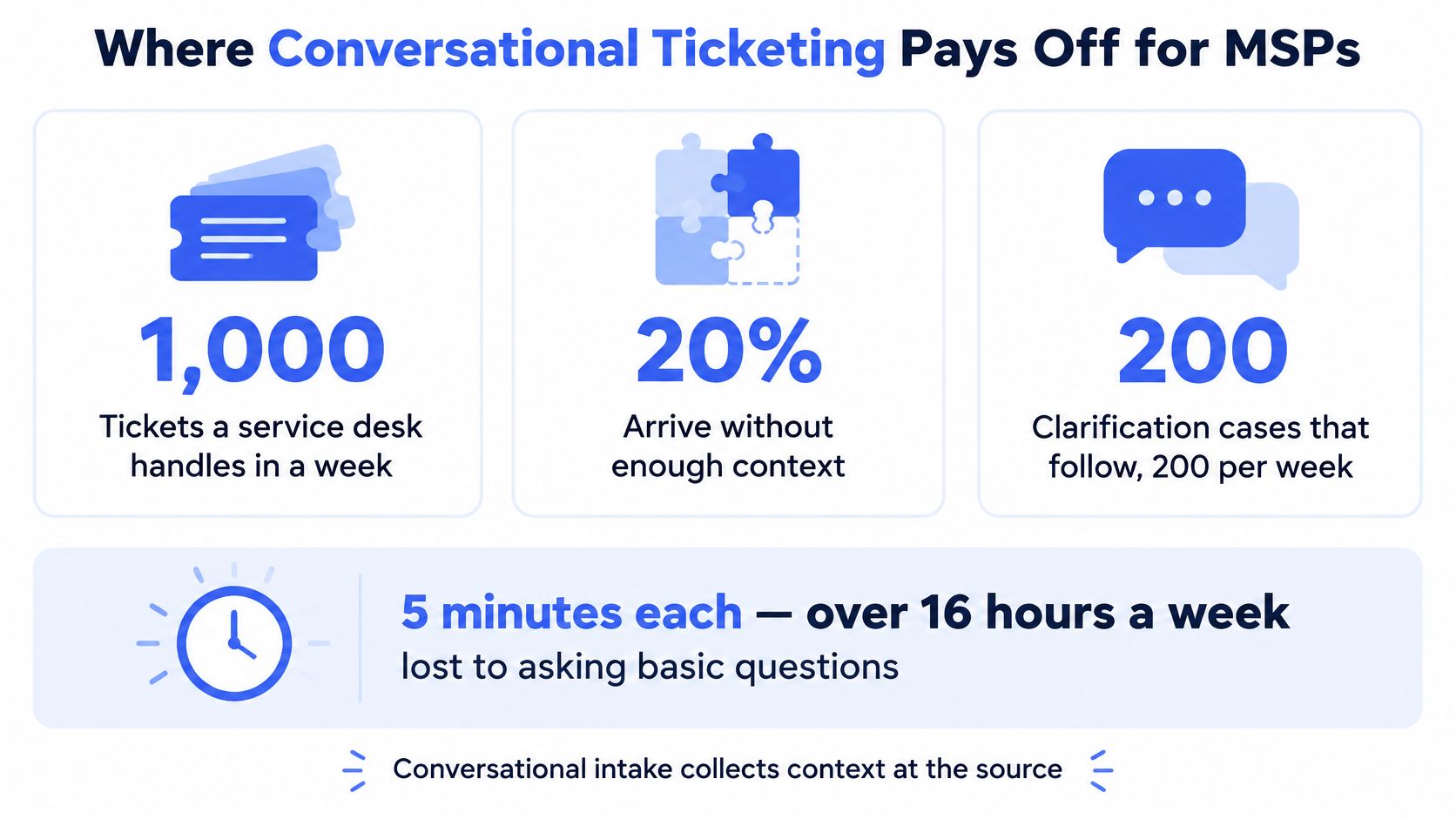
Consider a hypothetical service desk handling 1,000 tickets a week. If 20% arrive without sufficient context, staff face 200 clarification cases. At five minutes each, that's over 16 hours a week spent collecting basic information before meaningful diagnosis starts.
In the same worked scenario, suppose 10% of tickets need a second routing pass. An additional 8 to 15 hours of handling illustrates how expensive reassignment can become. These are planning assumptions, not a forecast of savings for your MSP.
Intake losses and what conversational ticketing changes
| Intake problem | Scale from the research or worked scenario | What conversational ticketing changes |
|---|---|---|
| Incomplete tickets | Hypothetical scenario: 20% of 1,000 weekly tickets lack context, producing 200 clarifications | Asks for missing diagnostics before a technician starts |
| Clarification time | Scenario calculation: 5 minutes per case, over 16 hours a week | Collects answers during intake and records them on the ticket |
| Misrouted tickets | Scenario assumption: 10% need a second pass, adding 8 to 15 hours | Classifies at submission and flags low-confidence cases |
| After-hours calls | ITSM.tools' summary of an HDI survey calculated that roughly 30% of all organizations didn't handle issues until the following morning; 32% staffed service desks 24×7 | Records caller, urgency, and context and escalates emergencies |
The illustration makes the clarification scenario tangible.
Capacity and Coverage Are Different Benefits
During staffed hours, the opportunity is to reduce repeated handling. A technician shouldn't have to reconstruct the requester's identity, repeat questions already answered, or send a ticket back because it landed on the wrong board. Clear ticket routing rules matter as much as accurate transcription.
After hours, the opportunity is continuity. Intake can preserve the caller's identity, reported impact, and callback details while the technician is unavailable. Escalation rules then distinguish a business-stopping incident from a request that can wait until the next staffed period.
Planning rule: Replace scenario assumptions with your own clarification and reassignment records before setting a savings target.
Don't assume that every avoided question becomes billable capacity. Check whether technicians spend less time per completed ticket, whether urgent incidents reach the on-call person, and whether clients stop repeating their story. Those are the changes that justify an intake redesign.
Keeping Humans in Control of Automated Intake
AI captures; humans decide. Treat conversational ticketing as a governed human-AI workflow, not an unrestricted resolver. Define the boundary before giving an integration permission to change live tickets.
The illustration shows the transition from a spoken report to structured fields.
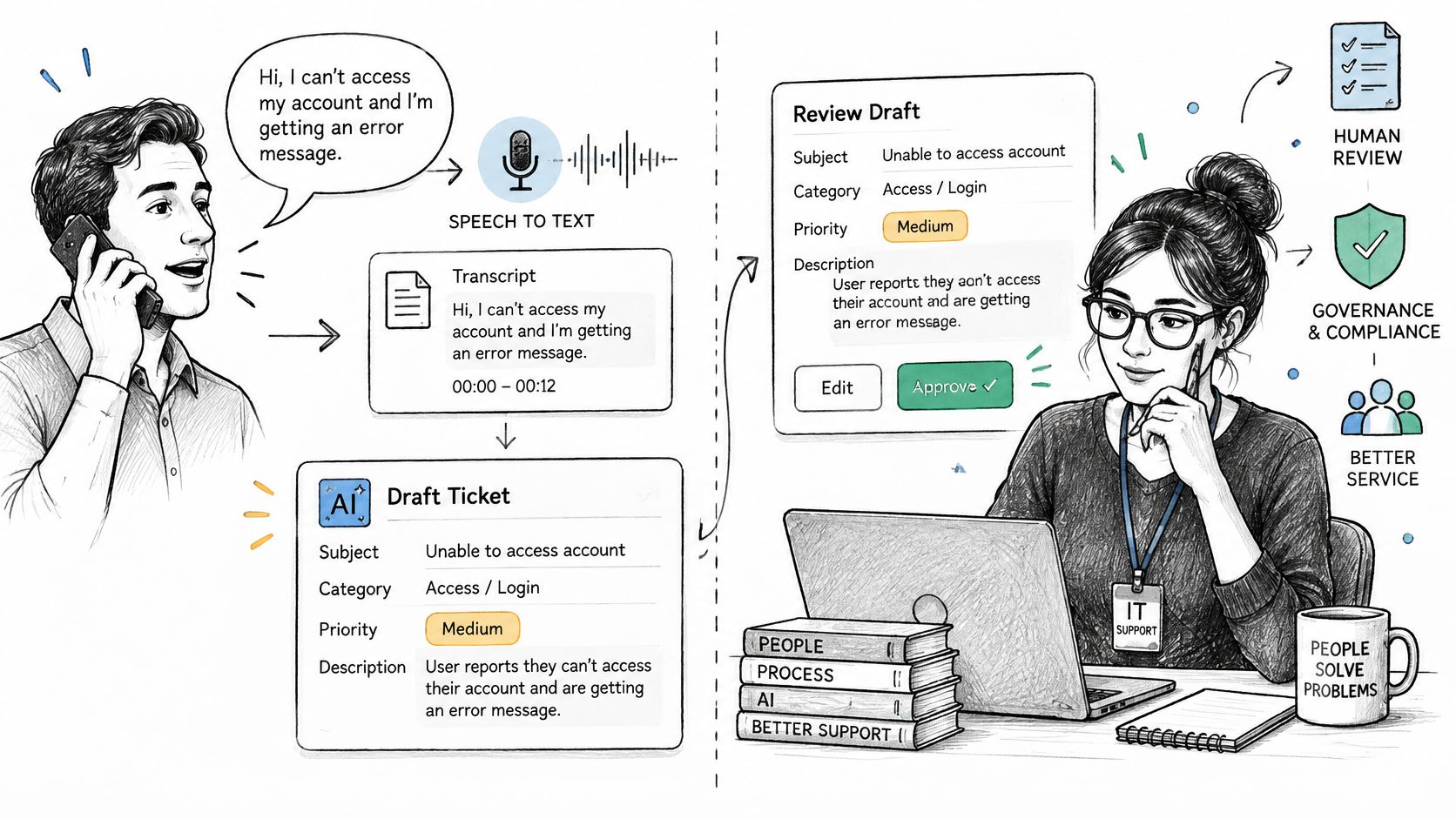
NIST's Generative AI Risk Management Profile recommends explicitly distinguishing human and AI responsibilities, documenting intended use and knowledge limits, and maintaining testing and validation records. For an MSP, turn that guidance into a written approval policy.
Decisions AI can handle alone and decisions that need approval
| Decision | AI can handle alone | Human approval required |
|---|---|---|
| Capturing caller details and symptoms | Yes, with transcript evidence attached | When the caller's identity is unclear |
| Categorising and titling a ticket | Yes, when confidence is high | When confidence is low or the request contradicts itself |
| Changing priority on an incident | No | Confirm before any change |
| Customer-facing commitments or timelines | No | Every time |
| Security-related or access requests | No | Every time |
| Closing a ticket | No | A technician confirms the resolution |
Make Every Important Field Traceable
Provenance means a reviewer can inspect where a field came from. Preserve the relevant transcript span, retrieved document, timestamp, and available confidence information alongside the generated value.
Keep caller statements, AI inferences, retrieved documentation, and technician-confirmed facts visibly distinct. “Caller reports possible ransomware” must not become “ransomware confirmed.” Route contradictions and low-confidence conversations to a person, and give that person a concise handoff with the supporting evidence.
Use the video alongside your written approval policy when discussing the workflow with your team.
Set Recording and Data Rules Before Launch
Build an appropriate recording notice, consent process, and retention rule for the jurisdictions you serve. Confirm who can retrieve transcripts, how deletion works, and whether sensitive information should be excluded from capture.
Data handling also depends on the selected AI provider. Returned call and ticket data from our MCP connector is processed by the AI provider the user selects, under that provider's terms. Include that processing path in your review rather than assuming the connector's permissions settle every privacy question.
Linking Conversations to PSA Tickets and Documentation
Update the existing PSA record rather than maintaining a parallel one. Otherwise, a technician may work from one version while the dispatcher, account manager, or billing team sees another.
For ConnectWise, Autotask, HaloPSA, and Syncro, map the operational objects explicitly: status, priority, type, assignee, contact, notes, time entries, and attachments. Field names and supported write actions can differ, so don't accept “PSA integration” as a complete specification.
PSA fields conversational ticketing writes to
| PSA object | What the AI writes or sets | Why technicians and billing need it |
|---|---|---|
| Status | Moves the ticket to a chosen ready-to-work state | Decides whether work enters the queue |
| Priority and type | Suggests values and flags urgent incidents for confirmation | Supports SLA handling and alerts |
| Assignee and contact | Matches the requester and routes to a queue or person | Ensures the right technician sees the request |
| Notes | Posts a summary, steps taken, and any confirmed resolution | Preserves the audit trail for handoffs |
| Time entries | Logs call or session time against the ticket | Feeds billing and profitability analysis |
| Attachments | Links transcripts or captured evidence where the PSA allows | Supports later review |
Check the Operational Effect of Each Write
Start with status and assignment. A detailed note on a ticket that remains outside the working queue doesn't give anyone ownership. Confirm the destination board, status, and responsible person using a test request in your own environment.
Then inspect notes and time entries separately. Notes explain the work; time entries account for labour. Attachments preserve evidence, but shouldn't force technicians to read an entire transcript to discover the next action. A ConnectWise PSA workflow should make these distinctions visible rather than putting everything into one text field.
N-able's PSA ticket documentation describes outage start time, end time, duration, and PSA ticket status alongside the ability to open the ticket and record notes and time. That's a useful model: preserve event timing while adding the technician's activity to the same case.
Elapsed outage duration and recorded labour aren't interchangeable. An incident can remain open while a technician waits for a supplier, so treating the whole outage as working time would distort account analysis.
Connect Findings to Client Documentation
Link relevant configuration records and knowledge-base articles from platforms such as IT Glue or Hudu. Require the answer to identify its source so a technician can check whether the instructions apply to this client and asset.
We don't replace your PSA. We integrate directly with the existing PSA to post call notes and time entries, sync tickets and clients, and run ticket AI apps.
For any proposed integration, establish which objects it reads, which it writes, and whether each write is logged against the ticket. Those details determine whether the workflow is auditable.
Misconceptions and Limits That Change the Results
Fewer Tickets Means Success
A system can deflect straightforward requests while leaving technicians with incomplete or incorrectly routed cases. Lower volume doesn't prove better service.
The SolarWinds discussion of its 2026 State of ITSM findings reports that 33% of organizations using AI self-service don't measure ticket reduction, alongside average weekly savings of 2.9 hours on triage and categorization and 2.8 hours on incident documentation. Saved hours are useful, but they can't establish improvement if reopens, reassignment, or missed service commitments rise.
Conversational Ticketing Is a Chatbot
Conversation volume measures activity, not ticket readiness. Judge whether the interaction produces diagnostic evidence, an appropriate assignment, and a dependable service record.
Full Autonomy Is the Goal
G2's AI customer-support report cites Gartner-related reporting that 75% of IT leaders were piloting or operating some form of AI agent, while 15% were considering, piloting, or deploying fully autonomous agents without human oversight. Broad agent adoption shouldn't be mistaken for broad acceptance of unsupervised decisions.
Use a pre-pilot baseline and a comparable human-originated control group. Match tickets by client, request type, priority, and channel so the comparison doesn't reward the group receiving easier work.
Outcome metrics for automated intake
| Metric | What it shows |
|---|---|
| First-touch completeness | Share with every required diagnostic field captured at intake |
| Reassignment rate | Tickets moved between queues or technicians after routing |
| Time to assignment | Minutes from submission to a named technician |
| SLA compliance | Share resolved within the agreed resolution window |
| Reopen rate | Share reopened after closure |
| Technician minutes per ticket | Labour time taken from time entries |
| Client sentiment | Client or caller feedback on intake |
| Gross margin by account | Billed revenue less delivery cost, assessed as a share of revenue |
The revenue-minus-delivery-cost amount is gross profit; the percentage is gross margin. Keep that distinction consistent when comparing accounts.
Also test the conversion itself: field-level extraction accuracy, unsupported-claim rate, escalation recall for critical incidents, human override rate, and time to validated ready-to-work status.
Faster intake only counts as improvement when technicians don't inherit the saved work as rework.
An override isn't automatically a failure. Review why it happened: correcting a misleading summary requires a different response from changing an assignment because the on-call roster changed.
Confirm Your First Conversational Ticketing Workflow
Start with after-hours phone intake on a selected support board, not every conversation across the business. It's a bounded workflow with a clear question: can the service desk capture actionable requests and identify exceptions without making promises it can't keep?
If after-hours volume is too low for a meaningful comparison, choose a busy intake path that regularly produces incomplete portal tickets. Keep the scope narrow enough that a dispatcher can review the results without losing control of the queue.
Run a Bounded Pilot
Record a baseline. Use a proposed four-week observation period to collect the outcome metrics above. Treat that duration as a starting pilot design, not a guarantee that every request type will have enough cases.
Define the permitted workspace. Select the boards, request types, and ready-to-work status the automation may use. Keep changes outside that scope under dispatcher control.
Write escalation triggers. Include emergencies, repeated failed attempts, frustrated callers, access requests, and high-value accounts requiring special handling. Name the on-call owner and define the fallback when that person doesn't acknowledge the handoff.
Begin in shadow mode. Let the AI draft the record while a dispatcher checks it before release. Log corrections by field so the team can distinguish asset-matching problems from summary or routing problems.
Compare equivalent work. After a proposed further four-week review period, compare automated and human-originated tickets using the same definitions. Inspect difficult cases individually rather than letting an average conceal an urgent incident that was missed.
Expand selectively. Add a workflow only when ticket quality and account margin hold. If technicians spend longer verifying generated notes than they previously spent writing them, fix that problem before expanding.
Within the boards and agents you enable, Vight triages every new ticket by matching the request, emailing the client for missing details, posting an internal note, and moving it to the ready-to-work status you choose. Apply your approval rules to that workflow rather than treating automatic movement as permission for autonomous decisions.
Resolve These Questions Before Release
- Provenance: Can the dispatcher inspect the evidence behind important fields?
- Data handling: Who processes the content, under which terms, and with what access and retention controls?
- Write scope: Which PSA objects can change, and can you audit each change?
- Failure handling: What happens when identification fails, the client stops replying, or escalation goes unanswered?
Give one operations owner authority to pause the pilot. The release decision should rest on better service records and sustainable delivery effort, not the percentage of requests handled automatically.
Vight connects call documentation, ticket triage, and client documentation with your existing PSA. Visit Vight to discuss a bounded conversational ticketing workflow, and bring a sample of incomplete tickets so you can assess the fields, handoffs, and approval rules your service desk needs.