
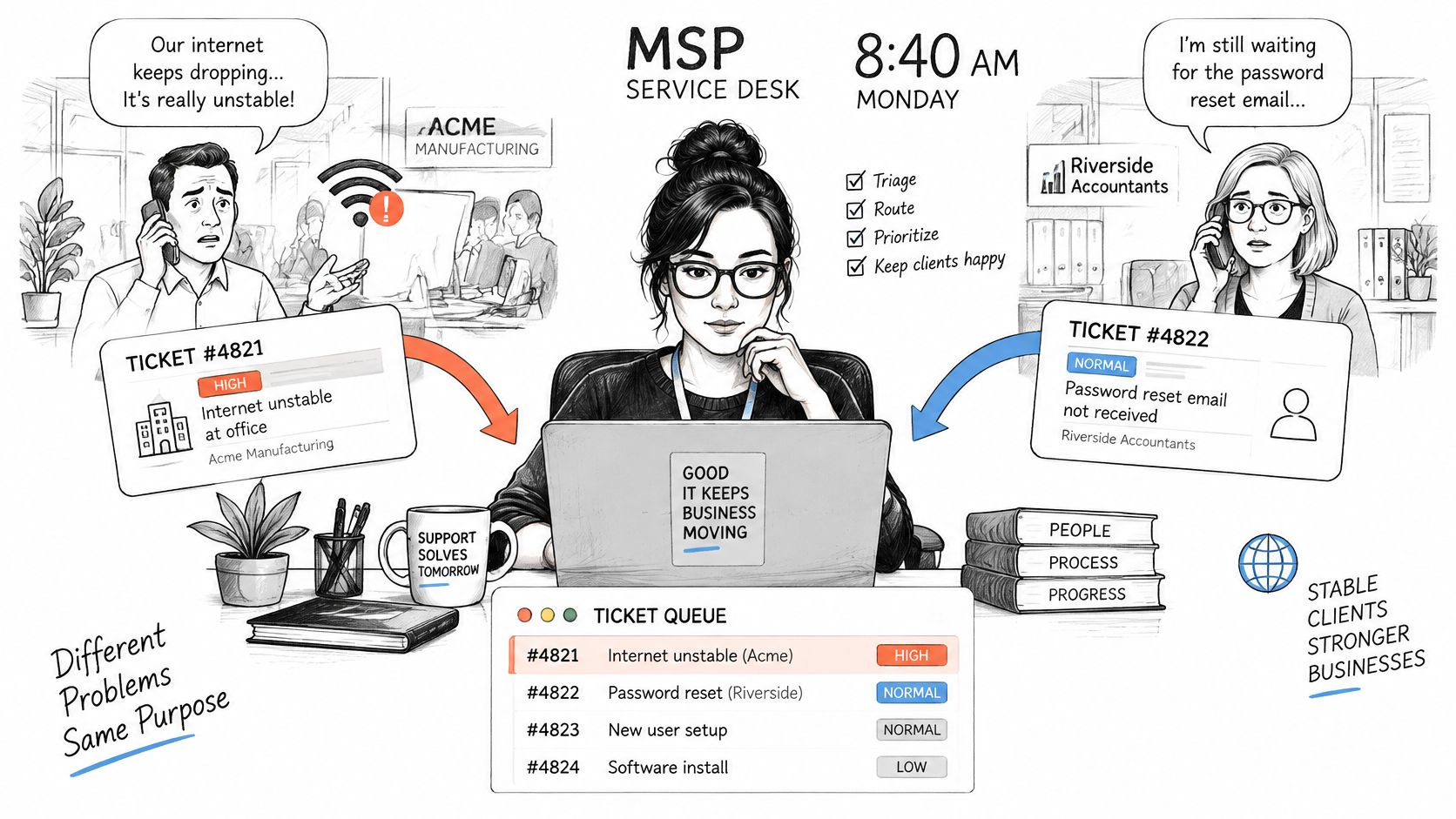
It's 8:40 on a Monday. One client's office reports that the internet keeps dropping. Another client's accountant asks why a password reset still hasn't arrived. Both requests land in the same inbox. They should not wait in the same line.
The outage is costing a whole office its morning. The password reset is annoying one person. If your desk works the queue in arrival order, the outage sits behind the reset, and both the client and the technician lose time.
Table of Contents
- Ticket Routing Explained for MSP Service Desks
- The Routing Rules MSPs Use and What They Read
- How a Ticket Moves From Intake to Assignment
- One Ticket Routed Three Ways
- Escalation and Fallback When Routing Fails
- Automating Routing Without Losing Control
- Routing Metrics That Show Whether It Works
- Set Up Your First Routing Rules This Week
Ticket Routing Explained for MSP Service Desks
Ticket routing is the decision you make after a request is recorded and before a technician starts the work. It answers three questions at once: where the ticket goes, how urgent it is, and who owns it.
A hospital triage nurse doesn't treat people in the order they walked in. She sorts by severity, then by which specialist can help. Your service desk needs the same habit. Arrival time is a timestamp, not a priority.
Every route should produce three outputs, and a ticket without all three is still sitting in a pile.
- Destination: a queue or team that matches the work, such as applications, infrastructure, or a named account team.
- Priority: the label that starts the response clock, tied to users affected and to the contract, not to who shouted first.
- Owner: a person or rota with an escalation timer, so the ticket moves if nobody acknowledges it.
Why this is harder at an MSP
You don't run one help desk for one company. You run many client environments, each with its own contracted response time, and technicians who know some of those environments far better than others. Phone calls become tickets. A misroute sends a firewall change to someone who has never seen that client's rules, or it parks a site-wide outage behind password resets.
Practical rule: A route is only as good as the fields it reads. If client, asset, or impact is blank, the router is guessing.
The rest of this article uses five words in a fixed order. Intake creates the record. Validation checks that the record is complete. Triage judges severity. Assignment picks the queue and the owner. Escalation moves the ticket when that owner doesn't act.
The Routing Rules MSPs Use and What They Read
Rules should fire from the most specific match to the broadest one. A live outage at a premium client goes to the on-call engineer even when that client's own queue has a free technician. Impact and priority sit above client preference and skill match. Otherwise a comfortable local queue hides a business-stopping failure.
| Rule type | Input signal | Example | Typical destination |
|---|---|---|---|
| Category or keyword match | Subject, description and product name | Mail client not opening | Application support queue |
| Client and contract | Client ID, SLA tier and service board | Premium client with one-hour response target | Named account team |
| Asset or device | Device ID, site and monitoring alert source | Alert from a domain controller | Infrastructure team |
| Priority and impact | Users affected, outage flag and business-critical system | Whole office offline | On-call technician |
| Time of day | Business hours or after-hours status | Server alert at 2 a.m. | After-hours on-call rota |
| Skill and workload | Certifications and current queue load | Firewall ticket | Certified engineer with spare capacity |
What each rule is allowed to read
Category rules fail the moment the subject line is vague. "Help" and "it's broken again" match nothing useful. The router should also read the description, the linked asset, and the caller's contract tier. A device has to be tied to the right client, or an alert from one site lands on another client's board. Keep the category list short enough that someone maintains it. Boards should match how the team works, not an org chart from three years ago.
NIST's incident-handling guidance recommends written prioritization guidelines that weigh the criticality of affected resources and data, current and potential technical impact, likely recoverability, applicable service-level agreements, and the time and day of the incident. It also says you should define how quickly the team must respond, what actions are required, and how incidents escalate when the designated response doesn't happen.
First-come, first-served belongs only to requests of genuinely equal weight. Two password resets in the same tier can wait their turn. A whole office offline cannot.
Write the conflict order down the way you write any other standard operating procedure. When two rules disagree, the higher one wins, and the ticket note should say which rule fired. New dispatchers then stop inventing a private queue order on busy Mondays.
How a Ticket Moves From Intake to Assignment
A mature desk separates the path into stages so a delay has an address. The NIST Cybersecurity Framework implementation examples describe creating and assigning tickets from alerts, confirming that a report needs a response, estimating severity, and prioritizing by scope, likely impact, and time-criticality, while keeping a human path for uncertain cases.
The flow below is the same idea in service-desk language.
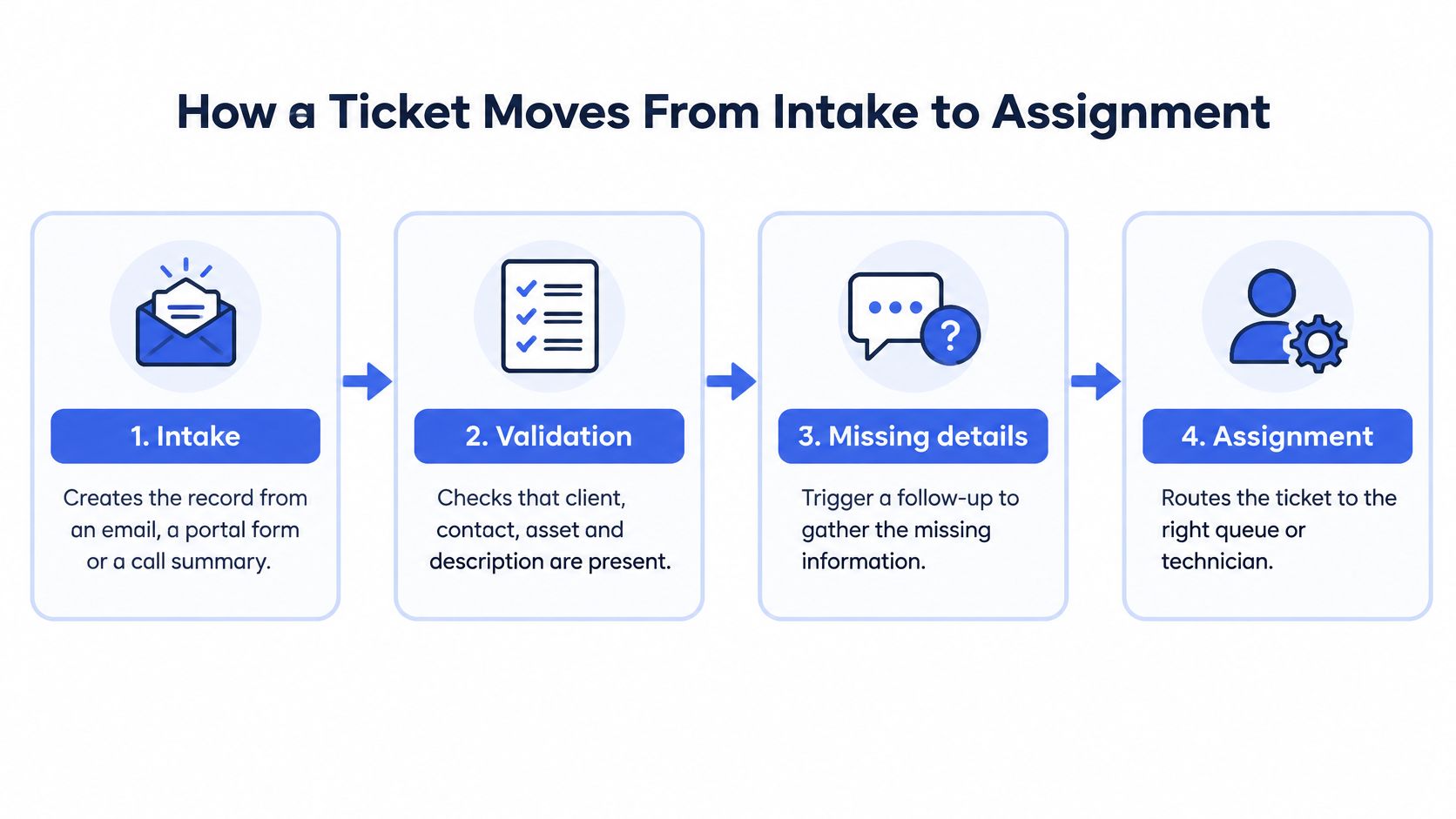
- Intake creates the record from an email, a portal form, or a call summary. Skipping this step means the request lives in someone's inbox and never gets a clock.
- Validation checks that client, contact, asset, and description are present. A missing asset is how a printer ticket lands on the infrastructure team.
- Missing details trigger a follow-up, and the ticket waits in a holding status. Routing a half-empty record just creates a second conversation later.
- Severity assessment estimates scope, business impact, and time-criticality. Without it, urgent work hides behind routine requests that happened to arrive first.
- Prioritization sets response and resolution clocks from the contract and the impact. A blank priority is a backlog you can't see.
- Assignment matches category and client rules to a queue, then checks who is available. Skill without availability is how tickets pile on one person.
- The escalation timer watches for a missing first response and moves the ticket to a backup owner. A named owner who is in a meeting is not coverage.
What automation should touch
Automation can run intake, validation, prioritization, and assignment for routine requests. Uncertain cases keep a human review path. Each stage should leave a visible field on the ticket: source, completeness, severity, priority, queue, owner, and the time each one was set. When a client asks why something took all afternoon, you can point at the stage that stalled instead of blaming "the queue."
The same discipline shows up in field work. A practical guide for service teams walks through how dispatch, status, and ownership stay visible once a job leaves the building. Your PSA path should be that explicit before anyone automates it.
If you want to see a desk walk a live ticket through triage rather than read another policy page, this short walkthrough is a useful contrast to the checklist above.
One Ticket Routed Three Ways
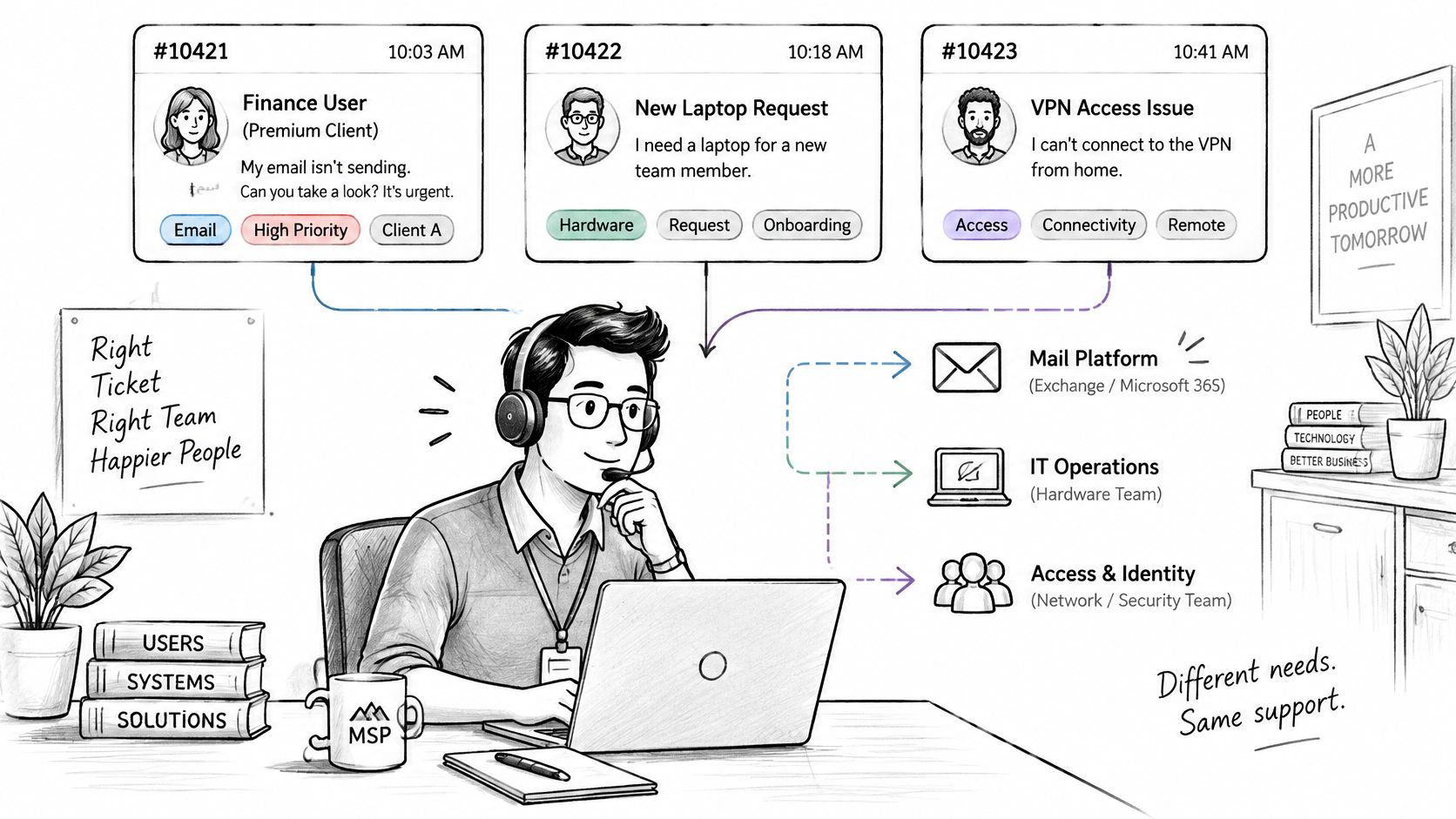
Three tickets hit a mid-sized MSP in the same hour. The fields on each one, not the arrival order, decide the outcome.
Ticket one, 9:05. A finance user at a premium client says email will not send. The category rule matches the mail platform. The contract tier lifts the priority. A senior mail specialist has it inside the hour. The field that changed the outcome was the contract tier. Same symptom at a best-effort client would have waited in the application queue.
Ticket two, 2:11 a.m. Monitoring shows a file server offline for a manufacturing client. The impact rule marks it priority one because the plant can't run. The after-hours rota pages the on-call engineer. The escalation timer moves it to the backup owner after fifteen minutes without an acknowledgement. The field that changed the outcome was the outage flag, read together with the time of day.
Ticket three, 9:20. The subject is "printer not working." There is no model, no location, and no error. Confidence is low, so the router asks for those three details and holds the ticket until the client replies. The field that changed the outcome was a blank asset. Guessing a queue here would have burned a visit.
Arrival-order handling would have done the opposite. The server outage waits behind the mail complaint and the printer note, because those two arrived while people were awake and typing. Routing is a set of field decisions. Change the field, and you change who wakes up.
If you can't name the field that sent a ticket somewhere, you don't have a rule. You have a habit.
Escalation and Fallback When Routing Fails
Automation is safest when it can refuse the job. MSP Control's routing guidance pairs board, classification, and priority changes with exception handling: match work to scheduling-group ownership and availability, and keep manual triage for unmatched tasks, unavailable staff, and failed processing. It also splits immediate-work settings from after-hours settings.
Three fallbacks cover most failures.
Low confidence. The router doesn't pick a queue. It asks the client for the device model, the location, and the error message, then waits. A wrong confident guess costs more than a short hold.
Ambiguous or high-impact. Security, access, finance, and anything that looks like an outage go to a manual triage queue that a senior dispatcher owns. A model can suggest a board. It shouldn't place a privileged incident.
Unavailable staff. When the escalation timer expires, the backup rota takes the ticket. After hours, emergencies use that rota and a shorter chain. Ordinary requests keep the business-hours rules and wait until morning.
Duplicates and permitted fields
Merge tickets only when the content is clearly the same incident and the reports arrived close together. A loose match will glue Tuesday's printer to Thursday's VPN. Automation may change board, classification, and priority only inside fields your policy allows. If it can't validate ownership or availability, it stops and hands the ticket to a person.
When the PSA and another system disagree on client or asset, treat that the way you'd treat a bad sync. How to fix ERP integration errors is a useful parallel: don't let a stale record drive the next action.
| Symptom | Likely cause | Fix |
|---|---|---|
| Tickets land in the general queue | Category rules missing or keywords do not match | Add rules for the top ten categories and review unmatched tickets weekly |
| Urgent outage waits for hours | Priority set by arrival time, not users affected | Score priority from impact and business-critical systems |
| Ticket reassigned three times | Owner chosen by skill only, ignoring availability and client familiarity | Add workload and client-history checks to assignment |
| After-hours emergency unanswered | No after-hours rota or escalation timer | Route to on-call and escalate to backup after a set number of minutes |
| Unrelated tickets merged | Similarity threshold too loose or time window too wide | Require both content similarity and a close time window before merging |
Automating Routing Without Losing Control
Let automation act only when the evidence is strong enough. Split confidence into three bands. Above a high threshold, route automatically. In the middle, suggest a queue and let a dispatcher confirm. Below that, send the ticket to manual triage and ask for the missing diagnostics.
A study of about 25,000 real IT-support tickets with attachments found that using attachments and other modalities raised assignment accuracy from 86.1% to 88.6% and assignment coverage from 89.3% to 96.5%, while resolution accuracy rose from 74.7% to 82.4% against text-only analysis, as reported in that multimodal routing study. For an MSP, that means reading the call transcript, the screenshot, the asset, and the prior history before you pick a queue. Subject lines are the weakest field you have.
What the gains actually depended on
A 2025 study of automated ticket management reported a clustering score of 0.96, 95% engineering approval of proposed resolutions, a 30% reduction in average resolution time, and a 35% reduction in ticket backlog, according to the ACM write-up of that system. Those results sat on a similarity threshold, deduplication logic, and a time window, not on a classifier left alone.
Inconsistent incident data, fragmented knowledge bases, inaccurate asset records, and poorly mapped dependencies make the same automation unreliable. Name an owner for client and asset records and audit them monthly. Limit which client data the model may read. UC Today, drawing on Deloitte, flags unauthorized access, transmission, or misuse of sensitive data as a leading GenAI adoption risk, alongside outputs that are wrong.
If you are choosing orchestration tooling around these controls, a SOAR platform selection checklist is a sober way to compare human approval, logging, and fallback before you turn a router loose. The same caution belongs in any help desk automation rollout: measure correct routing when fields conflict, not just how many tickets moved without a person.
Routing Metrics That Show Whether It Works
First-contact resolution is where routing errors show up first. Did the client get a fix without a reassignment, an escalation, or a second call to repeat the same story? A ticket that a Level 1 tech closes after an internal bounce can still fail that test if the client had to explain the problem twice.
Track time to first assignment separately from time to first response. Assignment delay tells you the ticket was waiting for an owner. Response delay tells you a technician had it and hadn't started. Mix them and you'll "fix" capacity when the problem is a generic queue.
A 2024 Freshservice benchmark, as summarized by Desk365, found agents responded in an average of 6.56 hours and resolved tickets in an average of 22.89 hours, and it treats first-assignment time as its own measure. A later compilation of Freshservice's 2025 data, in that same write-up, puts average IT-ticket first response at 9.36 business hours and resolution at 21.96 business hours. Definitions differ, so use them as a warning that waiting happens before the fix, not as a target to copy.
| Metric | How to use it |
|---|---|
| First-contact resolution | Trend your own rate weekly by category |
| Time to first assignment | Set your own baseline from the last 90 days |
| Time to first response | Compare against each client's contracted response time |
| Reassignment rate | Target a falling rate by category after each rule change |
| Reopen rate | Review every reopen against its routing decision |
| SLA breach rate | Check priority and timers for each breached client |
A correct category that sits for days in the wrong queue is still a routing failure. Break each metric down by client and by category. Averages hide the client who always waits. Compare the trend with your own history, and fold the review into the MSP metrics you already trust. Routing can't repair a missing skill, a broken contract, or an asset list nobody maintains. It can stop those gaps from staying invisible.
Set Up Your First Routing Rules This Week
- Export the last 90 days of tickets. Count the top ten categories, and note how many lack a client or an asset.
- Write one rule per category, and name the client, asset, or contract field that rule must read before it fires.
- In ConnectWise, Autotask, HaloPSA, or Syncro, confirm that priority, board, and classification are writable, and that a bad automated change can be rolled back.
- Create a manual triage queue for ambiguous, high-impact, and unassigned tickets, with a named senior dispatcher.
- Put a first-response timer and a named backup owner on every queue.
- Each week, review first-contact resolution, reassignment, and time to first assignment, split by client.
Change one queue at a time so you can see which field moved the outcome. Keep the rules in the PSA your team already lives in. We don't replace that system. We integrate with it to post call notes and time entries, sync tickets and clients, and run ticket AI apps on the records you already own.
Vight triages new tickets against the request, emails the client when details are missing, and moves the work to a ready-to-work status you choose, while the route still follows your boards and your escalation timers. If you want that intake sitting on the PSA you already run, visit Vight and see how call notes, triage, and ticket sync fit the rules you just wrote.