
A technician finishes a client call, answers the next one, and leaves the write-up until later. The ticket exists, but the troubleshooting steps are missing, the evidence is in an inbox, and billing staff can't tell whether the work was recorded.
That's the practical test for Autotask PSA. Having a ticketing platform isn't enough. Your service desk needs a reliable connection between the request, the work performed, the client's documentation, and the time you can account for.
Table of Contents
- What Autotask PSA Is and What It Records
- Where Autotask Sits in the MSP Stack
- How a Ticket Moves Through the Service Desk
- Keeping Documentation Connected to Tickets
- Automating Intake and Triage Without Duplicate Entry
- How Time Entries Reach the Invoice
- API Limits and Data Rules for Safe Integration
- Check Your Setup Before You Connect Automation
What Autotask PSA Is and What It Records
Autotask PSA is a professional services automation platform that MSPs use as the system of record for service requests, client accounts, billable time, and invoicing. If your remote monitoring and management platform is the alarm system watching client machines, the PSA is the dispatch office that decides who responds, records the work, and prepares it for billing.
Autotask's PSA datasheet describes ticketing as a shared record for support issues, service requests, incidents, and emails, with billable and non-billable time entered against tickets or tasks appearing on technicians' timesheets. That connection matters more than the ticket count: it lets operations and finance examine the same work.
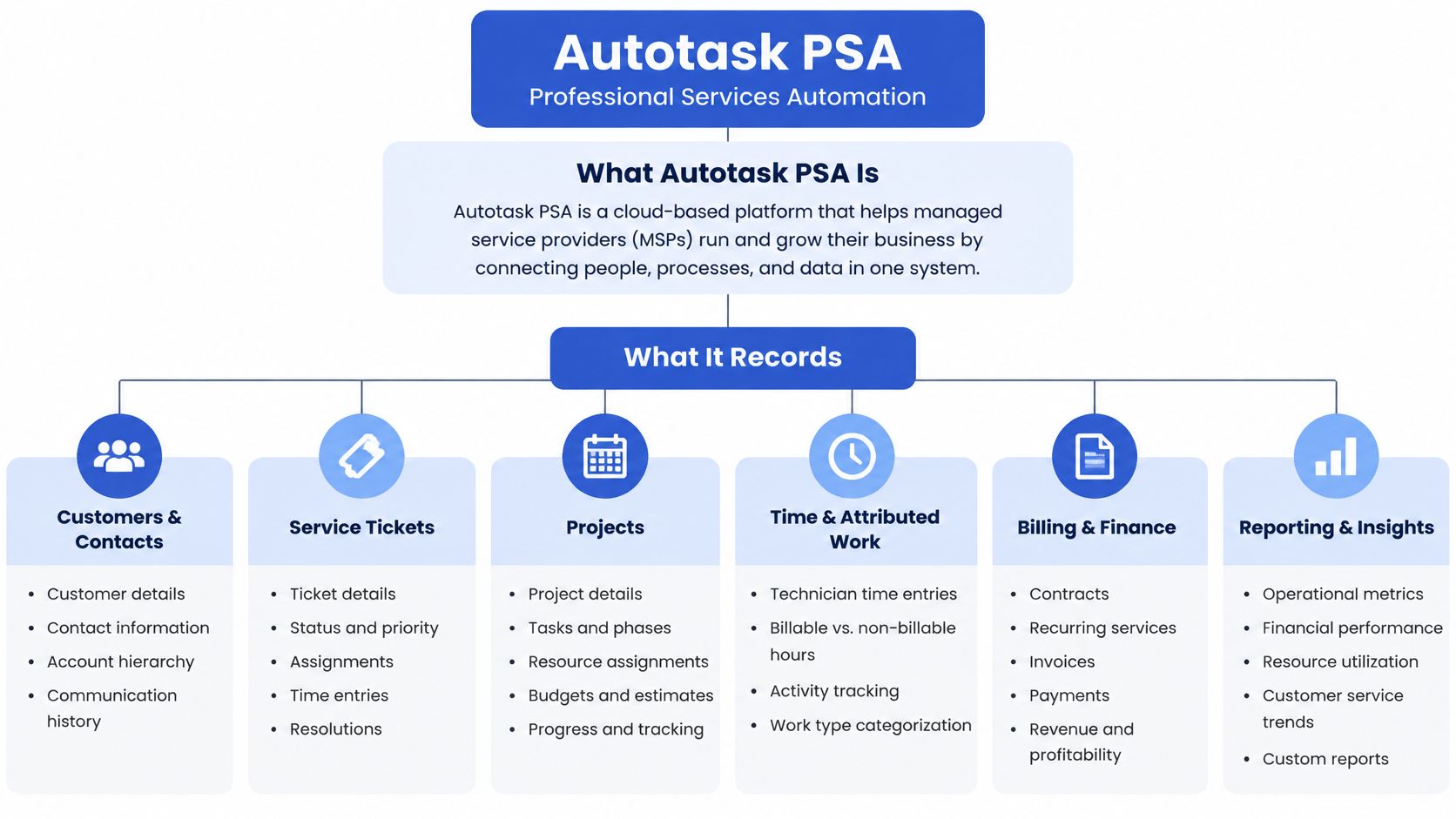
Autotask PSA core records and what they hold
| Record or module | What it holds | Who uses it most |
|---|---|---|
| Tickets | Service requests, incidents and emails in one system of record | Service-desk staff and dispatchers |
| Time entries | Billable and non-billable resource time tied to tickets or tasks | Technicians and billing staff |
| Companies and contacts | Client accounts, sites and contacts linked to tickets | Account managers |
| Workflow rules | Conditions that update records or send notifications when events occur | Service-desk managers and administrators |
| Invoicing and reporting | Billable time turned into invoices and profitability views | Finance and MSP owners |
These records answer different operational questions. A ticket explains what the client needs. A time entry records the effort. The company and contact records establish whose environment and agreement apply. Reporting becomes useful only when those relationships are correct.
The PSA doesn't need to contain every file your MSP owns. Phone systems, documentation platforms, and shared repositories should either write the relevant service record into Autotask or provide a dependable reference from it.
Practical rule: Keep the service transaction in the PSA. Keep reusable technical knowledge in its authoritative documentation system.
Run a simple self-test: list the records your team creates during a normal working day. Mark anything that lives only outside Autotask, such as handwritten call notes, a spreadsheet of promised callbacks, or an engineer's private troubleshooting log. Those aren't automatically wrong, but each needs an explicit destination or reference before the work is considered complete.
Where Autotask Sits in the MSP Stack
Say an MSP adds backup monitoring and phone automation. The useful question isn't which application has the most features. It is which application owns the service record.
Autotask earned that position over time:
- Independent PSA foundation. Autotask built its business-management software for IT service providers as an independent vendor before private-equity ownership reshaped the company.
- Broader operational stack. The 2017 combination joined the PSA with backup, disaster recovery, networking continuity, file synchronization, and remote monitoring; Datto's merger announcement described a combined network of more than 13,000 MSPs serving over 500,000 SMBs, not standalone Autotask customers.
- Integration ecosystem. In 2025, Datto reported more than 250 third-party integrations through its Autotask integration hub.
That history matters for one practical reason. The PSA is the record every other tool writes to or reads from. Your RMM pushes alerts into tickets. Your documentation platform holds the reusable knowledge those tickets reference. Automation layers such as Vight sit on top and integrate with Autotask rather than replace it, posting call notes, time entries, and triage updates back into the same ticket records your billing and reporting already depend on.
Operationally, connect new tools to the established PSA unless replacing it solves a clear problem. During vendor reviews, check who owns the product, what the roadmap commits to, and how support responds when an integration breaks.
For the architectural distinction, use our PSA and RMM comparison. For the client-side view, Accelerate IT Services Inc.'s guide to choosing a managed IT provider frames what buyers expect from the service behind the software.
How a Ticket Moves Through the Service Desk
A ticket should let another technician continue the work without reconstructing the conversation. Treat each lifecycle stage as a handoff with an owner, a destination record, and an exit condition.
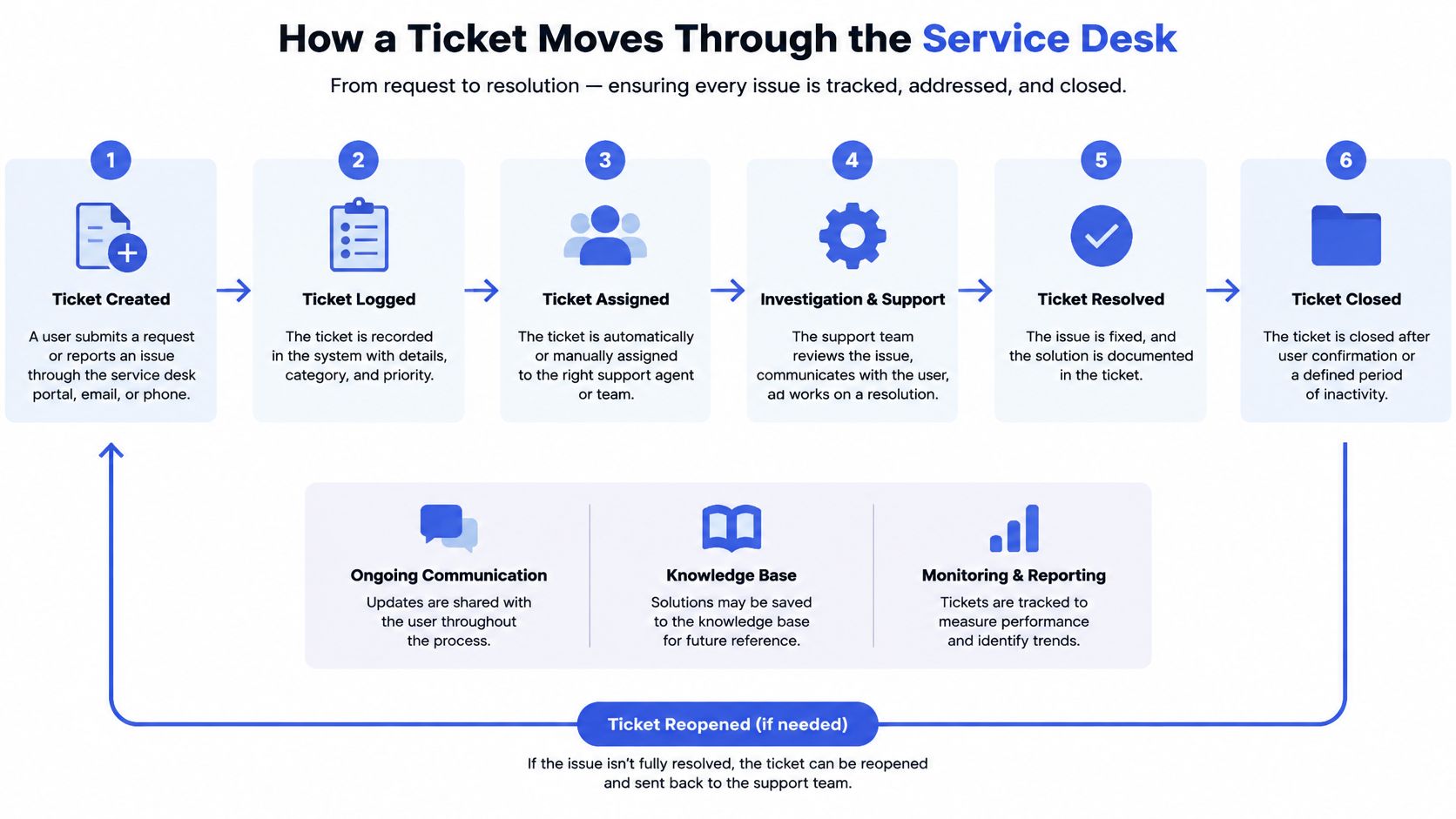
From request to accountable work
Intake creates the ticket. An email, portal submission, phone conversation, or API request becomes a ticket linked to the correct company and contact. The common gap is a recognizable problem description attached to the wrong client, which sends the technician into the wrong environment.
Classification establishes the work type. A dispatcher or configured automation sets the queue, category, and priority on the ticket. Leaving the category blank makes subsequent routing and reporting less dependable; assigning everything the highest priority makes genuine emergencies harder to distinguish.
Routing establishes responsibility. Configure conditions and notifications so an incoming or edited ticket reaches a named technician or an actively managed queue. A notification isn't ownership, and a ticket that everyone can see may still have nobody responsible for its next action.
Work produces a technical record. The technician records observations, troubleshooting actions, results, and resolution steps in ticket notes or associated work entries. Notes such as “fixed issue” leave the next technician unable to distinguish a lasting repair from a temporary workaround.
Time capture records effort. The technician enters billable or non-billable time against the ticket, with a description that explains the work. The failure point is recording general time while leaving the service ticket without its associated effort.
Waiting and escalation make the next action visible. Change the ticket status when the client must respond, a supplier must act, or another technician must take over. Record what you're waiting for and who follows up; a waiting status without a next action becomes a hiding place for unresolved work.
Closure prepares the record for billing review. Confirm the resolution, work notes, time, and applicable billing treatment before closing the ticket. Closure shouldn't be used to clear a queue while leaving finance to reconstruct missing details.
External intake without another ticket database
Autotask's Tickets entity documentation exposes tickets at /atservicesrest/v1.0/Tickets, supporting record operations and webhooks so external intake systems can create or update the existing service record.
Keep the acceptance test concrete: an owner, a category, useful notes, and a time entry before closure. Where no technician labor occurred, record the reason rather than inventing time to satisfy a checkbox.
Keeping Documentation Connected to Tickets
Start by locating the evidence: ticket notes, IT Glue or Hudu, shared drives, and individual inboxes. If technicians disagree about where the authoritative copy lives, adding another integration won't settle the disagreement.
Autotask's product overview emphasizes connected service context, but a connected interface isn't proof that every deliverable is recoverable. User-review accounts describe a separate Google Drive process for photos and completed forms, and third-party help with email-to-ticket creation. Treat those as workflow-specific reports, not universal product limitations.
Use this routine to keep evidence accessible:
- Assign an authoritative home. Put incident-specific findings on the ticket. Keep reusable configurations and procedures in the documentation platform, and credentials in the approved credential store.
- Reference rather than duplicate. Store a stable document reference on the ticket. Copying the same procedure into several places creates uncertainty when someone updates only one version.
- Capture the source. Route call summaries and relevant attachments to the associated ticket, with the source-system reference in a structured field. Preserve access controls when linking to recordings or sensitive client material.
- Check reachability weekly. Sample closed tickets that reference attachments or external evidence. Confirm that another authorized technician can open the record without asking its creator for access.
A link that only the original technician can open isn't a usable handoff.
Good ticket notes explain what happened during this service event. Client documentation explains the environment and reusable method. A technician opening the ticket next month should find both without asking where the work went.
Automating Intake and Triage Without Duplicate Entry
Which work happens before a ticket exists, and which work should happen on the existing record? Answer that before connecting a call tool or enabling a triage agent.
Caller identification and initial request capture happen before or during ticket creation. Clarification, categorization, enrichment, and handoff should normally update the matched ticket rather than create parallel records.
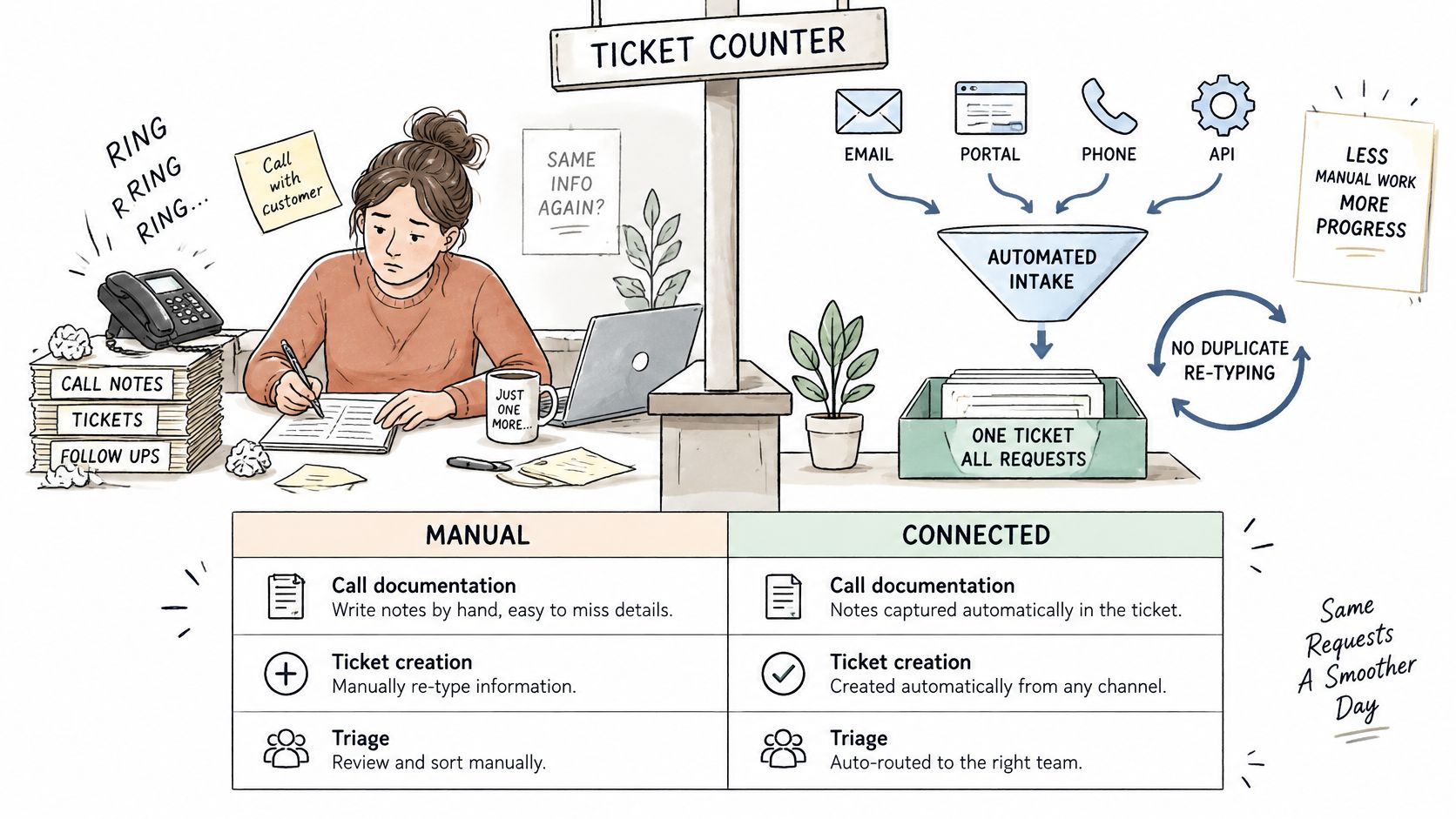
Intake and triage tasks, manual versus connected
| Task | Manual approach | Connected automation |
|---|---|---|
| Call documentation | Technician writes notes after the call | Call transcribed and summarized as a structured time entry on the PSA |
| Missing details | Technician emails the client and waits for a reply | Automated email requests missing information and logs the response |
| Ticket titles and categories | Dispatcher rewrites them by hand | AI rewrites titles and assigns categories |
| After-hours calls | Voicemail and a callback the next morning | Voice agent captures caller details and urgency and creates a ticket |
| Duplicate requests | Manual search before triage | Duplicate detection flags or merges related tickets |
These are connected-workflow patterns, not a claim that every capability comes from a standard Autotask rule. Each needs configuration, appropriate permissions, and an exception path.
Use rules for predictable decisions
Autotask's workflow documentation describes rules that evaluate configured conditions and can update data or send notifications when events occur, including ticket edits. It also describes integrations that create tickets, update status, create time entries, and change billing roles.
Keep the distinction clear. Native rules are appropriate for deterministic actions, such as notifying a queue when a field matches an agreed value. Summarizing a conversation, interpreting an ambiguous request, or deciding whether related complaints describe the same incident requires contextual interpretation, whether supplied by a person or AI.
Vight doesn't replace your PSA. We integrate directly with your existing PSA to post call notes and time entries, sync tickets and clients, and run ticket AI apps.
Make readiness a defined condition
Say a client emails that a server is slow. A connected workflow can produce a clearer title, request the affected host name by email, record the reply, and post an internal summary. It should move the ticket to your selected ready-to-work status only when the required information is present.
Don't let a title rewrite change the reported facts. Don't let duplicate detection merge separate client impacts merely because the wording looks similar.
Review boundary: Automate the preparation of a decision before automating the decision itself.
For every automated action, name the record it writes to and the person who reviews it. If neither is clear, the workflow isn't ready for unattended operation.
How Time Entries Reach the Invoice
An invoice is only as complete as the time entries behind it. A detailed ticket can still leave work unbilled if its associated labor record is missing or cannot proceed through approval.
Autotask's TimeEntries entity documentation allows time against tickets or tasks, including labor and general activities such as meetings, travel, and training. It also establishes the relationship, timesheet-state, posting, and time-zone restrictions an integration must respect.
Time entry rules that affect automation
| Rule | What it means for automation | Risk if ignored |
|---|---|---|
| Ticket or task link | Entry must attach to a ticket or task | Entry cannot appear on an invoice |
| Timesheet status | API entries land only on timesheets in New or Rejected status | The write is rejected and time goes unposted |
| Post-approval edits | Entries cannot be updated after approval and posting | Corrections need a separate reversal process |
| Time zone | API-created entries use Coordinated Universal Time | Hours can appear on the wrong day |
A ticket association makes time eligible for invoicing; it doesn't mean every associated entry should be billed. Finance still needs the correct contract treatment, billing role, and billable designation.
Say a call transcript identifies forty minutes spent investigating a server fault, but the relevant timesheet was approved and posted yesterday. That's a hypothetical correction case, not permission for the connector to overwrite the entry or place the time elsewhere without notice. Route it to billing staff for the approved correction or reversal process.
Validate before posting
Before launch, confirm that automated labor entries carry the correct ticket or task reference. Check the timesheet status before attempting the write, convert timestamps deliberately, and send late entries to a review queue.
Our Autotask phone integration guide is relevant when calls are the source of those entries. Keep call duration separate from billable duration: hold time, unrelated discussion, overlapping activity, and contract coverage all require treatment.
Run a weekly leakage check by comparing service-call records with posted time. Investigate missing entries and unexplained differences before month-end, but don't automatically classify every discrepancy as lost revenue. Sometimes the issue is incomplete capture; sometimes it's pricing or contract scope.
API Limits and Data Rules for Safe Integration
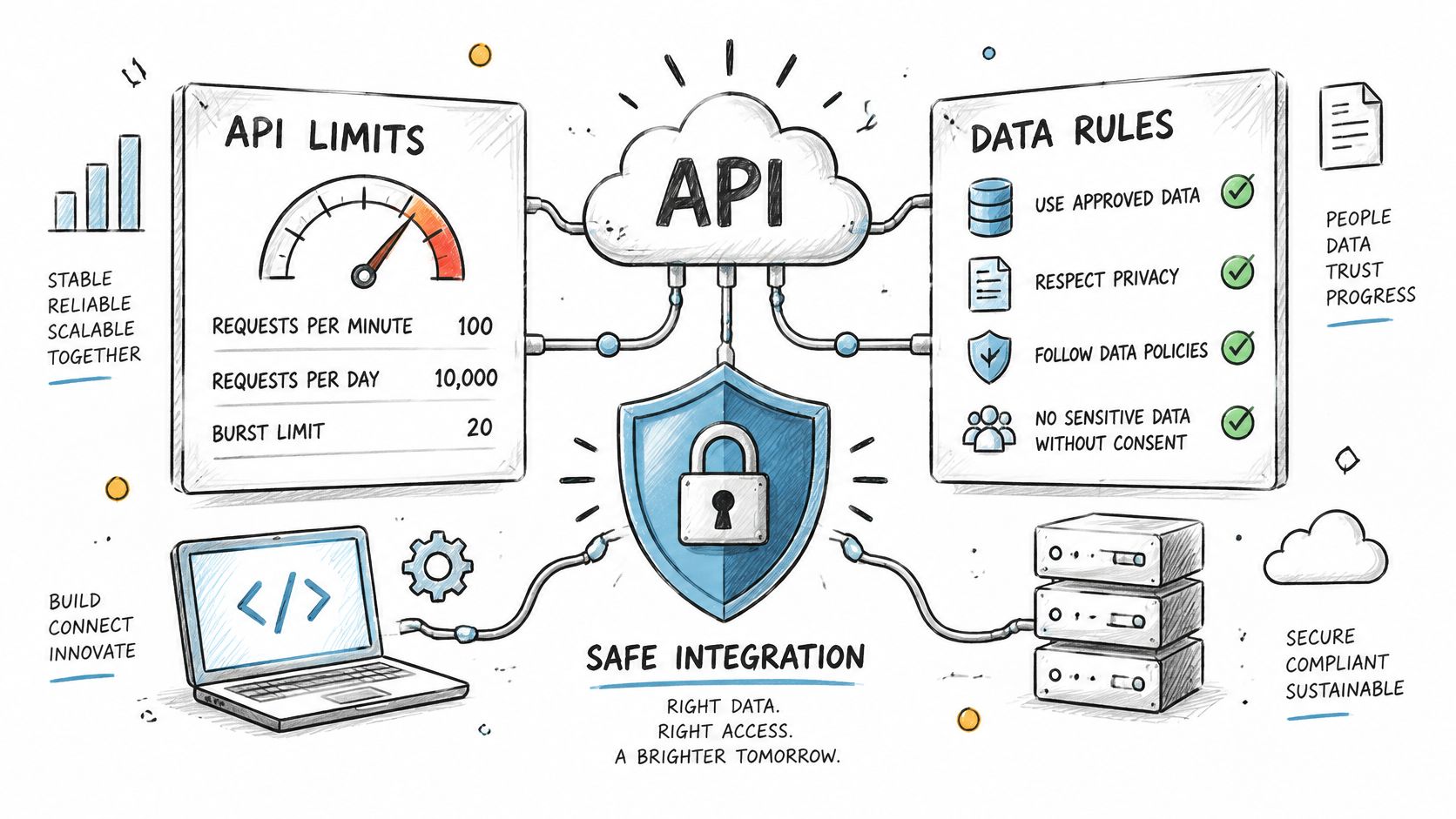
Autotask documents 10,000 external REST requests per hour between an individual database and the API, equivalent to about 20 requests per technician per hour across 500 active technicians before other traffic, in its REST thresholds and limits guidance. The same guidance identifies support for up to 300 ticket user-defined fields.
Autotask integration limits and design responses
| Limit or feature | Documented figure | Design response |
|---|---|---|
| REST API requests | 10,000 per hour per database | Queue high-volume jobs, batch writes where supported, and back off on throttling |
| Per-technician headroom | About 20 requests per technician per hour at 500 technicians | Reserve capacity for other integrations, retries and reports |
| Ticket user-defined fields | Up to 300 | Store call IDs, urgency scores and source references as structured fields |
| Webhooks | HTTP POST when subscribed entities change | Replace polling and make handlers idempotent to avoid duplicates |
| Tickets REST endpoint | /atservicesrest/v1.0/Tickets |
Use filtered queries and targeted updates rather than full downloads |
The technician calculation is a planning illustration, not an individual allowance. Your connectors share database-level capacity, including background jobs users don't see.
Build for contention and replay
Queue transcript posting, enrichment, sentiment scoring, and duplicate checks rather than sending an uncontrolled burst. Cache stable company and configuration-item records, consolidate work where supported, and apply exponential backoff when throttled. Leave spare capacity for recovery instead of designing around continuous use of the ceiling.
Autotask's API overview describes REST and SOAP interfaces and webhook notifications delivered as HTTP POST requests when subscribed entities change. Use those events where available instead of repeatedly downloading unchanged records.
A webhook handler must be idempotent: processing the same event again shouldn't create another note, ticket, or time entry. Persist the source event reference, track write outcomes, and distinguish a failed request from a successful write whose acknowledgement never reached your connector.
Make metadata operationally useful
Map call identifiers, source references, urgency assessments, and triage confidence to agreed structured fields. Define the type, allowed values, owner, and overwrite behavior for each. Don't let unrelated integrations assign different meanings to the same field.
Ask an integration partner:
- Capacity: How do you budget requests alongside our other connectors?
- Recovery: How do retries avoid duplicate writes after an ambiguous response?
- Mapping: Which fields do you own, and how do you handle human edits?
Check Your Setup Before You Connect Automation
Start with one intake channel and one Autotask board, not the entire service desk. A narrow pilot makes it possible to inspect exceptions and identify whether automation improves the record or merely changes who cleans it up.
Set the operating boundaries
- Confirm access with the PSA administrator. Specify which tickets, boards, and categories the integration may read and write. Include the integration account's permissions and the person authorized to approve changes.
- Choose enabled boards and agents. Estimate reads, writes, lookups, and retries against the database's hourly request budget. Include existing integrations rather than treating the new connector as the only consumer.
- Define ready-to-work. Select the status technicians monitor and document the information required before a ticket reaches it.
- Assign time-entry review. Check timesheet state before posting and give a named reviewer responsibility for automated labor records and late corrections.
- Approve field mapping. Name the destination of every write, including structured fields for call references, urgency, and source identifiers.
Measure the record, not the activity count
Run a two-week pilot on the selected board and compare it with the week before. Those are proposed test periods, not performance benchmarks. Define the missing-detail rate as requests that need clarification before useful work can begin, and track the share of service calls that produce a ticket with unlogged labor.
Inspect the exceptions alongside the totals. A lower missing-detail rate isn't progress if the automation inserts plausible but incorrect information. Expand only where record completeness improves without unacceptable correction work.
Vight connects to your existing phone system and PSA, and you can be up and running within a day. That connection time isn't a substitute for operational validation.
Any PSA ticket we process with an AI agent counts as a ticket, including title rewrites, deduplication, categorization, or summaries. You choose which boards and agents run, so keep the enabled scope aligned with the pilot and review processing activity before expanding.
Vight connects your phone system, Autotask PSA, and client documentation to document calls, triage new tickets, and retrieve operational answers without replacing your PSA. Visit Vight to discuss a pilot around one intake channel, with clear field mapping, time-entry review, and measurable documentation outcomes.