
A PSA runs the service business, covering tickets, time, contracts, and billing; an RMM runs the devices, covering monitoring, alerts, patching, and remote access. They manage different parts of the same service, so choosing between them is usually the wrong decision.
The popular advice is to compare features, buy a compatible pair, and connect them. That misses the operational problem: a connection doesn't establish data ownership. An integration can move alerts successfully while technicians still reconstruct the client context, repair ticket associations, and enter their time afterward.
For MSP owners and service managers, the better question is whether the pairing produces complete work records and contains failures within the affected client.
Table of Contents
- PSA vs RMM at a Glance
- What Each Tool Does During One Service Event
- Which System Owns Each Type of Data
- Pick a Setup Model for Your Team Size
- Protect Centralized Automation Across Clients
- Connect PSA and RMM and Verify Before You Commit
PSA vs RMM at a Glance
PSA means professional services automation. RMM means remote monitoring and management. The distinction is between managing service obligations and managing endpoint conditions, not between administrative software and technical software. Technicians use both.
A PSA tells the service manager who owns the work, which agreement applies, and whether the labor was recorded. An RMM tells the technician what the endpoint reported, which maintenance actions ran, and whether the device recovered.
PSA and RMM compared on core criteria
| Aspect | PSA | RMM |
|---|---|---|
| Core job | Runs service delivery and the business: tickets, time, contracts, billing | Runs device health: monitoring, alerts, patching, scripts, remote access |
| Primary data | Tickets, clients, agreements, time entries, invoices | Endpoint inventory, health telemetry, patch state, alert events |
| Typical trigger | A client request by email, phone, or portal | A device alert, often before anyone notices a problem |
| Main users | Service desk, account managers, billing staff | Monitoring team, technicians, automation engineers |
| Success metrics | First-response SLA, backlog age, time captured, billing accuracy | Uptime, patch compliance, alert volume, auto-remediation rate |
| Example products | ConnectWise PSA, Autotask, HaloPSA | ConnectWise Automate, ConnectWise RMM |
Some platforms, including Syncro, bundle PSA and RMM functions in one product. That changes the purchasing and administration model, but it doesn't remove the distinction between a business record and a device observation.
Integration has long been an MSP operating priority. In a 2018 survey of more than 800 MSPs across over 40 countries, Kaseya's MSP benchmark announcement reported that 80% of high-performing MSPs rated PSA and RMM integration exceptionally important, compared with 69% of all respondents.
Classify the record before choosing the tool
Use a simple classification test when a vendor demonstrates overlapping features:
- Business accountability: If the record answers what you billed, which contract applies, or who owns the ticket, put its authority in the PSA.
- Device evidence: If it answers whether the endpoint is healthy or what changed on it, put its authority in the RMM.
- Shared context: If both systems need the information, identify its owner and synchronize a reference or controlled copy.
Practical rule: A shared dashboard is useful. A defined source of truth is necessary.
This makes an RMM vs PSA comparison more useful than a feature checklist. A tool can display another system's information without becoming authoritative for it.
What Each Tool Does During One Service Event
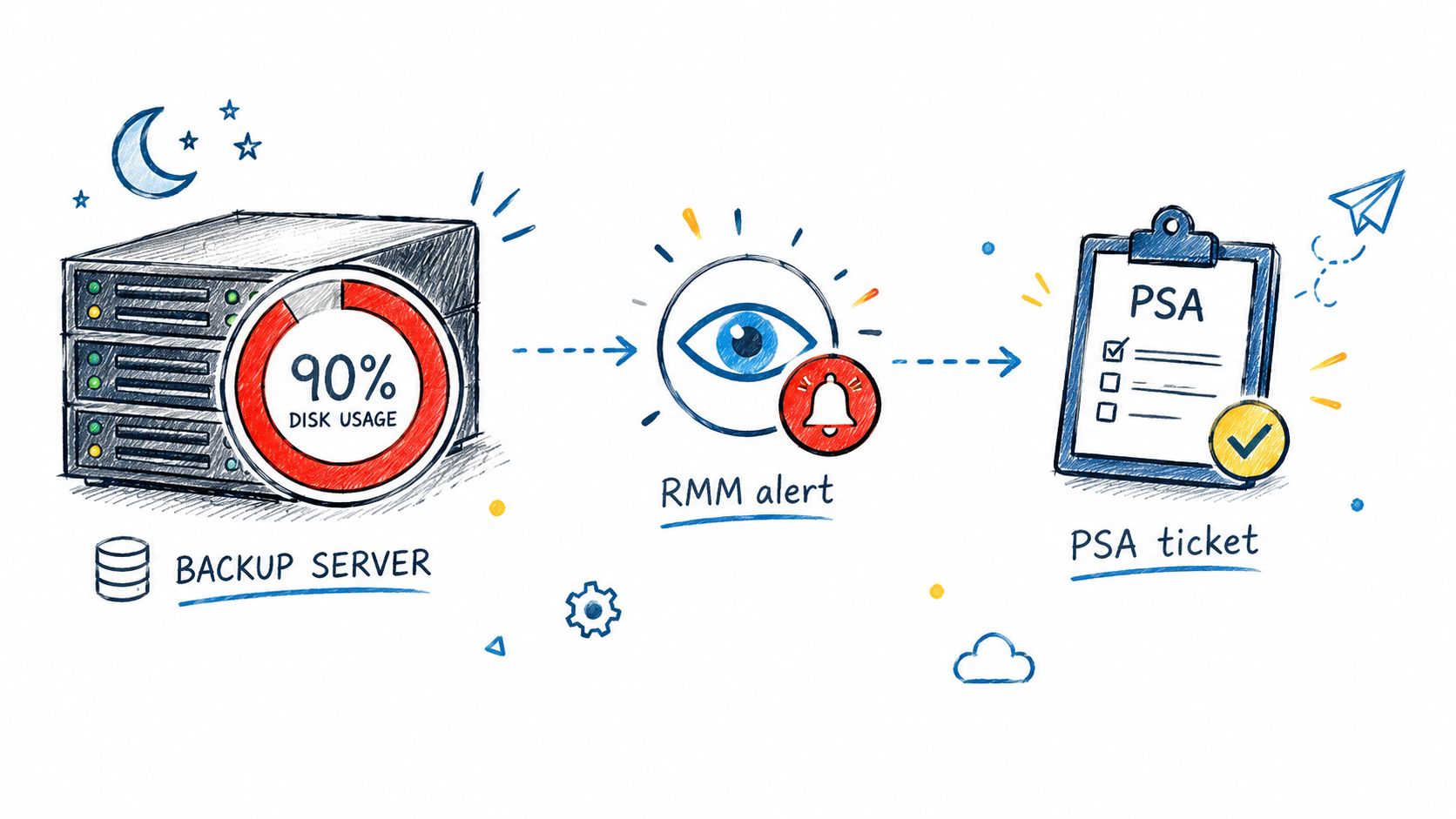
Illustrative example: A backup server's disk reaches a configured 90% full warning threshold overnight. This is a hypothetical operating threshold, not a recommended setting for every server.
The handoffs should preserve the evidence needed to resolve the condition and account for the work.
Detection becomes assigned work
The RMM detects the threshold breach and records the device name, client association, severity, and timestamp. Its monitoring rule determines whether the condition requires action or merely observation.
The integration then creates a PSA ticket with diagnostic context attached. The ticket should identify the affected volume, reported utilization, relevant alert, and endpoint, rather than forcing a dispatcher to search the monitoring console.
The service desk assigns the ticket to a technician. The technician starts a time entry against the client's agreement, checks the server's role and retention requirements, and establishes whether the disk warning threatens the backup process.
Remediation becomes verified recovery
Through an RMM remote session, the technician identifies old application logs that can safely be removed. They confirm those files aren't required backup data, clear the approved files, and rerun the disk check.
The RMM records the action and updated device state. The technician records the reason for the cleanup and any client communication in the PSA, then closes the ticket only after recovery is confirmed.
A successful cleanup isn't necessarily a permanent fix. If log growth caused the warning, the ticket should also identify whether retention settings need adjustment or capacity planning requires follow-up.
Where the handoff fails
A ticket without its alert association leaves the technician rebuilding context manually. A time entry without the correct agreement can produce incorrect billing treatment, even when the technical fix was sound.
Not every warning deserves a ticket. Establish which RMM alerts should create tickets before enabling broad alert forwarding, especially for transient conditions and maintenance windows.
At the end of this event:
- The PSA holds: The assigned work record, technician time, client communication, resolution narrative, and applicable billing treatment.
- The RMM holds: The device measurements, remote-management events, remediation results, and evidence that the monitored condition recovered.
Those records should describe the same event without requiring either system to impersonate the other.
Which System Owns Each Type of Data
The PSA owns the business record; the RMM owns observed device state. Shared identifiers connect those domains, but unrestricted two-way editing can create conflicts rather than consistency.
Assign authority at the field or object level. A broad promise of bidirectional synchronization doesn't explain which value wins after an outage, a manual correction, or a delayed update.
Authoritative system for each data object
| Data object | Authoritative system | Why | Reconciliation key |
|---|---|---|---|
| Ticket status and history | PSA | Service team works and reports from it | Ticket ID and alert ID |
| Device inventory and health | RMM | RMM supplies live endpoint observations | Asset ID mapped to the PSA configuration item |
| Client, site, and asset identifiers | Both, mapped | Each system maintains its own identities and naming | Shared client and site IDs, with an asset mapping |
| Agreement and contract billing | PSA | Billing rules and invoices live there | Agreement ID linked to client |
| Time entries | PSA | Labor is captured and billed there, with device context from RMM | Ticket ID and technician ID |
| Patch and script state | RMM | Patch status and script results come from endpoints | Asset ID and patch job ID |
| Alert-to-ticket link | Both | Alert creates the ticket; closure depends on RMM recovery | Alert ID stored on the ticket |
Names aren't reliable reconciliation keys. A client can rename a site, and technicians can replace a device while retaining its hostname. Preserve stable identifiers and define what happens when an asset is retired, reassigned, or recreated.
A mapping failure can create duplicate tickets, assign labor to the wrong agreement, or leave service work out of profitability reporting. Treat unmatched records as exceptions for review, not as permission to guess.
Score the integration's behavior
Evaluate the connector against operational tests, not the breadth of its dashboard:
- API coverage: Confirm supported operations for tickets, assets, agreements, time entries, and status changes.
- Event latency: Measure when the originating event occurred and when the receiving system accepted it.
- Retry safety: Require idempotency, meaning a retried event doesn't create another ticket or time entry.
- Field-level auditability: Retain the previous value, new value, actor, and timestamp for consequential changes.
- Billing reconciliation: Verify how endpoint counts and usage reach agreement billing, including exclusions and effective changes.
NIST's survey of remote monitoring places monitoring in the context of performance evaluation, diagnostics, assurance, and security testing. That's a better evaluation frame than counting visible widgets: ask what the monitoring evidence lets your team verify.
Give each manager the right view
Owners need cost-to-serve, endpoints per technician, recurring revenue per endpoint, and margin by agreement. Service-desk managers need first-response SLA attainment, backlog aging, auto-resolution rate, and mean time to resolution by alert class.
Don't treat remote-session duration as a complete labor record. Diagnosis, client conversations, and follow-up can happen outside that session; a disciplined MSP time-tracking process should account for that work without creating overlapping entries.
Pick a Setup Model for Your Team Size
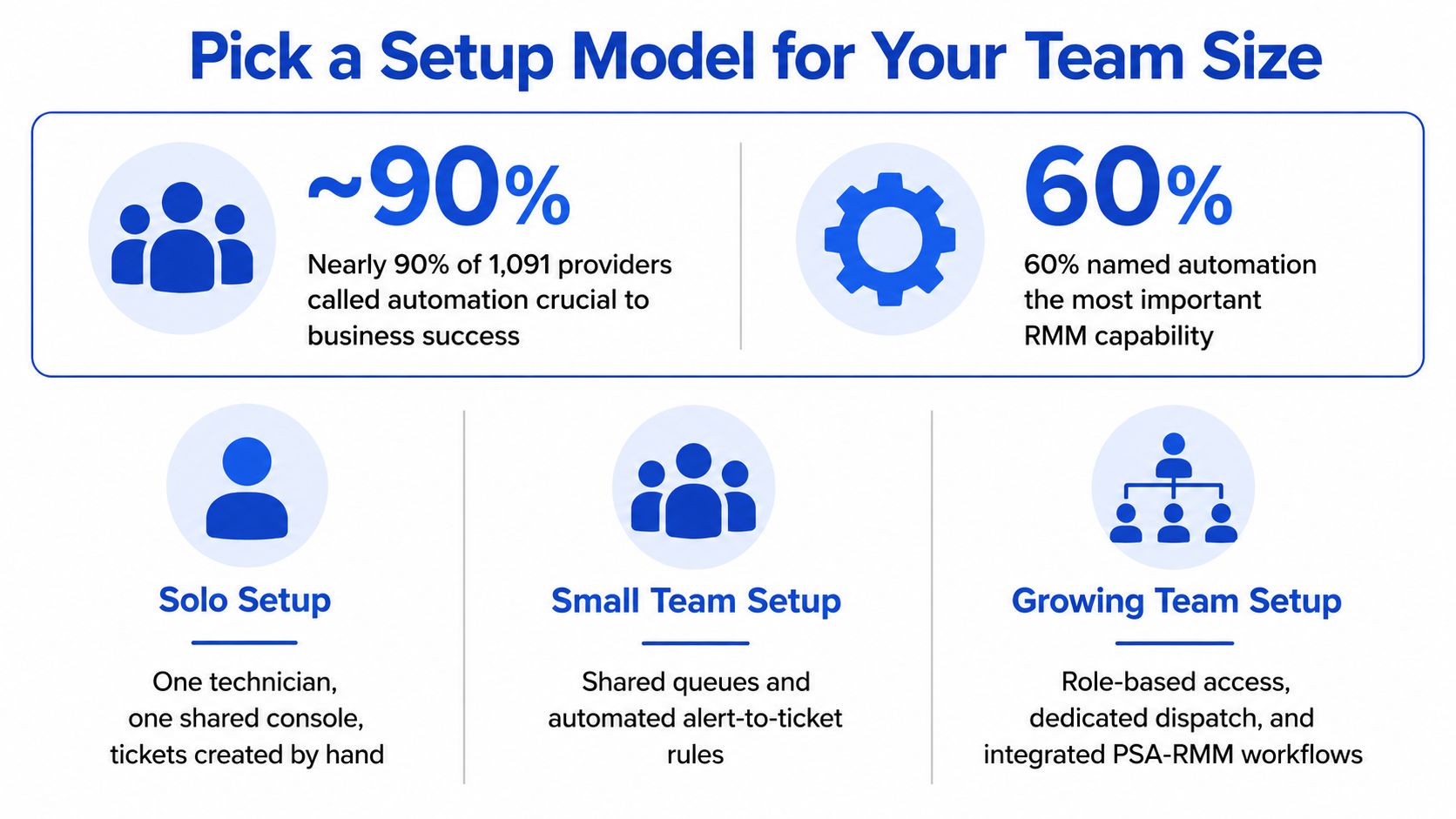
The 2024 Kaseya MSP Benchmark Survey reports that 60% of respondents identified automation as the most important RMM feature in 2024, while PSA integration rose from 30% in 2023 to 37% in 2024. Those numbers describe adoption, not architecture. Demand is climbing on both data domains, and the right pairing is the one your team can reconcile when the two sides disagree.
Setup models compared on operating criteria
| Criterion | Single-vendor suite | Separate PSA and RMM with integration | Separate tools plus automation layer |
|---|---|---|---|
| Data sync | Built in, usually without a separate mapping project | Requires mapping and ongoing maintenance | Connector coverage sets which objects and actions synchronize |
| Admin overhead | One primary console and permission model | Separate consoles and permission sets | Additional access, connector, and workflow administration |
| Vendor lock-in | High when both functions share the platform | Moderate, with migration possible by category | Potentially lower when connectors and exports support replacement |
| Feature depth | Breadth may trade off depth in one area | Tools can be selected for category depth | Each underlying tool sets its technical depth |
| Best fit | Smaller teams that want one console | Teams with separate service-desk and monitoring roles | Teams that already run a PSA they want to keep |
Team structure matters more than an arbitrary employee threshold. A six-person shop where everyone dispatches needs a different model than a twenty-person MSP with a dedicated monitoring function.
Choose around the responsibility split
For a small MSP where the owner also dispatches, I would start with a single-vendor suite such as Syncro. Reducing administration is valuable when the same person sells, schedules, and troubleshoots. Review every alert class before allowing it to create tickets; a unified console won't rescue an overloaded queue.
For a growing MSP with a dedicated service desk and monitoring team, use separate tools with a governed integration. Put the service-desk manager in charge of alert-to-ticket rules and the monitoring lead in charge of detection logic. Decide in advance which system wins when they disagree: typically the RMM for device state, the PSA for anything that touches billing or client communication.
For an MSP that already likes its PSA, add an automation layer before considering a replacement. Target a defined gap, such as incomplete intake or delayed documentation. Replacing a functioning PSA to fix missing call context can create a much larger migration problem.
Each model fails differently, and failure containment should weigh as heavily as features. A suite concentrates dependence on one platform, so when it degrades, both domains stall together. Separate tools keep running independently, but the connector between them becomes a failure point your team must own and monitor. An automation layer adds a third dependency; require a clear owner for failed jobs, expired credentials, and incorrect updates before counting the expected labor savings.
Diagnose connected but incomplete workflows
The MSP GLOBAL State of the Industry Report 2025 identifies automation as a primary growth focus while describing continuing trust and collaboration barriers. Treat implementation as a responsibility-design problem rather than a connector purchase.
Measure context completeness by asking whether a technician can begin work without chasing the requester or dispatcher. Track time-to-ready-to-work, duplicate-ticket rate, documentation lag, and the share of AI-generated updates requiring correction. Then check the other side of the ledger: what queues up when the sync breaks, and does the pairing fail loudly or drop events without any warning.
If technicians still retype alert details, receive tickets without diagnostic information, or reconstruct time after the work, the pairing is connected but incomplete.
The missing information may never have existed in either tool. Phone conversations, technician decisions, and undocumented resolution context require their own capture process.
Protect Centralized Automation Across Clients
Centralized automation changes how far a mistake or compromised account can reach. A ticket-editing workflow and a remote script may share client identifiers, but they should never inherit the same permissions by default.
An analysis of MSP cyber incidents published in Information found that at least 40% of the analyzed confirmed cases began through remote-access gateways or unpatched edge devices, and all selected incidents produced downstream multi-tenant impact. Those findings describe the selected cases, not a breach rate for the MSP industry.
Separate permissions and client boundaries
Give each integration account the narrowest role required for its work. An account that appends ticket notes shouldn't automatically gain remote-session or script-execution rights.
- Isolate client context: Test that one client's ticket, alert, or documentation cannot appear in another client's workflow.
- Protect remote access: Patch and restrict the gateways supporting remote management before enabling automated remediation.
- Record every action: Preserve the initiating identity, target client, affected record, approval, and result.
- Constrain AI input: Treat transcripts, ticket descriptions, and retrieved documents as untrusted content, not instructions granting new authority.
Start AI retrieval read-only where practical. Require human approval for consequential changes until the team has validated the workflow, and don't let retrieved text override tenant filters or permission checks.
Contain failure before expanding scope
Set retention and deletion rules for phone transcripts and screen-capture data. These records can contain sensitive information unrelated to the ticket, so access should follow a defined purpose rather than broad technician convenience.
Every AI-generated ticket update needs an attributable author and audit entry. Keep an emergency shutdown procedure that disables writes, revokes credentials, and identifies which clients received affected updates.
Judge automation partly by the clients a bad rule cannot reach.
Track unauthorized cross-client retrieval attempts, time to revoke access, and the clients affected by a workflow defect. The owner approves access rules; the service-desk manager approves automation scope. Neither approval substitutes for the other.
Connect PSA and RMM and Verify Before You Commit
A successful PSA RMM integration completes a controlled loop rather than merely delivering an alert. Kaseya's guide to professional services automation describes the intended feedback loop in which RMM remediation can automatically close the corresponding PSA ticket.
Use this operating sequence: RMM detection → enriched ticket → assignment and time capture → automated remediation → closure with an audit trail.
Start with a sandbox or limited client scope. The rollout should be reversible without losing the service history your technicians need.
Configure the handoffs deliberately
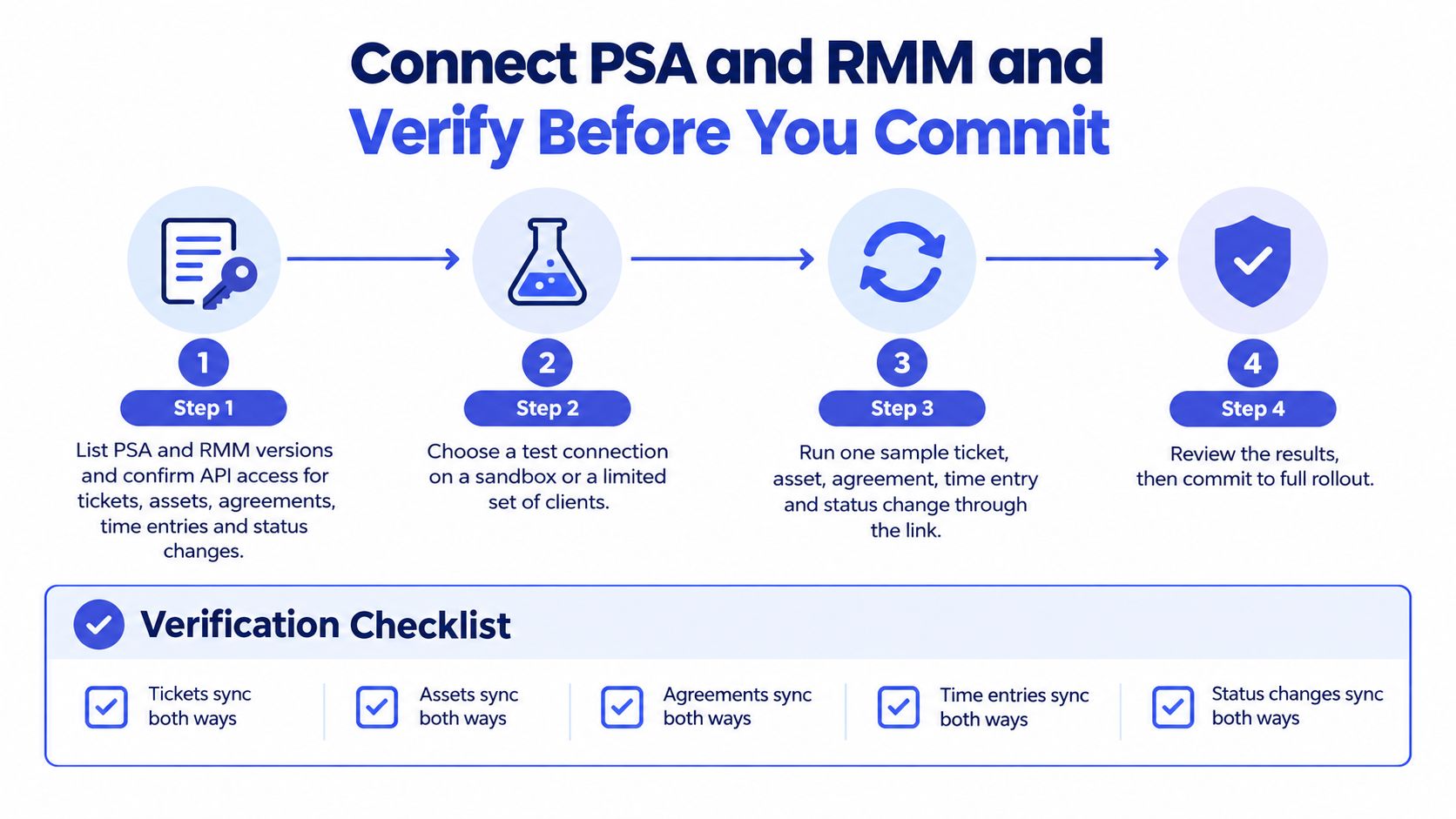
Inventory the platforms and API access. Record PSA and RMM versions, connector requirements, authentication methods, and supported operations. Test access to tickets, assets, agreements, time entries, and status changes rather than assuming a successful login proves coverage.
Choose stable client, site, and asset keys. Load and review the mapping before enabling synchronization, and send unmatched objects to an exception queue.
Translate severity into service priority. An RMM warning isn't automatically a high-priority service incident. Map technical severity to operational impact, and explicitly exclude alert classes that don't require service-desk action.
Configure deduplication and suppression. Repeated alerts for the same unresolved device condition should update the existing incident, while expected maintenance conditions should follow documented suppression rules.
Define the ticket payload. Include client, endpoint, alert type, severity, timestamps, ownership, and a reference to the original event. Reject incomplete mappings rather than creating tickets under a generic customer.
Establish assignment and time capture. Confirm which queue receives the ticket, who accepts it, and how the resulting labor reaches the correct agreement. Keep automated execution history distinguishable from human labor entries.
Gate closure on recovery evidence. A script completing successfully doesn't prove the monitored condition recovered. Require a fresh RMM observation and preserve remediation history on the ticket.
Run a representative test batch before expanding access. Include actionable alerts, repeats, maintenance conditions, missing mappings, and failed remediation; deliberately retry events to test duplicate prevention.
Don't interpret the infographic's two-way synchronization checks as permission to make every object writable in both directions. Test the direction your ownership model requires, with read-only access wherever writes aren't necessary.
The following video is an additional walkthrough resource.
Verify before production rollout
Review actual resulting records, not just connector success messages. A technically accepted API request can still create a ticket under the wrong client or apply the wrong agreement.
- Ownership matches practice: Staff edits and automated updates respect the authoritative-system table.
- API coverage is proven: Required objects and status transitions complete through the intended permissions.
- Recovery gates closure: Failed remediation leaves the ticket open or routes it for review.
- Mappings are reviewed: Client, site, asset, technician, and agreement associations are correct.
- The batch is accepted: Service-desk and monitoring owners have reviewed routing, duplicates, exceptions, and closure evidence.
After launch, track correctly routed alert share, false-positive rate, mean time from detection to ticket creation, and share of closed tickets with recovery evidence. Define each denominator and timestamp consistently so configuration changes produce comparable results.
If you're evaluating an AI automation layer, Vight supplements rather than replaces your PSA: we post call notes and time entries, sync tickets and clients, and run ticket AI apps. Our integrations include ConnectWise, Autotask, HaloPSA, Syncro, ConnectWise Automate, ConnectWise RMM, Microsoft Teams, Slack, SharePoint, IT Glue, and Hudu; review the ConnectWise integration against your required workflows. We connect to your existing phone system and PSA, and many customers are up and running within a day; bring your ownership table and test-batch results when arranging a demo.
Vight helps put service-call context and technician records into the PSA your team already uses, without treating those records as authoritative device telemetry. Visit Vight to book a demo, and bring a representative alert, its resulting ticket, and the missing context you want the workflow to capture.
Leave a Reply