
The dispatcher hangs up an outage call, opens the ticket, and finds a note saying the user called and someone is looking into it. The next technician still needs to know which site is affected, what the caller tested, and whether anyone promised a callback. The phone system captured the conversation, but the desk didn't get a usable handoff.
Call logging software should close that gap. For an MSP, its value isn't a larger recording archive. It's supervised ticket automation that puts useful service details into the PSA while leaving risky decisions under human control.
Table of Contents
- What Call Logging Software Captures on an MSP Desk
- A Scorecard for MSP Call Logging Software
- Ticket Creation Triage and After-Hours Intake
- Transcript Errors Speakers and Human Review
- Client Separation Consent and PSA Fit
- Pricing Models and Hidden Costs
- Run a One-Week Call Logging Pilot
What Call Logging Software Captures on an MSP Desk
Call logging software turns each processed call into a searchable event and, when connected to your workflow, a service record. The foundation is the Call Detail Record, or CDR, which identifies who called whom, when the call started and ended, its duration, direction, route or trunk, and outcome. GL Communications' technical description of call-record analysis also describes signaling and technical information that supports quality analysis and routing investigations.
That record is the envelope, not the letter. It can establish that the client reached the support queue and spoke with an agent, but it doesn't explain whether a firewall restart restored connectivity or merely interrupted the conversation.
Separate the phone record from the service record
Say a dispatcher finishes a twelve-minute outage call. The phone history shows an answered inbound call, the recording contains the troubleshooting conversation, and the PSA has an empty description. Those are different artifacts, and only the last one tells the next technician where to begin.
Call log fields by layer
| Layer | Typical fields | Question it answers |
|---|---|---|
| Telephony record (CDR) | Caller and recipient IDs, start and end, duration, direction, route or trunk, disposition | Was the call answered, missed, or transferred? |
| VoIP technical data | SIP response codes, latency, jitter, IP addresses, queue, agent ID | Why did call quality or routing fail? |
| Content layer | Recording, speaker-labeled transcript, confidence flags | What did the client say was broken? |
| Ticket action | Ticket ID, PSA time entry, urgency, escalation status | What did the desk do with the call? |
Phone-system history is useful for reconciling billing, measuring workload, and investigating routing. A recording archive preserves evidence, but someone still has to listen to it. A PSA note should carry the issue, attempted steps, outcome, and remaining action so the next technician doesn't reconstruct the call.
The desk needs documentation where technicians already work.
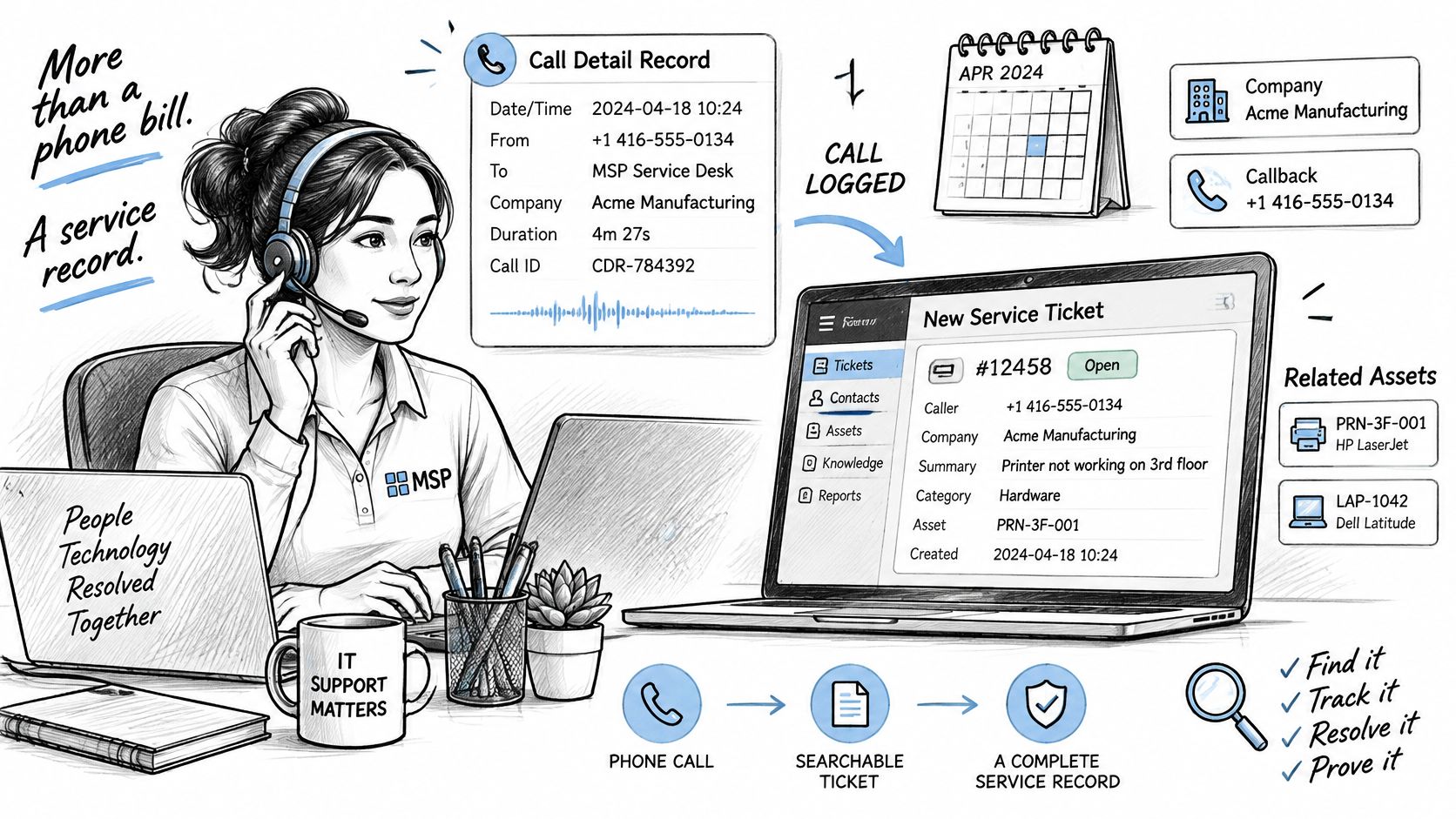
Put the useful content on the ticket
Vight transcribes and summarizes each call, then posts a structured time entry to your PSA with speaker identification and the issue, steps taken, and resolution written up. Technicians take calls as usual, with nothing new to click, while we handle documentation in the background.
The operational distinction matters. A troubleshooting step is not a resolution, and a customer's proposed explanation is not a confirmed diagnosis. If the connection remains down, the note should state that clearly rather than turn a plausible conversation into a successful outcome.
Practical rule: If the note isn't on the ticket the next morning, the product is functioning as a call list, not a service-desk documentation system.
A Scorecard for MSP Call Logging Software
Mark each row pass, partial, or fail during a live demonstration using a representative client call. Ask the presenter to open the resulting PSA record, not just the call-analysis dashboard.
MSP call logging scorecard
| Capability | Minimum bar | Red flag |
|---|---|---|
| Call documentation | Speaker-labeled issue, steps, and resolution posted as a PSA time entry | Techs still rewrite every note by hand |
| Ticket creation | Caller, account, urgency, and request create or update a ticket | Voicemail or a call list with no ticket |
| Triage | Missing diagnostics collected before a ready-to-work status | New tickets land in a generic queue |
| After-hours intake | Emergency versus routine split with a predefined escalation | Same greeting and no routing when staff are off |
| PSA fit | Syncs clients, tickets, notes, and time into the existing PSA | Forces a second ticketing system |
| Accuracy control | Recording kept; low-confidence technical terms and priorities flagged | Auto-posts unverified hostnames, serials, or page-outs |
| Privacy | Per-client separation, role-based search, retention, and deletion | One searchable transcript pool across clients |
Automation itself isn't the novel part: 46% of organizations used service-desk ticket automation in 2024, according to Ivanti's IT Service Management Trends research, based on surveys of more than 15,500 respondents. The buying question is how well the tool supervises incomplete information and handles exceptions.
Make the demonstration prove the handoff
A polished summary can conceal a broken workflow. Have the presenter show which client was selected, why the call attached to that ticket, and what happens if the caller has multiple open requests. Then inspect the time entry's author, work type, billable status, and treatment of transfers.
Run an ambiguous case as well as a clean one. A caller using a personal mobile number shouldn't be matched to an account solely because someone at that company once used it. An unresolved identity should remain an exception for review, not become a confidently misfiled note.
- Partial means extra work: Record whether a technician must copy text, select the client again, or repair the time entry.
- Failure handling matters: Disconnect the integration during testing and inspect the retry path, error visibility, and protection against duplicate entries.
- Approval needs an owner: Identify who reviews uncertain notes and where those exceptions appear during a busy shift.
Include usage in the comparison
Our credit model separates different kinds of work. A typical AI-processed ticket uses about 1.5 credits, while transcribing and summarizing a 10-minute call uses about 4 credits. AI phone coverage uses about 0.2 credits per minute, plus 38.4 credits monthly for each phone number.
The Scale plan costs $1,650/month for 20,000 credits, around 13,000 tickets per month, with all AI agents, unlimited users, 24/7 in-app support, and 1 TB storage. That ticket estimate isn't a combined allowance for tickets, transcription, and phone coverage; those workloads draw on the pool.
Don't let a favorable price compensate for an unusable handoff. A tool that fails documentation or PSA fit shouldn't proceed to a pilot.
Ticket Creation Triage and After-Hours Intake
Start with the destination: a technician should receive a request they can work, not a notification that someone spoke. The daytime workflow needs to collect context, attach it correctly, and resolve missing information before dispatch.
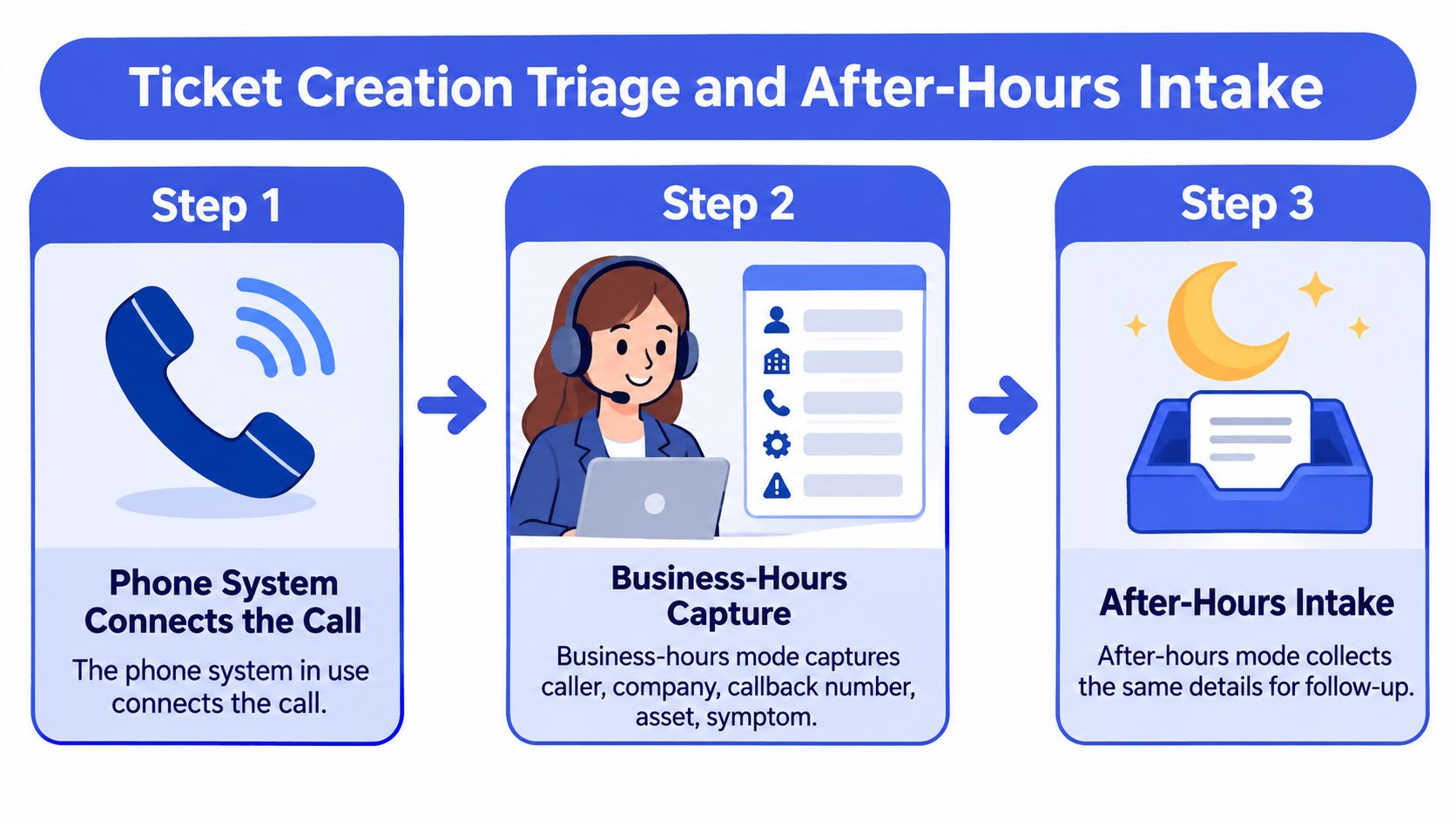
This flow shows the intake boundary between phone connectivity and service-desk handling.
Build the business-hours path
- Connect through the existing phone system. Keep the established queues and routing unless there's a specific reason to change them.
- Capture the caller, company, callback number, asset, symptom, and urgency. A person or AI front desk can collect these details, but an unverified account match must remain visible.
- Create or update the PSA ticket. Check for an existing request before opening another ticket about the same outage.
- Triage the gaps. Email for missing diagnostics, file the response, rewrite vague titles, categorize the request, and merge duplicates before moving it to a ready-to-work status.
- Flag potential urgency. Sentiment and outage language can prompt review, but the desk's escalation rule determines whether someone gets paged.
Our AI phone agent answers calls, asks questions, captures caller details, and files tickets, with front desk mode for business hours and after-hours mode for emergencies. The distinction between intake and ticket triage is important: collecting a complaint isn't the same as preparing a usable handoff.
Give after-hours calls a narrower job
A Vida analysis of 5.9 million minutes of U.S. business call logs reported that 47% of calls occurred outside traditional Monday-to-Friday working hours in 2026. That's a broad business-call benchmark, not an MSP-specific rate.
After-hours intake should establish identity, requested service, urgency, and account context, then create the ticket and apply the coverage agreement. A routine password reset can wait until morning with complete details. A site-down call can page the on-call technician with the summary attached, provided the account's escalation conditions are met.
The demonstration below provides additional context for the workflow.
Keep a call-purpose field separate from the priority field. The FCC's guide to unwanted robocalls and texts distinguishes consent requirements for autodialed or prerecorded outreach from emergency calls involving danger to life, safety, or property. That exception concerns automated-contact rules; it isn't blanket permission to record conversations or treat every urgent ticket as a legal emergency.
A successful intake isn't a ticket number. It's enough verified context for the next person to act.
If triage never happens, technicians inherit blank tickets with better timestamps.
Transcript Errors Speakers and Human Review
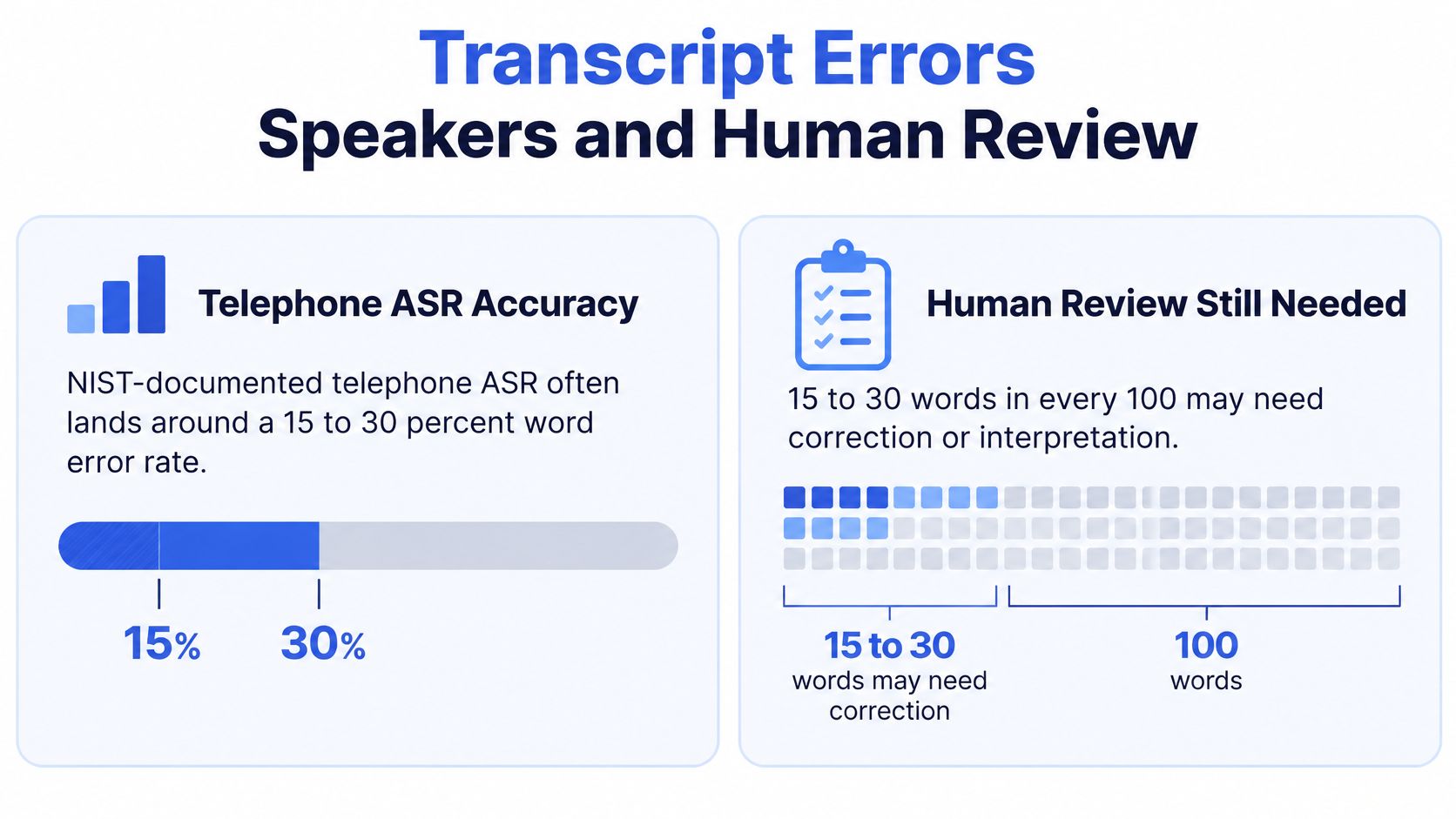
A single transcription-accuracy percentage will not tell you whether a call note is safe to act on. A dropped filler word rarely matters. A wrong hostname, serial number, command, or approval statement can send a technician down the wrong path in a live client environment.
Telephone audio is harder for speech recognition than clean studio recordings. Compressed codecs, speakerphones, background noise, and two people talking at once all push error counts up. Call-note accuracy has to be measured on your real phone calls, not assumed from a vendor demo recorded in a quiet room.
That gap between readable text and reliable operational detail is the whole review problem. A transcript can read smoothly while the three fields that drive the ticket are wrong.
Score words and speakers separately
Speaker diarization measures who spoke when. It says nothing about whether the words came out right. A telephone-conversation study from MIT's Spoken Language Systems group reported 0.9% diarization error under a specialized evaluation setup, using a measure that combines missed speech, false speech, and speaker confusion.
That figure comes from controlled conditions, not a busy support desk with overlapping calls. A swapped speaker label can turn a technician's suggestion into a customer-reported action, or make a tentative customer statement read as approval for a change. Once speaker-identified notes land inside ticket records, a labeling error becomes part of the client's documented history.
Field checks for call-note accuracy
| Check | What it measures | How to use it |
|---|---|---|
| Word error rate | Substituted, deleted, or inserted words | Test on recorded calls from your own phone system, not a studio demo |
| Diarization error | Missed speech, false speech, and wrong-speaker labels | Score overlapping and speakerphone calls separately from clean two-party calls |
| Correction minutes | Technician time spent fixing the note before it is final | Track per call type to find where automation actually saves labor |
| Entity misses | Hostnames, serials, asset IDs, callback numbers | Validate structured fields rather than leaving them as unchecked free text |
| Urgency errors | False priority or a missed outage | A person confirms before any page-out |
Review the fields that change action
A Sonix discussion of customer-service transcription workflows describes staff correcting, deleting, and rewording AI outputs when accents, speech speed, pronunciation, and numbers cause errors. A finished summary does not prove the documentation work disappeared; it proves the draft stage moved.
Keep the original recording under your retention policy and make uncertain transcript segments accessible to reviewers. Low-risk narrative can post automatically. Uncertain technical terms, contradictory urgency, and missing diagnostics should trigger a hold or a visible flag before the note reaches the ticket.
Run this way, call logging is supervised ticket automation built on call records, not a searchable archive or a PSA replacement. When a system posts a structured time entry with speaker identification and the written-up issue, steps taken, and resolution, as Vight does into ConnectWise, Autotask, HaloPSA, and Syncro, the review habit is what keeps the automation honest.
- Validate identity: Match the callback number and named asset against approved records before treating the note as fact.
- Preserve uncertainty: Record that a cause is suspected when nobody confirmed it on the call.
- Protect consequential actions: Require a person to confirm security-sensitive instructions, approvals, and page-outs.
For a practical spot check, sample twenty real tickets and count how many summaries need no edits at all. Include landline, mobile, and VoIP calls, plus accents, background noise, and overlapping speech. If the clean-note count is low on routine calls, the review queue belongs in the workflow permanently. If urgency or a security step is wrong anywhere in the sample, you are running assisted documentation, not an autonomous dispatcher.
Client Separation Consent and PSA Fit
Privacy changes how people use these tools. A 2025 industry survey covered by MSPoweruser identified privacy as the leading obstacle for 73% of businesses considering wider AI note-taker use, while 84% of users said they change what they say when a tool is listening.
For an MSP, the sharpest test is client separation. One client's transcripts, tickets, and documentation must not appear in another client's searches, and internal access should follow least privilege rather than a desk-wide permission to browse everything.
Prove the client boundaries
Use test accounts to verify search, playback, exports, and deletion. Recording rules differ by jurisdiction, so disclosure must fit the caller's circumstances and survive transfers; SnapDial's overview of GDPR rules for recorded calls is a useful starting resource for European privacy considerations, not a substitute for jurisdiction-specific advice.
- Consent and records: Define location-sensitive disclosure, whether AI notes become official records, and how consent evidence is retained.
- Retention and training: Establish deletion schedules for audio, transcripts, and derived notes, plus enforceable model-training exclusions.
- Security controls: We maintain a written information security program with encryption in transit and at rest, SSO, MFA, access controls, and logging.
Consent withdrawal also needs an operational trail. Under 47 CFR 64.1200, applicable revocations of prior express consent made in any reasonable manner must be honored within a reasonable time, no later than ten business days after receipt. Link the request to the number, channel, receipt date, and suppression action; a transcript alone doesn't prove subsequent automated outreach stopped.
Keep the PSA as the system of record
Vight supplements rather than replaces your PSA, posting notes and time entries, syncing tickets and clients, and running ticket AI apps. We integrate with ConnectWise, Autotask, HaloPSA, and Syncro; the Autotask ticketing workflow illustrates why record ownership matters.
Our phone integrations include 3CX, VitalPBX, RingCentral, Microsoft Teams, Zoom Phone, Dialpad, Intermedia, GoTo, SkySwitch/NetSapiens, Cytracom, and 8×8. Connected systems also include ConnectWise Automate, ConnectWise RMM, Teams, Slack, SharePoint, IT Glue, and Hudu.
Verify permissions across those connections, not just inside the logging interface. More search isn't a benefit until client boundaries and retention are proven.
Pricing Models and Hidden Costs
Convert every quote to cost per ticket with a usable note. A cheap recorded call isn't cheap if a technician must listen again and rebuild its documentation.
Per-seat pricing charges for licensed technicians whether they handle calls or not. Per-ticket and per-minute models follow activity instead, while phone coverage can add number or channel charges. Use your own call durations and ticket mix rather than comparing the headline units directly.
Build a comparable monthly cost sheet
| Cost line | What to include | What to establish |
|---|---|---|
| Platform | Subscription and required seats | Included agents, users, support, and storage |
| Usage | Tickets, transcription, summaries, phone coverage | Credit expiry, overages, and treatment of retries |
| Net labor | Review and correction work | Time saved after fixing notes and resolving exceptions |
For an alternative phone-platform comparison, DataLunix's breakdown of Freshcaller costs for enterprise customer service offers a useful checklist of pricing considerations. Don't treat a phone subscription and a PSA automation subscription as equivalent purchases unless they cover the same work.
Long conversations can consume more transcription capacity than short calls. A bundled credit pool also needs a workload model: calls, triage, and phone intake may compete for the same allowance, so an increase in one activity can change the remaining capacity.
Buying test: Divide the complete monthly cost by tickets that actually meet your documentation standard, not by calls the system processed.
Include costs outside the application
Check whether your PSA license permits the required API access and whether the phone system needs additional recording licenses. Retained audio can create storage costs, and integration exceptions can consume dispatcher time that never appears on the vendor invoice.
Use correction time from the pilot to estimate labor savings, keeping it separate from cash expenditure. Re-verify list prices, included allowances, and overage terms against the current quote before ordering.
Run a One-Week Call Logging Pilot
Set the go or no-go rule before enabling capture. Run a one-week pilot on your existing phone system and PSA, on one queue, with thirty to fifty real calls and at least five of them after-hours.
Vight connects to the phone system and PSA you already use, and many teams are up and running within a day. Spend the evaluation week examining the handoff to the ticket rather than redesigning the desk.
Define acceptance before the first call
- Documentation: the note reaches the correct ticket without another technician click, and the technician accepts the time entry.
- Preparation: missing-information questions go out before work begins, with replies attached to the request.
- Coverage: after-hours emergencies produce contextual tickets and follow the approved escalation path.
Keep each call's disposition and review outcome so a manager can reconcile the results. Record failed processing and unmatched calls as failures, not exclusions from the denominator. A pilot that drops its worst calls will pass anything.
Treat every summary as a draft until a person confirms the fields that carry risk: the hostname, the urgency, the time. That is what supervised ticket automation means in practice, and the pilot exists to measure how much supervision the drafts need.
Judge the results at day seven
Count the share of calls with usable PSA notes, median correction minutes, and missed or wrong entities involving hostnames and urgency. Classify failures by cause so a configuration problem doesn't get confused with a transcription problem; the fixes are different, and so is the go or no-go call.
Keep the tool only if correction time falls and no unverified page-out is released. Expand help-desk automation to other queues when those results justify it, and ignore how complete the dashboard looks.
If technicians still reconstruct the conversation after a week, the workflow is wrong. Fix the mapping or the routing before adding seats.
Vight connects support calls to structured PSA notes and time entries, with phone intake and ticket triage for the work around the conversation. Bring your current phone system, PSA, and representative calls to a demo, and evaluate the resulting tickets against your desk's acceptance rules.
Leave a Reply