Monday morning on a managed service desk looks much the same in every tool. Sixty open tickets, a handful with no owner, several with the type field left blank, and a client on the phone asking why last month's invoice includes three hours nobody can account for. The platform isn't usually the problem. The state of the ticket record is.
ConnectWise has sat at the center of that record for a long time. Third-party accounts trace the company's founding to 1982 and an initial PSA release around 2004, which puts roughly two decades of product evolution behind the current platform (SelectHub's ConnectWise PSA summary). That history explains both the depth and the friction. A ConnectWise ticketing system can carry a request from intake through SLA, time and invoice, but only when the fields feeding each of those steps are populated properly. What follows is how the record gets used, where it breaks, and what to fix before adding another automation layer on top.
Table of Contents
- Ticket Anatomy and the Fields That Drive Billing
- How a Ticket Moves from Intake to Close
- Intake, Triage and Priority Routing
- Documenting Work Without Exposing Client Data
- Automating Intake Within the API Budget
- Fixing Ticket Creation and Sync Failures
- Confirm the Service Desk Scorecard Before You Automate More
Ticket Anatomy and the Fields That Drive Billing
A dental client's front desk calls because the reception PC can't reach the file server. Someone opens a ticket on the Service Desk board, sets the type to Network, and assigns it to a named technician. That's four decisions inside a minute, and each one writes to a field that something downstream reads.
| Field | What it holds | Example entry |
|---|---|---|
| Summary | One-line statement of the problem | Reception PC cannot reach the file server |
| Company and contact | Client account and the person who asked | Dental client, front desk lead |
| Board | Queue that owns the work | Service Desk |
| Type and subtype | Category used for routing and reporting | Network, VPN |
| Status | Current lifecycle stage | New, In Progress, Waiting on Client |
| Priority | Urgency used for queue order and response clock | Set from your priority scheme |
| Owner | Technician responsible for the ticket | Assigned to a named technician |
| Notes and time entries | Internal and client-facing work record | Technician notes and billable time entries |
| Resolution | Final fix and closing summary | VPN profile reset, ticket closed |
Company, board, type, status, priority and owner are the fields that drive routing, SLA timers, reports and invoices. An empty type doesn't look broken in the list view. It looks broken in the routing rule that never fired, the SLA report that miscounts, and the invoice line that never appeared. The summary matters for a different reason: it's the one line a technician reads first, so write the symptom, "Reception PC cannot reach the file server", rather than the guess, "Network issue".
Worth checking: a blank Type field is invisible until the monthly margin report can't explain where the hours went.
ConnectWise's design explains why these fields carry so much weight. The platform grew from an internal application for an IT-services firm into a commercial professional-services-automation product, and by April 5, 2011, ConnectWise reported that more than 50,000 IT professionals had adopted its technology (ConnectWise's 2011 announcement). What those users adopted was a unified operational record where a ticket connects to the customer, the contract, technician time, dispatch and profitability reporting, not an isolated incident note.
What goes in at each stage
- At intake: company, contact, summary, board and type. Nothing else should block creation.
- During work: owner, status changes, notes and time entries, added as the work happens rather than the day before invoicing.
- At close: the resolution and the billing confirmation. The resolution is the field a client reads when reviewing the work, so name the fix in plain words.
Because the ticket is the billing source, a cleaner record is also the first step in reducing DSO through smarter billing. Compare your own template against that split before touching a single automation rule.
How a Ticket Moves from Intake to Close
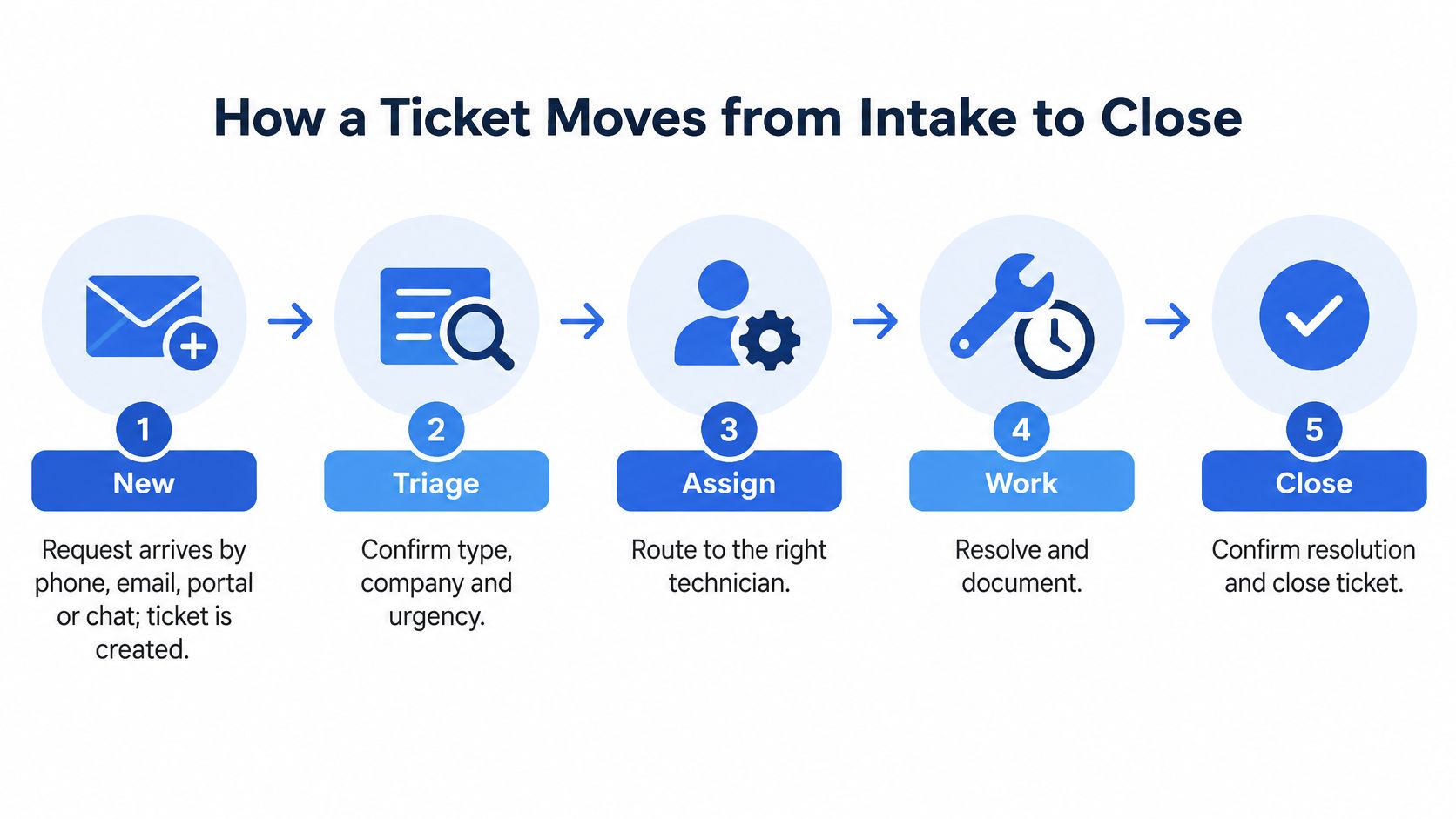
A ticket can arrive with a clear request and still lose context as it changes hands. Treat the workflow as a chain of custody: each status change should preserve what happened, who owns the next action, and what the client or technician needs to do.
Seven stages cover the path from request to billing, even when your instance uses different status names:
- New. A request arrives by phone, email, portal or chat. Create the ticket with the minimum fields needed to identify and route it.
- Triage. Confirm the request type, company and urgency before work begins.
- Assigned. Set an owner and board so the ticket has a queue and a person responsible for its next step.
- In progress. Record work in notes and time entries as it happens. Delayed entries weaken both the handoff record and the billing trail.
- Waiting on Client. The requester owes the next action. The SLA clock pauses only if your documented process says it does.
- Resolved. Write a plain-language summary of the fix that the client can understand without calling for clarification.
- Closed and billed. Confirm the time entries and agreement line so the invoice can pick up the work.
A password reset may pass through all seven stages within an hour, with one note and a short time entry. A server migration can move between In Progress and Waiting on Client for weeks. The failure point is often the waiting status: without a record of what the client was asked to provide, the ticket ages and ownership becomes unclear.
Find the stalls before you add automation
Status names vary by instance, so map your own statuses to these stages before building reports or rules. ConnectWise Automate's ticket search covers ticket ID, date range, ticket-body keywords, subject, owner, status, client, requestor and associated computer. It displays up to 250 results, and its documented status values are New, Open, Stalled, Resolved, Billed and Combined (ConnectWise Automate documentation). Use the available fields to report how long tickets remain in each stage, then review records that exceed your agreed interval. That gives the queue meeting a way to examine stalled work, missing updates and unclear next actions, rather than only the newest arrivals.
For a screen-by-screen view of the workflow, watch this walkthrough:
Intake, Triage and Priority Routing
A ticket marked urgent because a caller sounds frustrated can displace a real outage from the on-call queue. Set priority using user impact and the client's agreement, then route the ticket to the right queue.
Intake can arrive by phone, email, client portal, chat or monitoring alert. Whatever the channel, capture the same minimums: company, contact, summary and source. Recording the source makes it possible to assess whether a channel is helping clients reach support or creating duplicate requests. Phone and chat need particular care: details given verbally will not appear in the ticket unless the intake process records them.
Triage is a sequence of decisions, not just a priority field:
- Duplicate check: Look for an open ticket on the same issue. Merge when appropriate so technicians do not work the same request twice or contact the client twice.
- Type and subtype: Choose the category used by routing rules and reports.
- Missing information: Identify what the technician needs to start and assign responsibility for asking the client.
- Priority: Set impact and response expectations against the client's agreement.
| Priority | Typical trigger | Routing | Response clock |
|---|---|---|---|
| P1 Critical | Full outage or security incident affecting a client | Immediate page to on-call technician | Your SLA, starts at creation |
| P2 High | Several users blocked or a key system degraded | Top of the Service Desk queue, owner set quickly | Your SLA |
| P3 Normal | One user with a workaround available | Standard queue by ticket type | Your SLA |
| P4 Low | Requests, cosmetic issues, planned work | Scheduled backlog | Agreed date with the client |
| After-hours P1 | Emergency call outside business hours | On-call rotation, then escalation to owner | Immediate, per client agreement |
Apply the same impact-and-agreement test after hours. A server outage for a client with a 24/7 agreement goes to the on-call rotation. A printer request from a business-hours client can wait in the standard queue until morning, regardless of how urgent the caller sounds.
Routing rule that survives contact with reality: set priority from user impact and the client's agreement, never from how frustrated the caller sounds.
An escalation rule needs a condition and an action. For example: if a P2 ticket has no owner after the agreed interval, email the service manager. Build and test the rule on one board before copying it to others. Confirm that it fires on the intended tickets, reaches the right person and does not create duplicate alerts. A routing rule that is too broad can flood the service manager; one that is too narrow can leave an unowned ticket waiting. For practical ticket routing patterns, align the rule with the queue, ownership and response expectations technicians use.
Documenting Work Without Exposing Client Data
More automated notes is not the same as better service. It's more searchable text, and some of that text is a liability the moment it lands.
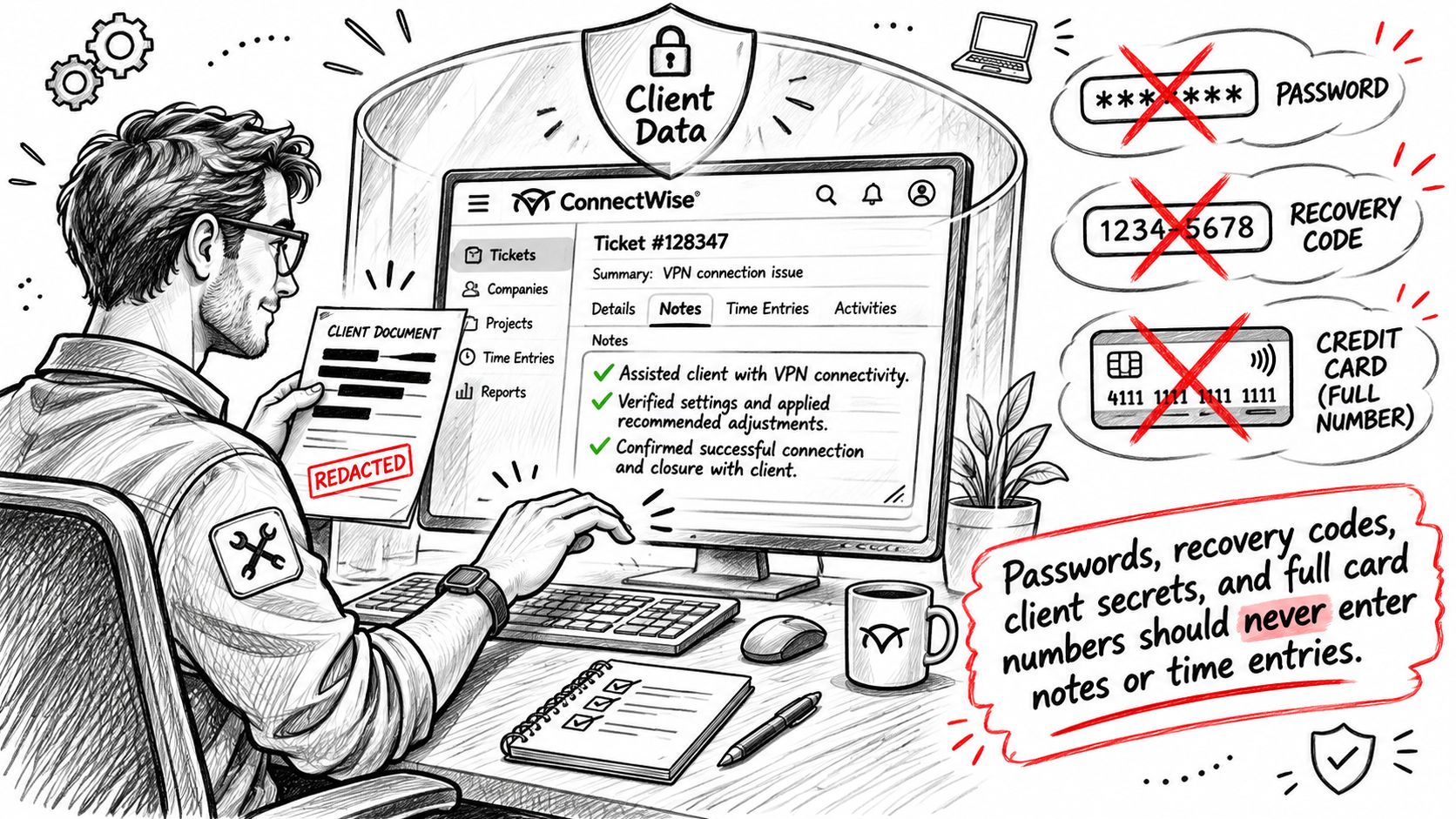
Picture an AI summary that faithfully transcribes a call, including the temporary password the technician read out to get the client working again. That password is now a searchable note visible to every technician on the board. Nothing malicious happened, and the exposure is real.
Four categories should never enter notes or time entries: passwords and recovery codes, client secrets and API keys, full payment or bank details, and personal data beyond what the service requires. Transcripts need redaction before posting, and AI-generated summaries need a human check before a client-facing note goes out. Complete notes are worth nothing if nobody is willing to read them aloud in a client review meeting.
This isn't hypothetical housekeeping. ConnectWise disclosed a January 2026 PSA security fix addressing stored-script execution risks in time-entry note handling and session-cookie exposure in versions before PSA 2026.1 (ConnectWise security bulletins). Ticket notes are executable surface area in some versions, which turns documentation hygiene into a patching question as well as a privacy one.
Five controls to adopt this week
- Scope note access so technicians see the boards they work, not the whole client estate.
- Separate client data into the fields designed for it, so credentials live in your documentation platform rather than a ticket note.
- Set transcript retention and delete call recordings and raw transcripts on a fixed schedule.
- Turn on edit auditing, so every note change has a named author and a timestamp.
- Name an owner for PSA patches, with a maximum interval between release and deployment.
If your governance has to satisfy an external auditor as well as a client, check which ISMS documents auditors expect before writing the retention policy, because the paper trail is usually audited more closely than the tooling. The practical mechanics of notes that stay useful without over-sharing are covered in our guide to ticket notes.
Automating Intake Within the API Budget
Automation sits in layers around the ConnectWise record, and it never replaces the record itself. The PSA ticket stays at the center.
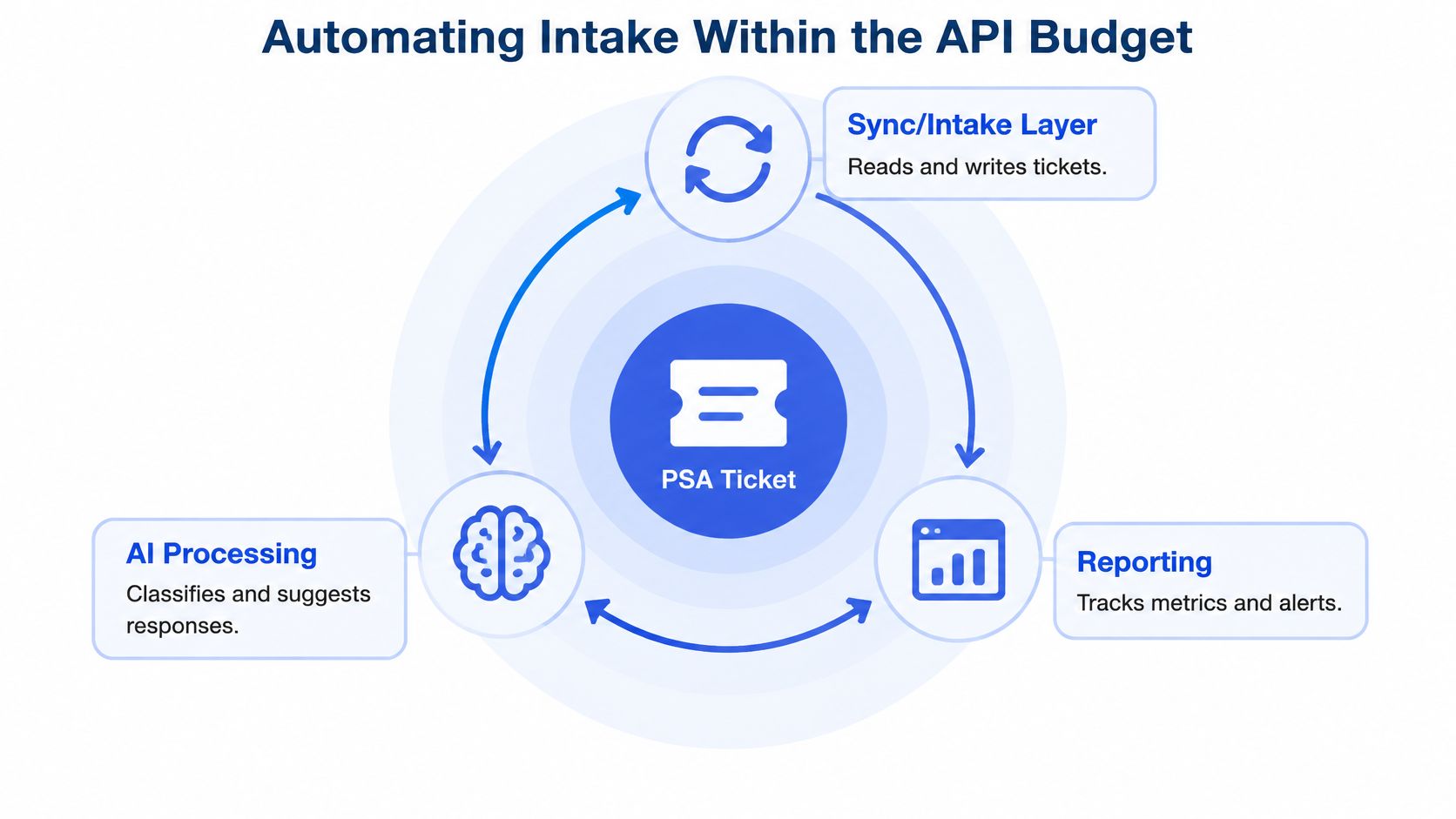
The innermost layer is the ticket with its fields and statuses. Around it sits a sync or intake layer that reads and writes tickets, then AI processing that classifies and summarizes, then reporting that watches the queue. A call documentation tool lives in that second layer: Vight is one example, posting call notes and time entries back onto the ConnectWise ticket rather than into a separate app. Judge any tool in that position by the same three questions you'd ask an internal script: how many calls it makes, which fields it reads, and how much it writes.
Where the quota actually goes
The ConnectWise PSA connector allows 100 calls per connection per 60-second renewal period, and it supports OData-style filtering through conditions, childConditions and customFieldConditions, plus field selection, ordering, page numbers and page sizes (Microsoft's ConnectWise PSA connector reference). That limit shapes the whole design.
An intake layer should request only the fields classification needs: ticket ID, summary, status, company, priority, board and owner. Downloading full ticket objects to read seven fields burns quota on documentation you already have. Bulk enrichment should be queued and rate-aware: poll incrementally from a stored cursor or timestamp, apply exponential backoff when throttling appears, and treat historical indexing as a separate, lower-priority job.
The failure mode worth designing against is emergency intake sharing a quota with a background re-index. A P1 creation delayed because a search job was chewing through the connection budget is an avoidable outage, so give live intake its own headroom. Smaller, stable records also make AI classification easier to validate, because there's less context noise to argue with.
Roll it out in this order: one board, one ticket type, measured against its pre-automation baseline, then widened. Not the reverse.
Fixing Ticket Creation and Sync Failures
A successful login proves the credentials work. It doesn't prove a ticket will land on the right board with the right type, and that gap is where most broken integrations live.
Connection inputs are the easy part: the ConnectWise site URL, company ID and API credentials. Ticket creation also depends on valid ticket type and category identifiers, and incorrect security permissions return 403 responses while excessive request volume returns 429 throttling responses (uSecure's ConnectWise integration setup guide). Neither error message usually says "your mapping is wrong".
| Symptom | Likely cause | Fix |
|---|---|---|
| Ticket creation returns 403 | API member lacks permission on the board or ticket type | Grant least-privilege permissions on the required boards and types |
| 429 throttling responses | Shared API member exceeds the rate limit | Use a dedicated API member, queue writes, apply exponential backoff |
| Tickets land on the wrong board | Board, type or category mapping is invalid | Re-validate company, board, type, subtype, status and priority mappings |
| Duplicate tickets after a retry | No idempotency key or duplicate check | Add an idempotency key or duplicate-detection rule |
| Failed writes disappear | No dead-letter queue | Send records that fail after bounded retries to a review queue |
Common trap: an integration that passes testing and then fails only on standard tickets, because the type identifier was copied from a sandbox instance where the IDs happened to match.
Test three paths, not one
Emergency, standard and after-hours paths each touch different boards, types and priorities, so each needs its own test: ticket creation, status transitions, notes and time-entry writes. Passing one path tells you almost nothing about the other two.
Shared API members create contention, since ConnectWise enforces rate limits per member and several integrations under one identity compete for the same allowance. Every integration gets its own least-privilege member, with a name that says which system owns it. Before touching retry settings, check two things: the API member's permissions on the specific boards and types, and the board mappings themselves. Those two checks resolve most failures, and retry tuning mostly amplifies them.
Confirm the Service Desk Scorecard Before You Automate More
Speed is the cheapest thing to improve and the easiest to fake. A queue that closes tickets faster while notes get thinner, escalations climb and unpaid technician effort grows is a worse desk with better-looking numbers.
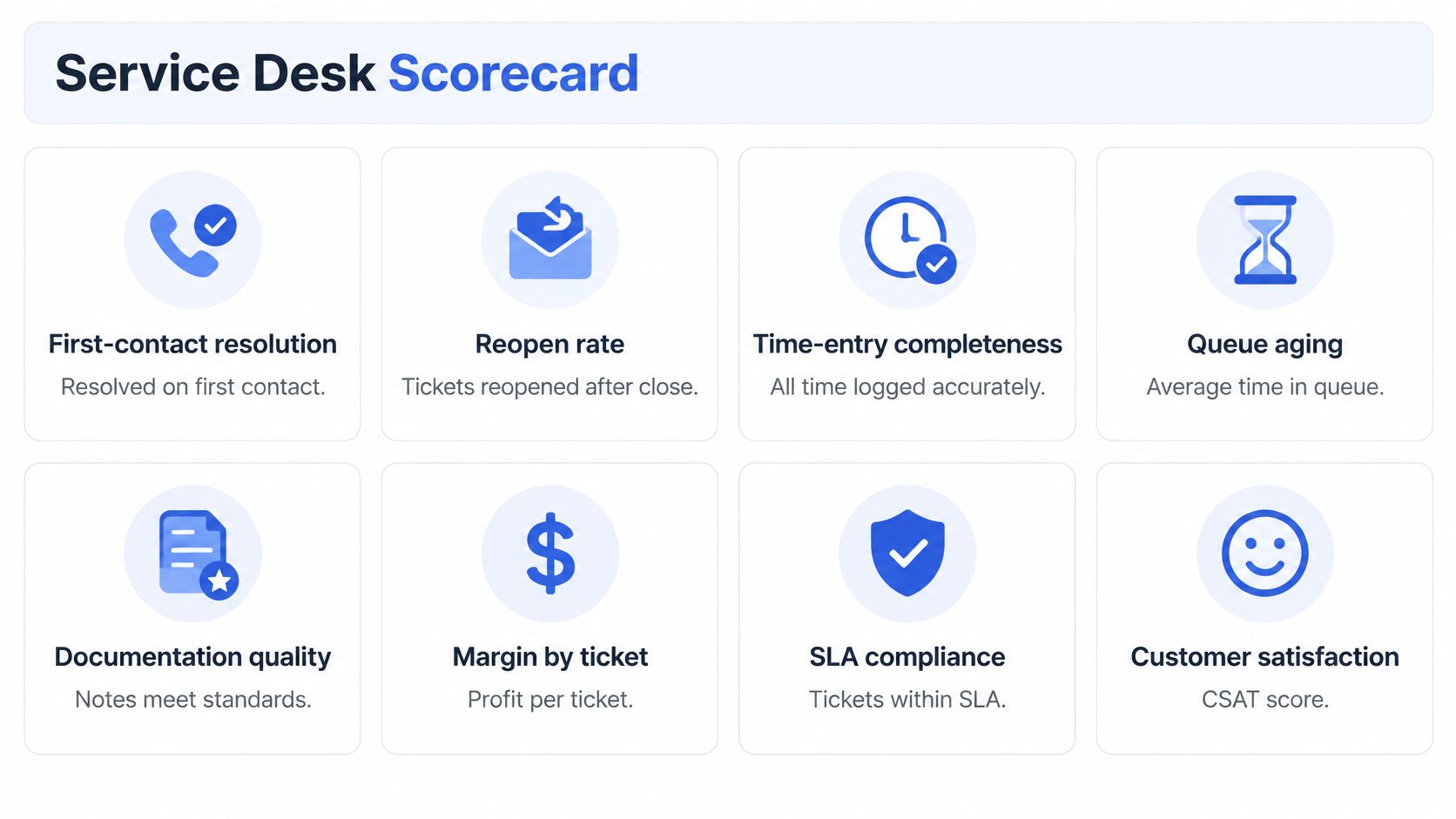
Eight measures belong on the scorecard: first-contact resolution, reopen rate, time-entry completeness, queue aging, documentation quality, margin by agreement, client sentiment and automation exception rate. Read them as pairs. First-contact resolution against reopen rate tells you whether speed is real. Time-entry completeness against margin by agreement tells you whether the work is billable. Documentation quality against repeat contacts tells you whether the next technician benefits from the last one's notes.
Baseline first, and baseline per ticket type. A blended average hides a fast-closing queue that generates rework, because the password resets drown out the migrations. Independent user reviews describe ConnectWise PSA as capable for ticket management, workflows and reporting, while also citing slow loading, rigid design, refresh-related interruptions and difficulty performing mass actions across boards (third-party review evidence). Those friction points are exactly the kind that push technicians into shortcuts, which then show up as incomplete notes and reopened tickets rather than as a platform complaint.
Decision rule: no automation expands to a second board until the scorecard shows a before-and-after baseline for one ticket type on the first.
Run a 30-day pilot on one board and one ticket type, capturing the baseline in the first two weeks before anything changes. Track the automation exception rate alongside speed, since records a human had to fix by hand are the true cost of the pilot. Then close the loop: connect call intake, ticket changes, technician time and client feedback, so you can see whether better notes reduce repeat contacts and protect gross margin. A ticket closed on time can still be commercially unprofitable, and margin is the measure that catches it.
Whatever posts into your PSA should be judged on the same baseline. Our integrations cover ConnectWise, Autotask, HaloPSA and Syncro, and we post call notes and time entries into the PSA rather than replacing it, with member status, permissions and call and ticket access checked on every request. Those rules also show which of your own numbers to trust, and our guide to MSP KPIs sets out which ones move first when documentation improves.
If your technicians are still writing up calls after the fact, or nobody can explain why the queue aged last week, Vight documents every call and ticket directly in your PSA, answers your phones, triages new tickets and finds answers across your client documentation. It sits beside ConnectWise rather than replacing it, posting notes and time entries to the ticket your team already works from. Visit Vight to see how the ConnectWise integration handles call documentation, ticket triage and the scorecard behind both.