
Your on-call technician has just finished a difficult fix when another client calls. The first ticket still needs notes, the new caller hasn't explained who else is affected, and someone has emailed the same issue to a different technician. Everyone is busy, but the service record doesn't show what's happening.
An AI help desk can handle much of that surrounding work. The useful question isn't how convincingly it talks or how many conversations it ends. It's whether junior technicians get better context, senior technicians spend less time correcting incomplete work, and clients can still reach a person when judgment matters.
Table of Contents
- What an AI Help Desk Does at Each Service Stage
- How AI Handles Phone Intake After Hours
- Where Documentation and Triage Recover Technician Time
- Connecting AI to Your PSA, Phone System and Documentation
- Measuring Benefits Without Averaging Away the Real Story
- Governance and Evaluation Criteria Before You Commit
- Run a Scoped Pilot Before Rolling Out
What an AI Help Desk Does at Each Service Stage
An AI help desk is a layer that reads incoming calls, messages and tickets, handles repetitive work around them, and leaves diagnosis and approval decisions with people. For an MSP, its value comes from connecting the conversation to the service workflow, not just adding a chatbot.
Think of a triage nurse. The nurse gathers history, assesses urgency and hands the patient to the right specialist with useful notes. The nurse doesn't perform every procedure. An AI help desk needs similarly clear boundaries.
AI help desk capabilities by service stage
| Capability | What it does | Service stage | Typical output |
|---|---|---|---|
| Phone intake | Answers calls, asks structured questions, captures caller details and urgency | Intake | New ticket with caller and urgency |
| Call documentation | Transcribes and summarizes issue, steps taken and resolution | Documentation | Structured note and time entry |
| Ticket triage | Requests missing details, categorizes, merges duplicates and flags priority | Triage | Ready-to-work ticket |
| Work-session capture | Turns technician activity into step-by-step notes and draft articles | Resolution | Work note and knowledge base draft |
| Knowledge search | Answers questions across tickets, calls and documents | Research | Answer with source citations |
| Call analysis | Scores sentiment and clarity and flags critical issues | Quality review | Alerts and summary reports |
| Escalation | Routes urgent cases to on-call staff with context | Escalation | Handoff with full incident context |
These are capabilities to evaluate, not a promise that every platform includes every row. Check whether a feature is generally available, requires a separate agent, or remains in beta. Screen-based work capture, for example, needs a different deployment and review process from call transcription.
Follow a request through the desk
Say a client phones because their accounting application won't open. Another employee has already reported the problem through the portal, but the caller doesn't know that.
The intake agent captures the caller's identity, symptoms and urgency, then creates a ticket or matches the call to the existing incident. If the request lacks useful detail, it asks what error appears, which location is affected and whether other applications work.
Next, the system categorizes the request and proposes a priority using your service rules. A technician receives the conversation, the client's replies and relevant history together, rather than reconstructing the issue from scattered messages.
- Diagnosis stays with the technician. A suggested cause is a hypothesis until someone checks it.
- Changes require the right approval. Finding a relevant runbook doesn't authorize a configuration change.
- Escalation follows defined ownership. The technician decides when specialist help is needed, while emergency routing follows your agreed rules.
During the fix, supported capture tools turn the conversation or work session into draft notes and a time entry. At closure, the technician reviews the summary and decides whether the resolution deserves a reusable knowledge article.
Practical rule: Automating the record of work isn't the same as authorizing the work.
Don't assume the AI closes tickets independently. A sensible initial deployment leaves closure under technician control, with the PSA retaining the billing and reporting record. Technicians should also keep their normal call workflow. At Vight, technicians take calls as usual with nothing new to click; we handle documentation automatically in the background.
For a desk with after-hours obligations, prioritize intake, urgency detection and reliable handoffs. For a team buried in write-ups, start with documentation capture and complete, ready-to-work tickets.
How AI Handles Phone Intake After Hours
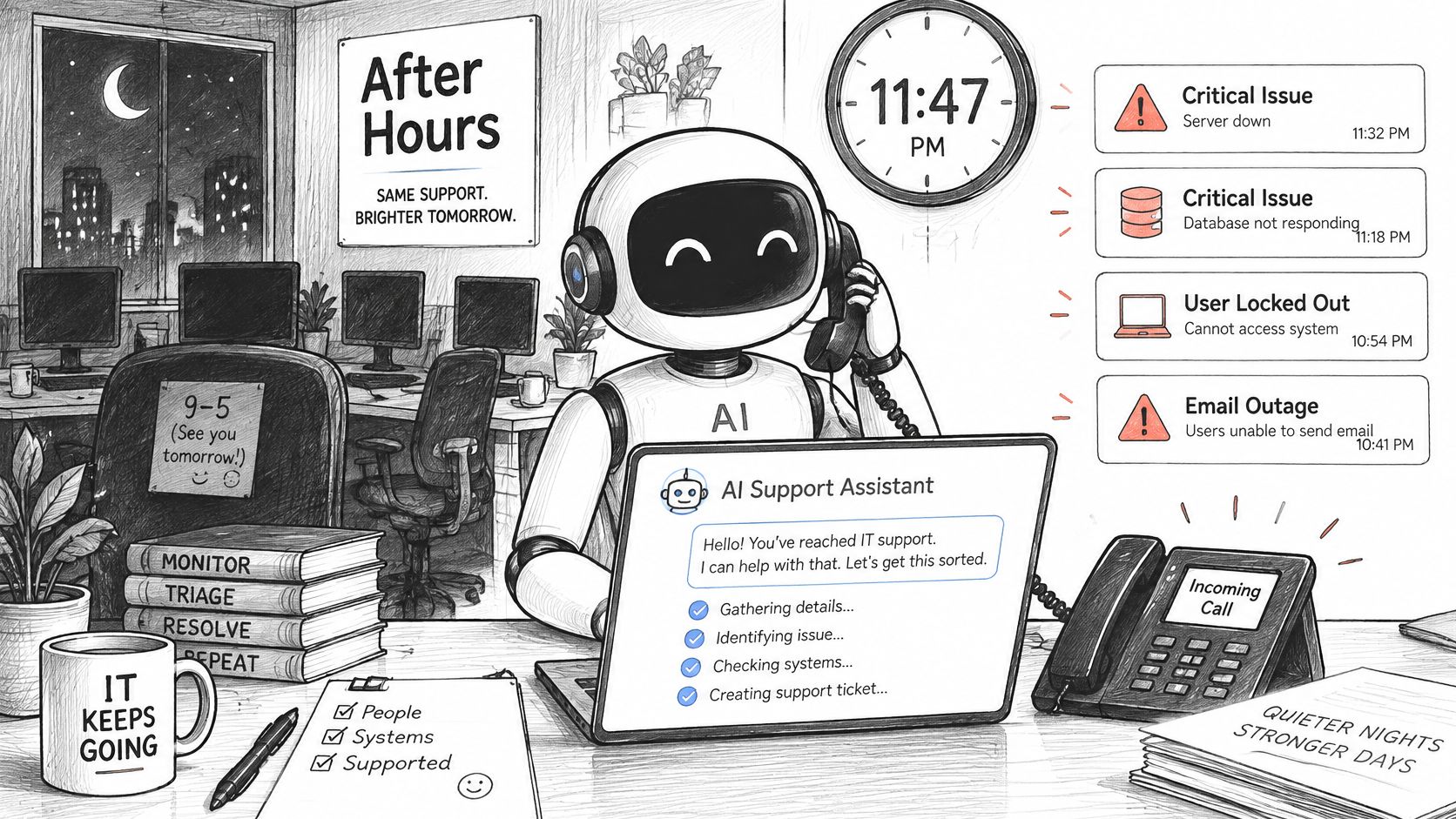
ChannelE2E data cited in an MSP phone statistics analysis indicates that 42% of critical IT issues occur outside traditional 9-to-5 business hours; the same analysis cites a separate survey in which 67% of businesses using managed IT services expect round-the-clock phone support. Those figures frame after-hours intake as an operational responsibility, not just a convenience.
The useful model is a receptionist who never sleeps but knows exactly when to wake the manager.
Ask questions that establish impact
Business-hours intake should route calls and file contextual tickets. After-hours mode needs an additional purpose: distinguish a request that can wait from an incident that requires the on-call technician.
A reliable intake asks:
- Identity: Who's calling, and which client and location do they belong to?
- Symptoms: What has stopped working, and what happens when they try?
- Timing: When did it start?
- Scope: How many users or locations are affected?
- Business impact: Can anyone affected work at all, or is there a workaround?
- Risk: Is there a security concern or a safety-related consequence?
The output should be a ticket containing the caller's details, stated symptoms, business impact and proposed urgency. A genuine priority-one incident also needs a handoff to on-call staff, with enough context that the technician doesn't restart the interview.
When evaluating call intelligence, examine the handoff as closely as the transcript. A complete recording doesn't help if nobody receives the emergency notification.
This video provides another view of the workflow.
Make the fallback explicit
Urgency can be misread. A calm caller may be reporting a company-wide outage, while an angry caller may have an isolated inconvenience. Use impact questions and contractual priority rules, not sentiment alone.
Verify identity before disclosing client information. Let callers request a human, define what happens when the on-call contact doesn't acknowledge an alert, and preserve a callback route if a transfer fails. No caller should be trapped in an automated loop.
Where Documentation and Triage Recover Technician Time
The fix may be finished while the technician's administrative work is still waiting. Meanwhile, the next ticket may contain little more than an application name and a request for help.
ScreenMeet's discussion of SysAid's 2026 State of Service Management report reports that IT teams lose 35% of working capacity to manual, repetitive tasks, while documentation can consume up to 30% of a technician session. These figures describe the reported service-management context, not a guaranteed saving for every MSP.
A DNS fix with a usable record
Consider a hypothetical DNS incident. The technician confirms that the affected device can reach the network, identifies a name-resolution fault, applies an approved correction and verifies that the application opens.
Without capture, the technician must reconstruct those steps afterward. For a worked example, suppose that write-up takes ten minutes, compared with a two-minute review of an automatically prepared draft. Those timings are illustrative, not a forecast.
A useful draft preserves the symptom, diagnostic checks, approved action and validation result. The technician checks that it hasn't turned an unsuccessful test into a successful fix or included time unrelated to the ticket.
Triage should remove missing-information work, not merely relabel the queue. Effective ticket triage can:
- Collect context: Email the client for missing details and attach the reply.
- Clarify the request: Replace an unclear title with the affected service and symptom.
- Organize ownership: Categorize the issue and select the appropriate board.
- Reduce fragmentation: Identify duplicate reports without losing affected-user details.
- Flag impact: Surface potential priority incidents for review.
A reviewed resolution can also become a draft knowledge article. Include the conditions under which the fix applies, the checks that established the cause and the validation that confirmed recovery. Otherwise, the next technician may repeat the action in the wrong environment.
Record what happened separately from what someone thinks caused it.
The caller's report that an application stopped opening is an observation. A suspected DNS fault is an inference until testing supports it. Keep each generated note traceable to its call segment or work session so a reviewer can check that distinction.
Connecting AI to Your PSA, Phone System and Documentation
An AI help desk should sit alongside your PSA, not force a replacement. The PSA remains the operational record for tickets, clients and billing. The AI reads context from connected systems and writes approved service information back into that record.
Our operating model follows that boundary: we integrate directly with your existing PSA to post call notes and time entries, sync tickets and clients, and run ticket AI applications.
Integration layers and what flows between them
| Layer | Example platforms | What flows | Why it matters |
|---|---|---|---|
| PSA or ticketing | ConnectWise, Autotask, HaloPSA, Syncro | Tickets, clients, call notes, time entries | Keeps one system of record for work and billing |
| RMM | ConnectWise Automate, ConnectWise RMM | Device status, alerts, configuration | Adds diagnostic context to tickets |
| Phone system | Cloud PBX and VoIP providers | Call audio, caller ID, routing, after-hours transfers | Captures intake and recordings |
| Messaging | Microsoft Teams, Slack | Notifications, escalation requests, status updates | Speeds up technician response |
| Documentation | SharePoint, IT Glue, Hudu | Runbooks, client configs, known fixes | Lets past resolutions be reused |
Treat these as distinct connections. A phone integration that captures audio doesn't establish that the PSA integration can select the right agreement or create a correct time entry. Likewise, a documentation connector needs access controls, not just successful indexing.
Test the actual transaction
For a ConnectWise integration, test a call from intake through the final ticket record. Check the client, board, note visibility and time entry rather than stopping at a successful connection message.
Use the same checklist for any PSA:
- Write-back: Does the integration create native notes and time entries, or only attach a summary?
- Board selection: Can you restrict processing to chosen boards, ticket types and statuses?
- Client mapping: How does it distinguish similarly named organizations and contacts across tenants?
- Sync failure: Are failed writes visible, retryable and protected against duplicate entries?
- Retention: Where do the recording, transcript, generated note and audit log remain?
A caller's number may map to a shared reception line, an outsourced employee or an outdated contact. Build a review path for uncertain matches rather than assigning the ticket to the first plausible client.
Also test failure recovery deliberately. Disconnect a test connection, submit a request and inspect what happens when service returns. Your team needs to know whether a delayed record will post automatically, require intervention or remain in an exception queue.
Measuring Benefits Without Averaging Away the Real Story
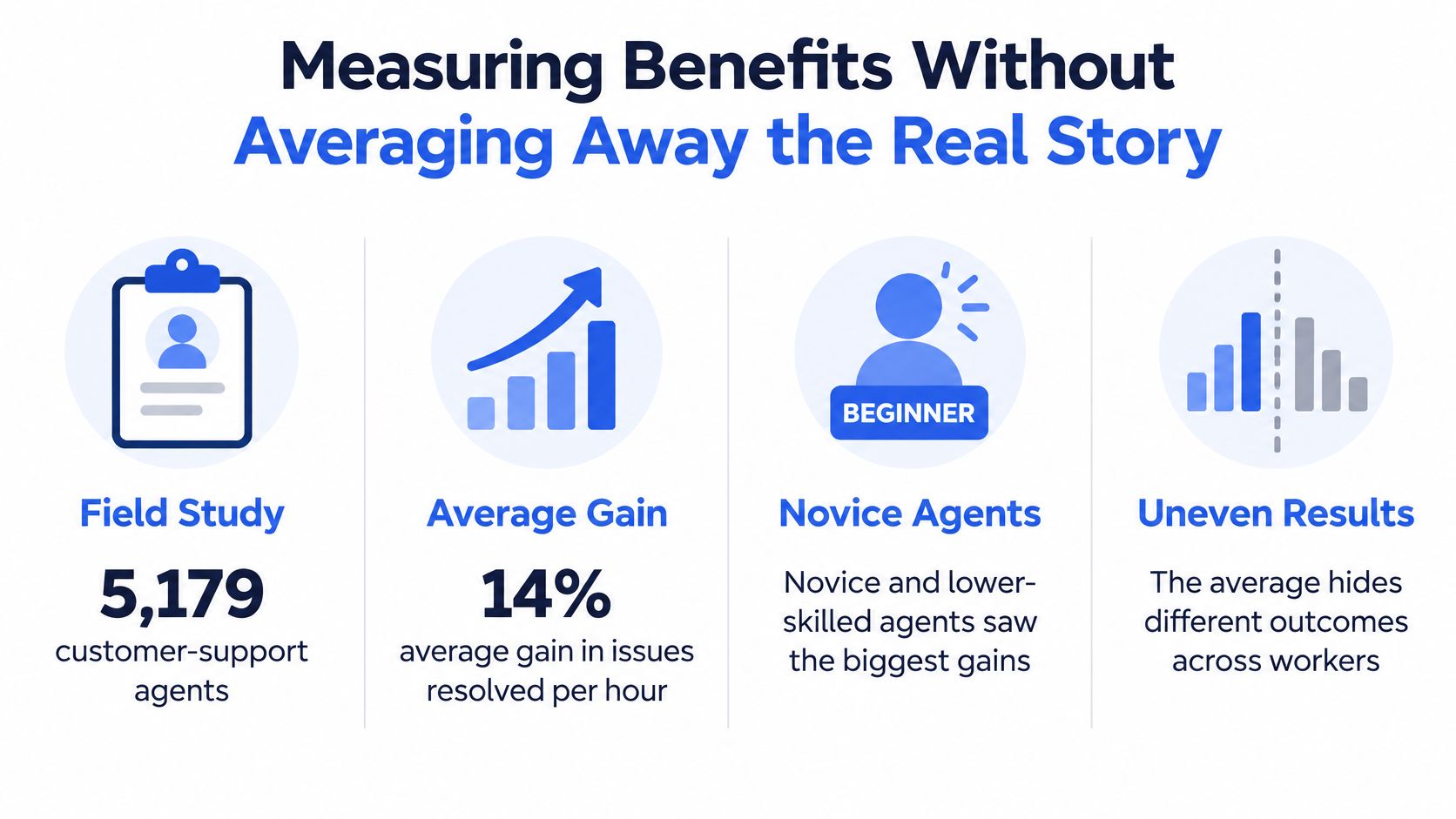
A field study published by the National Bureau of Economic Research followed 5,179 customer-support agents and found a 14% average increase in issues resolved per hour, but novice and lower-skilled workers improved by 34%, while experienced, highly skilled workers saw minimal impact. This is evidence about customer-support assistance, not a promised MSP performance lift.
The operational question is whether your deployment improves the service organization or mainly compensates for uneven experience. Better onboarding and more consistent handling can be valuable outcomes. They're different from making your strongest technicians substantially faster.
The infographic highlights why the average needs scrutiny.
Measure downstream work, not just output
A junior technician may finish intake sooner because the assistant proposes a category and summary. If a senior technician then spends longer correcting the record, the team hasn't necessarily saved time.
Metrics to track and the warning sign for each
| Metric | How to measure it | Segment by | Warning sign |
|---|---|---|---|
| Average resolution time | Hours from ticket open to close | Technician tenure, ticket type | Falls while reopened tickets rise |
| First-contact resolution | Share resolved without escalation | Ticket complexity, client type | Gains come only from simple tickets |
| Reopened tickets | Share reopened within seven days | Technician tenure, client | Summaries or notes are inaccurate |
| Escalation rate | Share sent to senior technicians | Workflow stage | Work shifts upward instead of falling |
| Time-entry accuracy | Share of tickets with complete, correct time entries | Board, client | Entries need manual correction |
| After-hours response | Minutes to first human or triage action | Hour band | Urgent calls wait for the next business day |
| Technician documentation hours | Weekly hours spent writing notes | Role, tenure | No change after rollout |
Use the seven-day reopening window as a consistent evaluation definition, not an industry benchmark. Separate first-contact resolution from ticket closure so administrative changes don't masquerade as better troubleshooting.
Establish a fair comparison
Use at least four weeks of baseline measurement as a practical pilot recommendation, then apply the same definitions after enablement. Segment results by tenure, complexity, client type and workflow stage; otherwise, a change in ticket mix can look like improvement.
Have a senior technician review a representative ticket sample, including escalations and reopened cases. Count correction effort and system-maintenance work alongside documentation savings.
A faster summary is useful only if the next person can trust it.
Keep retention and gross margin separate from immediate workflow measures. Evaluate whether reduced effort becomes accurate billable records, usable capacity or better service, rather than assuming that faster intake automatically produces a financial return. Judge the skill-split results before accepting the overall average.
Governance and Evaluation Criteria Before You Commit
Source grounding and access control are core requirements, not interface extras. An assistant that produces a convincing answer from another client's documentation has failed even if the technical advice is correct.
The NIST AI Risk Management Framework FAQs identify trustworthy AI characteristics including validity and reliability, security and resilience, accountability and transparency, explainability, privacy enhancement, and managed bias. For an MSP, those principles need to become testable operating controls.
Enforce permissions before retrieval
Permission-aware retrieval means checking the user's identity and client scope before ranking or exposing information. Don't retrieve broadly and rely on the assistant to hide restricted material afterward.
Every substantive answer should point to the ticket, call segment or document supporting it. Include source identifiers and timestamps so technicians can distinguish current instructions from an obsolete resolution. When evidence is missing or access is ambiguous, the assistant should decline to provide a definitive answer.
Evaluation criteria with strong signals and red flags
| Criterion | Strong signal | Red flag |
|---|---|---|
| Source citations | Every answer links to a ticket, call segment or document | Fluent answers with no traceable source |
| Permission-aware retrieval | Results follow the user's identity and client scope | One shared index visible to all clients |
| Data handling | Named AI provider and clear terms for returned data | Vague statements about where data is processed |
| Human handoff | Defined escalation thresholds and staff override | Automation with no exit path for callers |
| Audit trail | Logs of AI-created notes, changes and triage actions | Edits that cannot be traced to a source or user |
| Evaluation test set | Tested on de-identified real scenarios with leakage checks | Judged only on demo conversations |
| PSA write-back | Writes to the existing PSA without replacing it | Requires moving off the current PSA first |
Test difficult cases before purchase
Build a curated set of de-identified service scenarios. Include a current runbook, a superseded article, similarly named clients, incomplete symptoms and a request the test user isn't authorized to answer.
Measure these separately:
- Retrieval recall: Did it find the relevant permitted evidence?
- Citation accuracy: Does each reference support the associated statement?
- Answer faithfulness: Did it stay within what the evidence establishes?
- Unauthorized-data leakage: Did restricted information appear in results or summaries?
- Stale-document use: Did it prefer obsolete instructions over current guidance?
Repeat the tests after material changes to permissions, connectors or documentation. A polished demonstration isn't evidence that the assistant will respect your client boundaries.
Data handling also depends on the connection used. Returned call and ticket data from our MCP connector is processed by the AI provider the user selects, under that provider's terms. Confirm the selected provider and review those terms, including retention and permitted use, before connecting client records.
Run a Scoped Pilot Before Rolling Out
Treat the pilot as a decision about service quality and capacity, not a tour of features. Define who can stop it, who reviews exceptions and what evidence would justify expansion.
- Choose a bounded group. Select one client group or ticket board with enough activity to observe the workflow.
- Verify the connections. Check PSA write-back, board selection, phone routing and client mapping for that group.
- Record the baseline. Use the four-week measurement period and keep the definitions unchanged.
- Start in review mode. Have a technician approve triage and documentation outputs before they post.
- Inspect real work. As a practical sampling target, review around fifty tickets for citations and permissions, and run the de-identified governance tests.
- Expand conditionally. Widen scope only when reopened tickets and escalation rates hold steady and skill-level results improve.
Keep a log of every AI-created note and record change so reviewers can trace errors. We connect to your existing phone system and PSA, and many teams are up and running within a day; that connection milestone isn't a substitute for operational validation.
Expand when quality holds and technicians benefit across the intended roles. Pause if the apparent gain exists only in average speed. For general inquiries or support, contact hello@vight.ai; send sales inquiries to sales@vight.ai.
Vight documents every call and ticket in your PSA, answers your phones, triages new tickets and finds answers in your client documentation, built for MSPs. Visit Vight to discuss a scoped pilot using your existing phone system and PSA, with technician review and measurable quality checks before expansion.
Leave a Reply