
Monday starts with a queue full of voicemails, portal submissions and client emails. Say sixty to eighty tickets arrived overnight: some describe the same outage, some are routine requests, and others don't even identify the affected device. Your technicians are available, but the tickets aren't ready for them.
The expensive part isn't just sorting that queue. It's the clarification emails, wrong assignments and repeated investigations that follow when somebody starts work without enough context.
Table of Contents
- What Ticket Triage Means for an MSP Service Desk
- The Ticket Triage Process From Intake to Ready-to-Work
- Setting Priority From Impact and Urgency
- Manual Triage Compared With AI-Assisted Triage
- How AI Ticket Routing Chooses the Right Queue
- Using Customer Sentiment as a Triage Signal
- Measuring Whether Triage Actually Works
- Confirm Your Triage Rules Before You Automate
What Ticket Triage Means for an MSP Service Desk
Ticket triage is the assessment that determines what a request concerns, how serious it is and who should own it before technical work begins. Think of an emergency-room triage nurse: patients are directed by severity and required resources, not by arrival order alone.
For an MSP, the same principle applies across different clients, contracts and technology stacks. A password reset and a compromised administrator account might both arrive under account access, but they need very different handling.
The terms describe different decisions
- Triaging tickets means assessing individual requests and deciding their next action.
- The ticket triage process is the repeatable sequence your team follows to make those decisions.
- Prioritizing means evaluating impact and urgency to determine how quickly work needs attention.
- Routing means selecting the responsible queue or technician.
- AI ticket triage uses language interpretation alongside rules to assist with intake, classification and assessment.
- AI ticket routing is the part that selects a destination using the ticket's context and your operating constraints.
These aren't interchangeable labels. A ticket can have the correct category but the wrong owner, or reach the correct team without the diagnostic information that team needs.
Ownership isn't the same as readiness
Your MSP ticketing system should preserve the request, its supporting evidence and the decisions made during intake. Assigning a technician isn't enough if that technician must restart the conversation.
According to SolarWinds' State of ITSM Report 2024, average incident resolution took 21 hours in 2024 across more than 2,000 global SolarWinds Service Desk customers. That's an end-to-end resolution benchmark, not a measurement of triage alone.
The operational question is whether intake reduces the work required afterward. Correct priority, usable context, an appropriate owner and a visible next action matter more than an assignment timestamp by itself.
The Ticket Triage Process From Intake to Ready-to-Work
Use a defined handoff standard, not a dispatcher's personal judgement about whether a ticket looks complete. A ready-to-work ticket should let the receiving technician begin the next useful action without searching personal inboxes or asking the client to repeat the initial report.
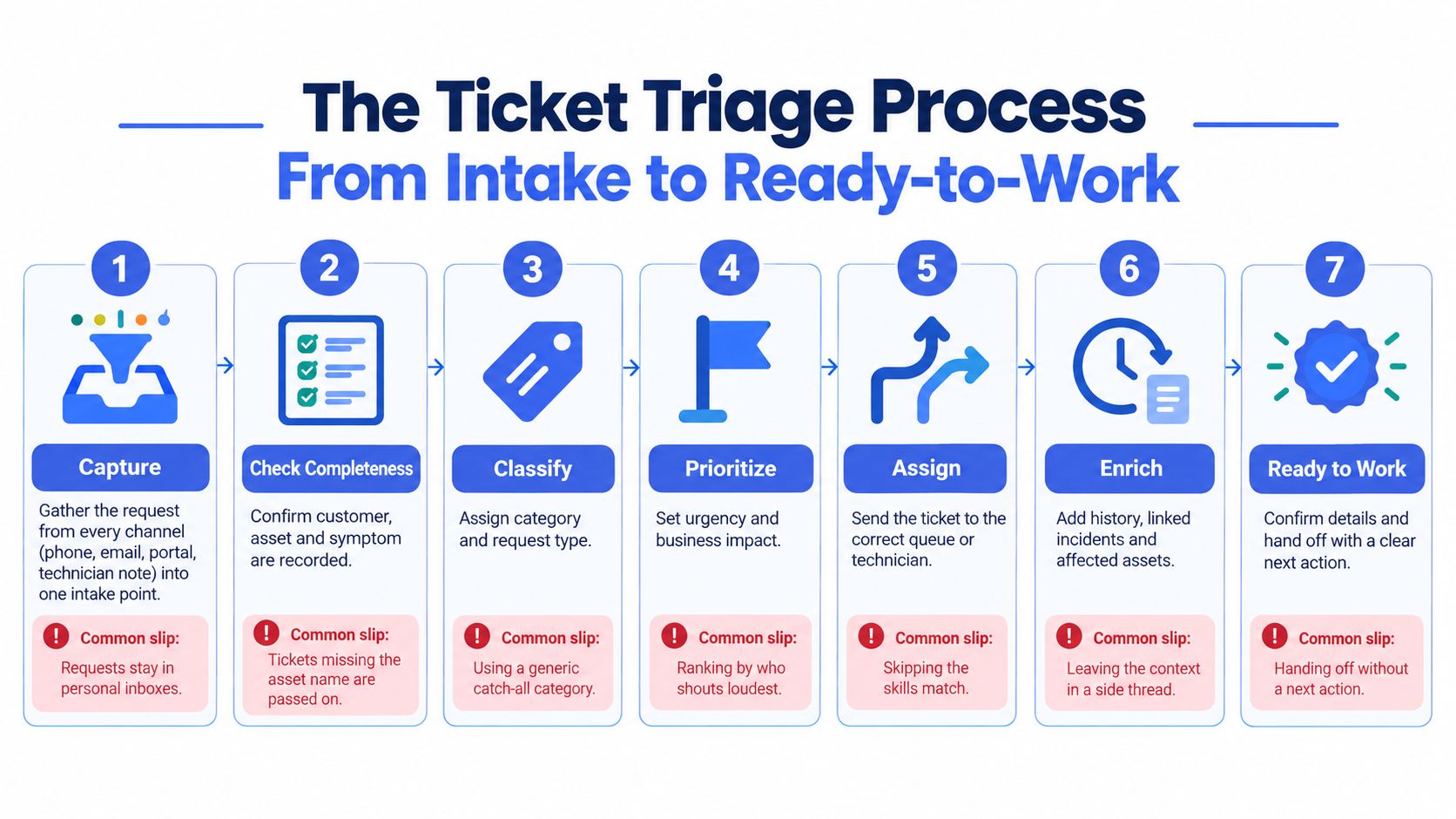
This flow illustrates the intake and handoff controls.
Run the intake sequence
Capture the request. Bring phone calls, emails, portal submissions and technician notes into a shared intake point so the request and conversation history stay together. The common slip is letting an actionable request remain in someone's inbox or chat.
Check completeness. Confirm the client, site, affected asset or user, symptom, contact details and business impact so you can make a defensible decision. A populated field isn't necessarily useful: laptop issue doesn't identify an asset, and urgent doesn't describe impact.
Request missing details. Ask the client for the facts that change handling, then record the answers on the ticket before routine assignment. Don't delay an obvious emergency while waiting for a perfect form, or ask for information already available in the client record.
Classify the request. Choose a category and request type from a short, maintained list so reporting and routing use consistent terms. The usual mistake is allowing other to become the default instead of fixing overlapping or missing categories.
Set priority. Apply the impact-and-urgency matrix using the work that's blocked, available workarounds and relevant deadlines. Don't copy the sender's requested priority without checking the evidence.
Check for duplicates. Link related reports to the active incident and merge genuine duplicates so technicians don't investigate the same failure independently. Keep distinct client communications and contractual obligations visible rather than merging everything with a similar subject.
Route and mark ready to work. Choose a queue or technician with the necessary skills, access and service responsibility, then include a clear next action. The common slip is assigning to whoever appears available without confirming they can perform the work.
Keep the controls proportionate
Category design is a practical starting point. Gain's service-desk workflow guide reports that preset categorization can reduce triage time by up to 40%, and describes an implementation combining automatic triage with automated workflows that reduced mean time to resolve from 4 hours to 45 minutes.
Don't treat those results as a promise for your queue. Category quality, workflow scope and the condition of the incoming tickets determine what you can improve.
Monitoring needs its own intake policy too. Decide whether RMM alerts should create tickets before sending every repeated notification into the same queue as client requests.
Handoff rule: Triage isn't finished permanently when a ticket reaches ready-to-work status. Reassess when a caller adds information or monitoring changes the incident picture.
Setting Priority From Impact and Urgency
Use a written matrix as the default decision rule. These priority labels are a common convention, not universal response commitments, so map them to each client's contracted response times.
Priority matrix from impact and urgency
| Impact | Urgency | Priority | MSP example |
|---|---|---|---|
| High | High | P1 | Whole client office offline during business hours |
| High | Medium | P2 | Line-of-business server slow for one department, no workaround |
| High | Low | P2 | Shared file server slow, with a workaround in place |
| Medium | High | P2 | Two users in one team unable to send email, no workaround |
| Medium | Medium | P3 | One team's line-of-business app error with a workaround |
| Medium | Low | P3 | One user's printer driver fault with a known workaround |
| Low | High | P2 | Single executive locked out before a board meeting |
| Low | Medium | P3 | Non-urgent software install for one user due this week |
| Low | Low | P4 | Request to change a desktop wallpaper or add a signature |
Separate reach from time pressure
Impact describes the business disruption: affected users, sites, services and critical activities. Headcount helps, but it isn't sufficient; an unavailable system used by a small payroll team can interrupt a business-critical process.
Urgency describes how soon the consequences worsen or a meaningful deadline arrives. A single executive locked out before a board meeting has limited reach but immediate time pressure.
Treat the examples as starting classifications, not substitutes for evidence. A department that can't process orders might justify higher impact than its user count suggests, while a technically degraded service with a reliable workaround may tolerate a longer wait.
Escalate risks outside the matrix
NIST SP 800-61r3 recommends basing incident triage, prioritization, escalation and recovery decisions on explicit risk factors. For an MSP, those factors include business impact, affected services, urgency, exploitability, data sensitivity and dependency criticality.
Create immediate escalation paths for widespread outages, privileged-account compromise and suspected data exposure. A suspected administrator-account takeover shouldn't wait in a routine access queue because only one person reported it.
Keep these operating controls explicit:
- Human override: Authorize designated staff to change the result when the matrix misses a material risk.
- Recorded evidence: Store the affected service, business consequence, deadline and workaround behind the priority decision.
- Reassessment trigger: Recalculate when scope expands, a workaround fails or new security information arrives.
The dispatcher shouldn't have to choose between obeying an inadequate rule and making an undocumented exception. Give them a controlled exception path.
Manual Triage Compared With AI-Assisted Triage
A ticket can be assigned quickly and still cost the service desk time if it lands in the wrong queue or arrives without the details needed to work it. Triage quality shows up downstream: in reassignment, clarification cycles, and technician time spent rereading and correcting intake.
Manual versus AI-assisted triage on measured effort
| Measure | Manual triage | AI-assisted triage |
|---|---|---|
| Time to assign one ticket | 9.7 minutes | 38 seconds |
| Assessing a straightforward request | 2–4 minutes | No comparable figure reported |
| Assessing an ambiguous ticket | 5–10 minutes | No comparable figure reported |
| Tickets reassigned at least once | 15–25% | No comparable figure reported |
| Time added per reassignment | 47 minutes on average | No comparable figure reported |
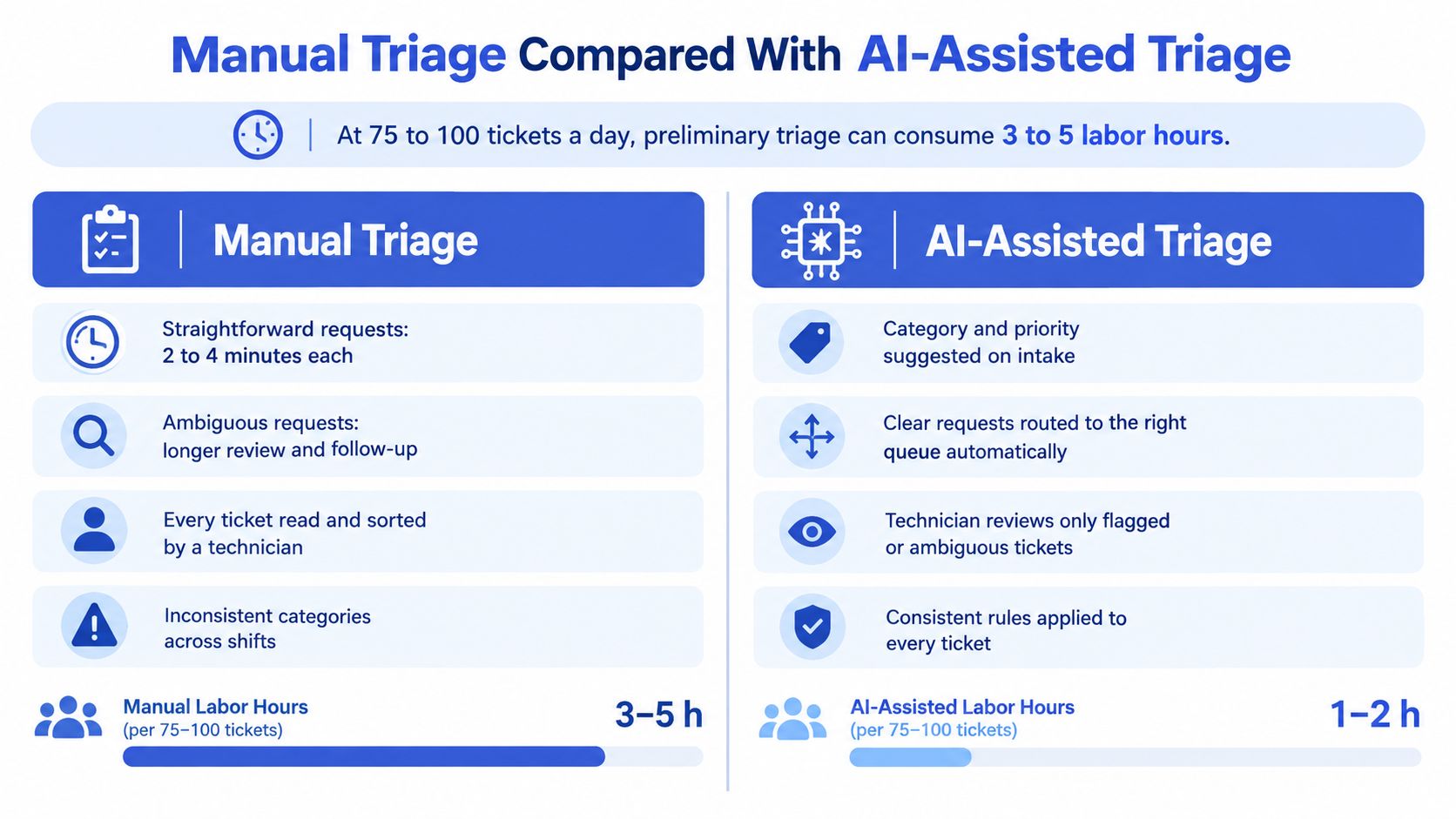
| Daily triage labor at MSP intake volume | 3–5 hours at 75–100 tickets per day | No comparable figure reported |
| Time added by misrouting | 30–60 minutes to resolution | No comparable figure reported |
The 9.7-minute manual versus 38-second AI-assisted assignment benchmark compares assignment speed. It does not show whether the ticket was correctly routed or arrived ready to work. Treat speed as one measure, not proof that downstream effort has fallen.
Mizo's manual-triage cost breakdown estimates 3–5 daily labor hours at 75–100 tickets per day, with straightforward assessments taking 2–4 minutes, ambiguous tickets taking 5–10 minutes, and misrouting adding 30–60 minutes to resolution. These are workload estimates, not a staffing formula for every MSP.
Automate interpretation, not accountability
AI can handle repetitive interpretation, such as rewriting a title, categorizing a ticket, flagging sentiment, or identifying a likely duplicate. A person still needs to resolve conflicts between the request and client records, decide between equally plausible categories, and judge when the available details are insufficient.
SysAid's automated-routing guide reports that 15–25% of manually triaged tickets are reassigned at least once, with each reassignment adding an average of 47 minutes to resolution. It also estimates approximately 390 hours of lost time monthly for an MSP processing 2,000 tickets. That estimate concerns delay and reassignment overhead, not necessarily technician labor that automation can recover.
A fast assignment saves little if the receiving technician must reread the request, correct its classification, and ask the client for missing information. Judge triage by the downstream work it prevents.
How AI Ticket Routing Chooses the Right Queue
Routing is a constrained matching problem. The router interprets the description, then compares it with client records, asset information, contract entitlement, team skills and current availability.
Traditional queue managers make those comparisons using categories and local knowledge. AI-assisted routing adds language interpretation and retrieval of relevant past work, but the destination still needs to satisfy your service rules.
Routing signals and how each one fails
| Routing signal | What it tells the router | Typical failure mode |
|---|---|---|
| Client and contract entitlement | Which client, service level and response terms apply | Client name spelled differently across sources |
| Asset or device record | Which machine, site or service is affected | New client or device not yet in the PSA |
| Category and symptom keywords | Likely request type | Vague description matching several categories |
| Required technician skill | Which team can resolve it | Skill tags out of date after staff changes |
| Current queue load and on-call cover | Who can take it now | Load data lagging behind real capacity |
| Past resolutions for the same client | Known fix and owner | Old fix no longer valid after a change |
| Sentiment and urgency signal | Whether to escalate or flag | Angry tone without real business impact |
Make uncertainty actionable
A routing score needs an operational consequence. High-confidence matches can enter an approved automatic path; low-confidence or contradictory matches should enter a staffed review queue.
High-impact and security-sensitive tickets need a human check even when the category match looks strong. A model can be confident that an incident concerns identity management without knowing whether the correct destination is routine support or security response.
Don't let workload balancing override eligibility. A quiet endpoint queue isn't an appropriate destination for a firewall incident if its technicians lack access or the required skills.
Preserve the PSA as the system of record
Vight doesn't replace your PSA; we integrate directly with your existing PSA to post call notes and time entries, sync tickets and clients, and run ticket AI apps. The ConnectWise integration is one integration point to evaluate against your existing workflow.
Inspect the records an integration reads and writes. Confirm that client identity, category, ownership and status remain consistent rather than creating a second, conflicting version of the queue.
For the first month, automatically route only categories you've already audited. Expand when the accepted assignments demonstrate that the rules work, not merely because the connector can reach more boards.
Using Customer Sentiment as a Triage Signal
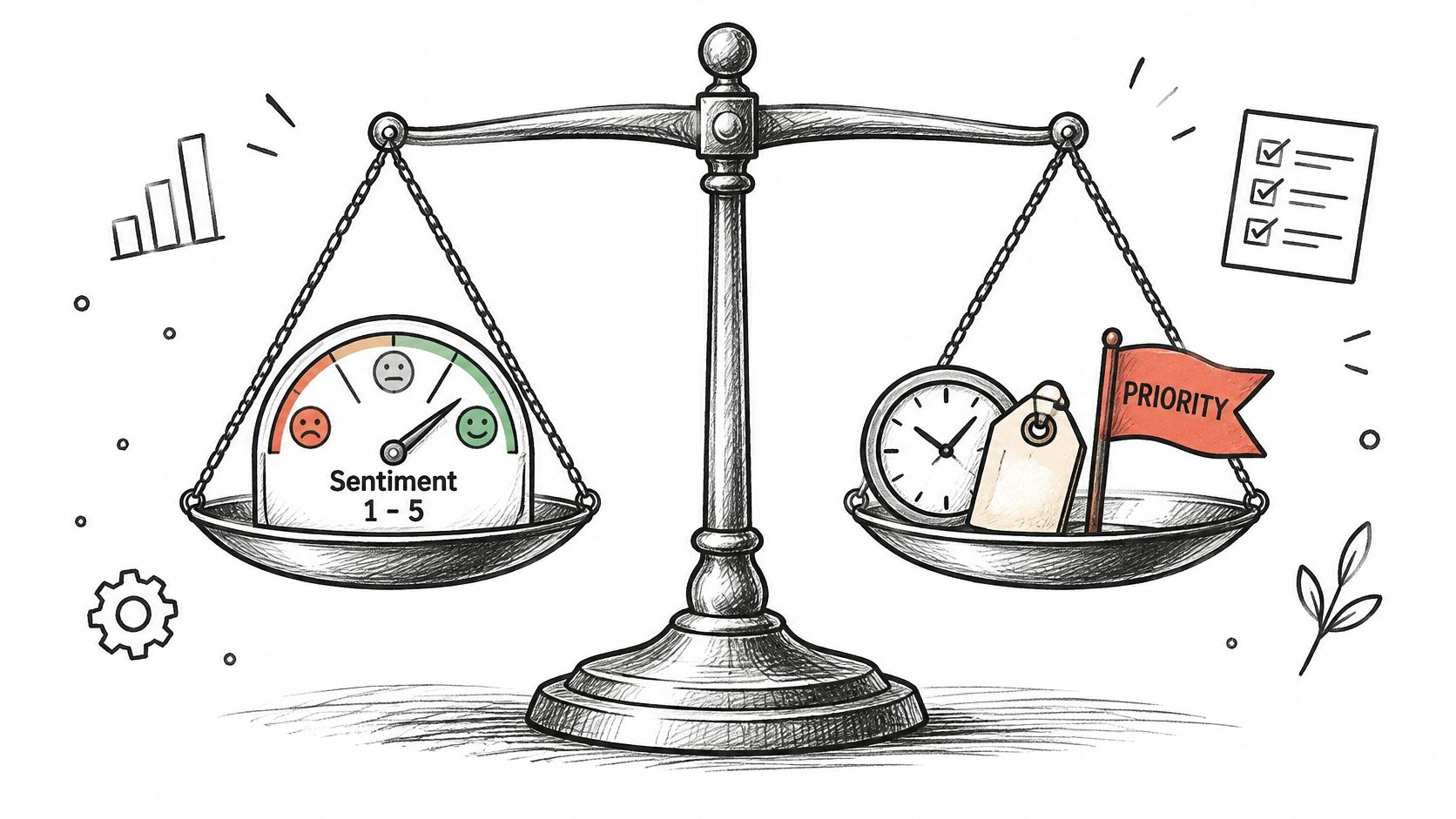
Sentiment analysis classifies the tone of a message as negative, neutral or positive. For MSPs, useful inputs include email bodies, portal text, call transcripts and technician notes; the result can flag a strained relationship, but it can't establish churn risk by itself.
Keep emotional tone separate from operational severity.
| Method | Useful application | Main limitation |
|---|---|---|
| Keyword and lexicon scoring | Transparent checks for explicit frustration or praise | Misses context, negation and sarcasm |
| Trained classifier | Classification using labeled examples from your own queue | Needs representative examples and ongoing maintenance |
| Language-model scoring | Interpreting phrasing and conversational context | Can overinterpret tone; needs an inspectable reason |
| Transcript-based scoring | Applying scoring to speaker turns and changes during a call | Depends on transcription and speaker identification accuracy |
Read the reason behind the flag
Sarcasm is an obvious failure case. A message saying the outage is wonderful may be negative, while a terse thanks may be neutral rather than evidence that the client is satisfied.
One-word replies provide little evidence. Multilingual messages, translated phrasing and differences in communication style also make simple tone labels unreliable.
Clients may be angry because the service desk has repeatedly missed a commitment. In that situation, the useful action isn't to soften the sentiment score; it's to identify the broken commitment, assign someone to communicate and correct the underlying service problem.
The following video provides additional context for evaluating sentiment alongside service handling.
Use sentiment to request attention
Store the triggering words, relevant speaker and surrounding context with each flag. Reviewers need to distinguish a client expressing frustration from a technician quoting an earlier complaint.
Escalation boundary: Sentiment can trigger human review or a communication escalation. It must never lower a priority established by impact and urgency.
A calm report of suspected data exposure still needs urgent handling. An angry request for a cosmetic change doesn't become a major incident, although an account manager may need to address the relationship separately.
Measuring Whether Triage Actually Works
Classification accuracy alone is misleading. A system can select plausible categories while leaving technicians to correct ownership, collect missing facts and repair poor handoffs.
The Stealth Agents ticket-triage benchmark reports assignment times of roughly 9.7 minutes for manual triage compared with about 38 seconds for AI-assisted triage. Assignment speed is useful, but it doesn't establish whether the receiving technician can resolve the request.
Triage metrics to track and what they can hide
| Metric | What it reveals | Blind spot |
|---|---|---|
| Time to first assignment | How quickly tickets get an owner | Fast assignment to the wrong queue |
| Reassignment rate | Routing accuracy | Reassignments hidden by re-tagging |
| Duplicate-merge rate | Whether one issue creates many tickets | Merges that combine unrelated issues |
| Share missing diagnostic fields | Intake completeness | Fields filled with placeholder text |
| Clarification cycles per ticket | Rework before work starts | Clients who stop replying |
| First-contact resolution | Whether the first technician can close it | Quick closures that reopen later |
| SLA-breach rate by priority | Response commitments kept | Breaches absorbed by unclear priority rules |
| Resolution time by priority and category | Speed of resolution by ticket class | Averages hiding slow categories |
| Reopen rate | Quality of the resolution | Tickets closed without a client check |
| Technician documentation burden | Hidden manual effort after triage | Notes left blank when time is tight |
Segment before drawing conclusions
Report results by client and ticket class. An overall improvement can hide a client whose tickets consistently arrive without asset details, or a category whose assignments are repeatedly rejected.
Separate appropriate escalation from avoidable reassignment. Moving a diagnosed fault to a specialist isn't the same failure as sending a firewall request to desktop support.
Record why technicians request clarification. Missing symptoms, unidentified assets and unclear approvals need different fixes; a single incomplete-ticket label won't tell you which intake rule to change.
Watch for effort shifted downstream
Deflection can leave people with a smaller but harder queue. Faster assignment can also increase technician interruption if incomplete tickets arrive sooner.
Pair intake measures with resolution quality, reopen rates and documentation effort. For the first quarter, review reassignment and clarification figures weekly, and inspect actual tickets behind each pattern before changing rules.
The useful improvement is less total effort to deliver a sound resolution, not a cleaner-looking intake dashboard.
Confirm Your Triage Rules Before You Automate
Write down the intake sequence and priority matrix as they operate today, including exceptions. If dispatchers disagree about the correct destination for the same request, resolve that disagreement before encoding it.
Switch on automation in a controlled order
- Start with completeness checks. Identify missing facts without changing ownership, and introduce duplicate detection with conservative merge rules and a review path.
- Add audited categories. Enable categorization and routing only where accepted historical assignments support the rules.
- Keep sentiment advisory. Use flags to request attention, not to replace the risk assessment.
Before launch, establish a human-reviewed ticket sample each week, record reassignment and clarification rates from day one, and name the person who owns priority-rule changes. Use the routing signals and downstream measures to test whether each expansion helps the receiving technician.
Check the data boundary
Confirm which client details leave your environment, which systems receive them and who approves that processing. Include ticket attachments, credentials pasted into notes and transcript content in that review, rather than checking only the ticket header.
Give staff a documented way to stop an incorrect automated action and return the ticket to a responsible person. Automation should make the handoff more dependable, not make exceptions harder to resolve.
Vight triages every new ticket by matching the request, emailing the client for missing details, posting an internal note and moving it to a ready-to-work status you choose. Our ticket AI apps cover title rewriting, categorization, deduplication, sentiment flagging and P1 alerting. Compare those actions with your queue's handoff requirements, then visit Vight to book a demo.
Leave a Reply